
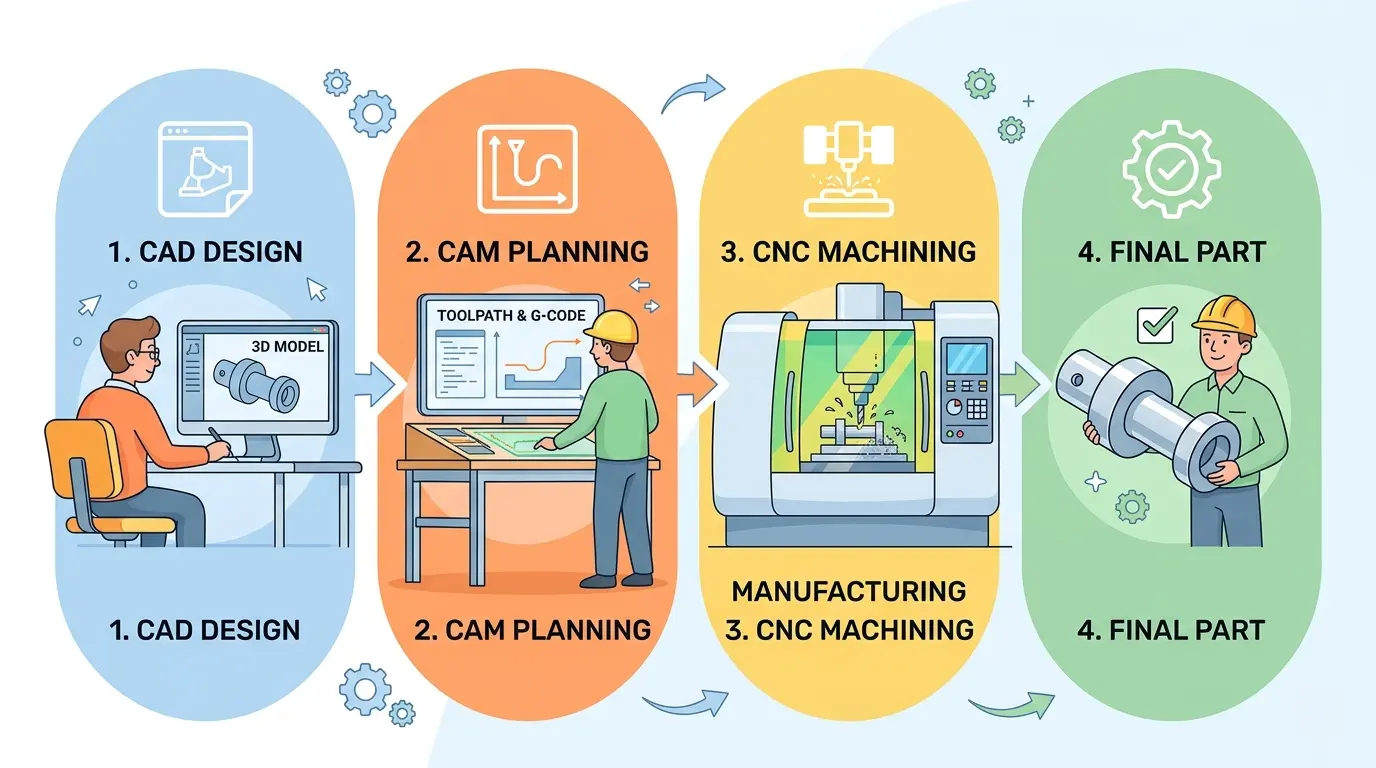
CAM in CNC means computer-aided manufacturing, but that phrase is only useful if it explains one practical thing: how geometry becomes a dependable cutting process instead of remaining a drawing on a screen. CAM is the layer where a design gets translated into machining logic such as toolpaths, operation order, tool selection, entry behavior, cutting strategy, and the posted output the controller can actually run.
That is why CAM matters far beyond software vocabulary. It decides where manufacturing judgment gets applied before the spindle starts. A good CAM process pushes problem-solving upstream, where mistakes are cheaper. A weak CAM process leaves too much improvisation for the operator to solve at the machine, where mistakes become scrap, lost time, broken tools, and unstable quality.
CAM Starts When Geometry Stops Being Enough
A CAD model or drawing can be perfectly correct and still be nowhere near ready for production. Geometry alone does not decide which face gets machined first, how the part will be held, what tool enters the material, how much stock remains between operations, or how the program should behave on the actual machine. CAM begins exactly where those questions start.
This is the cleanest way to understand the term. CAM is not simply “software that makes code.” It is the planning environment where manufacturing intent is attached to geometry so the machine can cut the part in a controlled, repeatable way.
Where CAM Sits In The Real Workflow
In a practical shop workflow, CAM sits between design intent and machine execution. Upstream, someone creates or receives geometry. Downstream, the operator has to set up the machine, load the tools, confirm workholding, and run a program that behaves predictably. CAM is the bridge between those two worlds.
That bridge is more important than it sounds. If it is weak, the operator spends time guessing what the programmer intended, the programmer keeps reworking paths that were never grounded in the real setup, and the machine becomes a place where decisions are made too late. Good CAM reduces that confusion by making the process clearer before metal, wood, plastic, or stone is ever touched.
What CAM Actually Decides
CAM software is where the shop decides things like:
- Which tools will be used.
- Which operations happen first.
- How the tool enters and exits the cut.
- How stock is removed across roughing, semi-finishing, and finishing.
- Which side or setup will carry each operation.
- What posted output the machine control will receive.
Each of those decisions affects floor performance. CAM is therefore not a passive handoff step. It is where a large part of process quality is created or lost.
Why Shops Feel CAM On The Floor Even When It Happens At A Desk
People sometimes describe CAM as office software, but the shop floor feels its effects immediately. CAM choices influence cycle time, tool life, entry marks, air-cutting waste, surface quality, part stability, and how often operators need to stop and think through a path that should already be clear. In other words, the software may live on a workstation, but the consequences live at the spindle.
That is why strong CAM reduces improvisation. When a job arrives at the machine with the right strategy, good notes, realistic tooling, and a trustworthy posted program, the operator can focus on execution instead of rebuilding the plan in real time.
CAM Does Not Replace Manufacturing Judgment
This is one of the biggest misunderstandings. CAM software can generate toolpaths, but it does not automatically generate good manufacturing decisions. Weak fixturing, poor drawing discipline, unrealistic tolerances, unstable machines, or bad tool choice will still create bad outcomes. CAM can express a poor decision very clearly and very efficiently.
That does not make CAM overrated. It simply means the software is powerful only when the surrounding process is honest. Shops that understand material behavior, workholding, setup logic, and downstream inspection get much more out of CAM than shops that expect the software to rescue weak process thinking.
The Postprocessor Is Part Of The Story, Not A Footnote
Another practical truth is that CAM is not finished when the toolpath looks good on screen. The program still has to be posted correctly for the control and machine in use. That means postprocessor quality matters. A beautiful strategy inside CAM can still become trouble if the posted output does not match the machine’s real expectations.
This is one reason buyers and managers should be cautious when software conversations stay too abstract. The useful question is not only whether the CAM package supports advanced strategies. The useful question is whether the whole chain from geometry to posted output fits the actual machine, controller, tooling, and operator practice in the shop.
Good CAM Moves Risk Upstream
One of the strongest operational benefits of CAM is that it shifts mistakes to a cheaper stage. If a programming issue is discovered during path review, setup review, or posting checks, it is usually cheaper to fix than if the same mistake appears during cutting. That is why mature shops invest time in CAM review habits. They are not being bureaucratic. They are buying down risk before the machine starts consuming material and time.
This is also why CAM should be discussed in connection with revision control, setup sheets, and operator handoff. Good programming is not only about creating a path. It is about making sure the right path reaches the right machine with the right assumptions attached.
Prototype Logic And Production Logic Are Not The Same
CAM can support both one-off problem solving and repeat production, but those are different jobs. In prototype work, the software may be used to solve access, geometry, or setup complexity quickly. In repeat production, the value often comes from standardization, predictable output, reusable templates, and cleaner handoff between programming and operation.
Buyers should keep that distinction clear. A CAM workflow that shines for unusual one-off parts may not be the same workflow that creates the best results for repeated daily production. The correct evaluation depends on what kind of work the shop is really doing most of the time.
CAM As Operational Memory
In strong operations, CAM becomes more than a programming step. It becomes a memory system. Tool libraries, proven strategies, reusable templates, and known-good posts help the shop repeat success instead of rediscovering it on every revision or operator change. That matters because production quality often drifts when too much knowledge lives only in one programmer’s head or one operator’s habits.
CAM helps stabilize that knowledge if the shop uses it intentionally. In that sense, the software is not just generating paths. It is helping preserve process knowledge in a way the business can reuse.
Where Shops Overestimate CAM
CAM gets overestimated when buyers or managers treat it like a shortcut around real process discipline. They assume better software will fix weak fixtures, poor incoming data, machine instability, or lack of operator clarity. It will not. It may make those weaknesses more visible, but it does not remove the need for engineering judgment.
Another common overestimate comes from demonstrations. A polished sample part can make any CAM environment look transformative. The harder question is whether the software will improve the buyer’s actual part family, actual machines, actual training level, and actual revision flow. That is the test that matters.
Setup Documentation Is Part Of CAM Value, Not A Separate Afterthought
Many CAM problems are not really path problems. They are handoff problems. The program may be technically correct, but the setup sheet is weak, the work offset assumptions are unclear, the fixture notes are incomplete, or the operator has to guess which revision is actually approved. When that happens, the floor feels the CAM process as confusion rather than support.
This is why mature shops treat setup documentation as part of the CAM result, not as optional paperwork. If the programmed strategy cannot survive the handoff to setup and operation, then the software has not yet delivered a dependable process.
Buyer Claims About “CAM Support” Need Translation
Suppliers, job shops, and machine sellers often mention CAM support as though that phrase proves readiness by itself. It does not. Buyers should ask what that support actually includes. Is it basic programming compatibility, strong postprocessor support, standardized setup logic, template reuse, operator documentation, or full process engineering around the machine? Those are very different realities hiding under one phrase.
That is why strong buyers translate the claim before accepting it. “CAM support” only matters once the seller explains how geometry, tooling, posting, setup, and revision control are being handled for real production.
Questions That Reveal Whether CAM Is Helping Or Just Existing
When a shop wants to judge its CAM process honestly, these questions are usually more useful than feature lists:
- Does the CAM setup reflect the real machine, tooling, and workholding?
- Are programming decisions aimed at one-off success or repeatable daily production?
- Which path choices most affect cycle time, finish quality, and scrap risk?
- How are revisions controlled so the machine always runs the correct posted output?
- Can the operator and programmer trace a machining issue back to a specific CAM decision?
These questions force the discussion toward measurable production behavior instead of vague software enthusiasm.
CAM In Woodworking And Panel Processing Has Its Own Logic
In woodworking and panel processing, CAM often looks different from metal-machining examples, but the role is the same. It still translates design intent into machine behavior. The software may decide nesting layouts, drilling sequences, groove logic, routing order, part labeling, and how a multi-operation sheet moves through the machine without confusion.
That means CAM still affects throughput, sheet yield, downstream assembly clarity, and the amount of operator intervention required at the machine. The details differ by process, but the core question stays the same: is the software helping the shop turn design information into repeatable production behavior?
Where It Fits In A Pandaxis Workflow
Pandaxis is relevant here because CAM is the upstream planning layer behind many different machine families, even though Pandaxis is not positioning itself as a CAM software vendor. Buyers comparing machinery still need to understand where software planning ends and machine execution begins. If the question expands into how software, machines, and process handoffs fit together across a line, it helps to review how Pandaxis frames connected woodworking production as a system rather than a set of isolated machines. If the buyer needs a broader equipment baseline across process types, the Pandaxis machinery lineup is useful because CAM only pays off when it is tied to the right machine family and workflow.
How To Test CAM Fit In Your Own Operation
The best way to judge CAM is to test it against representative work, not against a showroom part or a feature checklist. Compare current and proposed programming on jobs the shop actually repeats. Measure how much setup explanation is still needed. Watch whether the operator is trusting the program or correcting it mentally. Track whether cycle behavior, tool life, setup stability, and rework improve in a way the floor can actually feel.
That kind of test reveals far more than slogans about efficiency. It shows whether the software is truly reducing uncertainty or simply moving it to a different screen.
CAM Is Valuable When It Makes The Process Clearer
CAM in CNC is the manufacturing-planning layer that turns design geometry into machine-ready cutting logic. Its value is not that it sounds advanced. Its value is that it makes the process clearer before the machine starts, so fewer decisions are left to improvisation at the spindle.
That is the most practical way to understand it. If CAM reduces uncertainty, supports cleaner handoff, improves repeatability, and helps the right machine run the right strategy more reliably, it is doing its job. If it remains only a software label in a quotation or a vague promise of capability, the shop is still missing the real point.