Pandaxis

  • Products
    • CNC Nesting Machines
    • Panel Saws (Beam Saws)
    • Sliding Table Saws
    • Edgebanders
    • Boring & Drilling Machines
    • Wide Belt Sanders
    • Laser Cutters and Engravers
    • Stone CNC Machines
  • About Us
  • Contact Us
  • EnglishEnglish
    • Español Español
    • Italiano Italiano
    • Deutsch Deutsch
    • Français Français
    • Português Português
    • العربية العربية
    • Türkçe Türkçe
    • Русский Русский
    • Tiếng Việt Tiếng Việt
    • 한국어 한국어
    • 日本語 日本語
    • 简体中文 简体中文
  • Home
  • Blog
  • Blog
  • Glass Etching Machine vs Laser Engraver: What’s the Difference for Industrial Production?

Glass Etching Machine vs Laser Engraver: What’s the Difference for Industrial Production?

by pandaxis / Sunday, 26 April 2026 / Published in Blog
Glass Etching Machine vs Laser Engraver

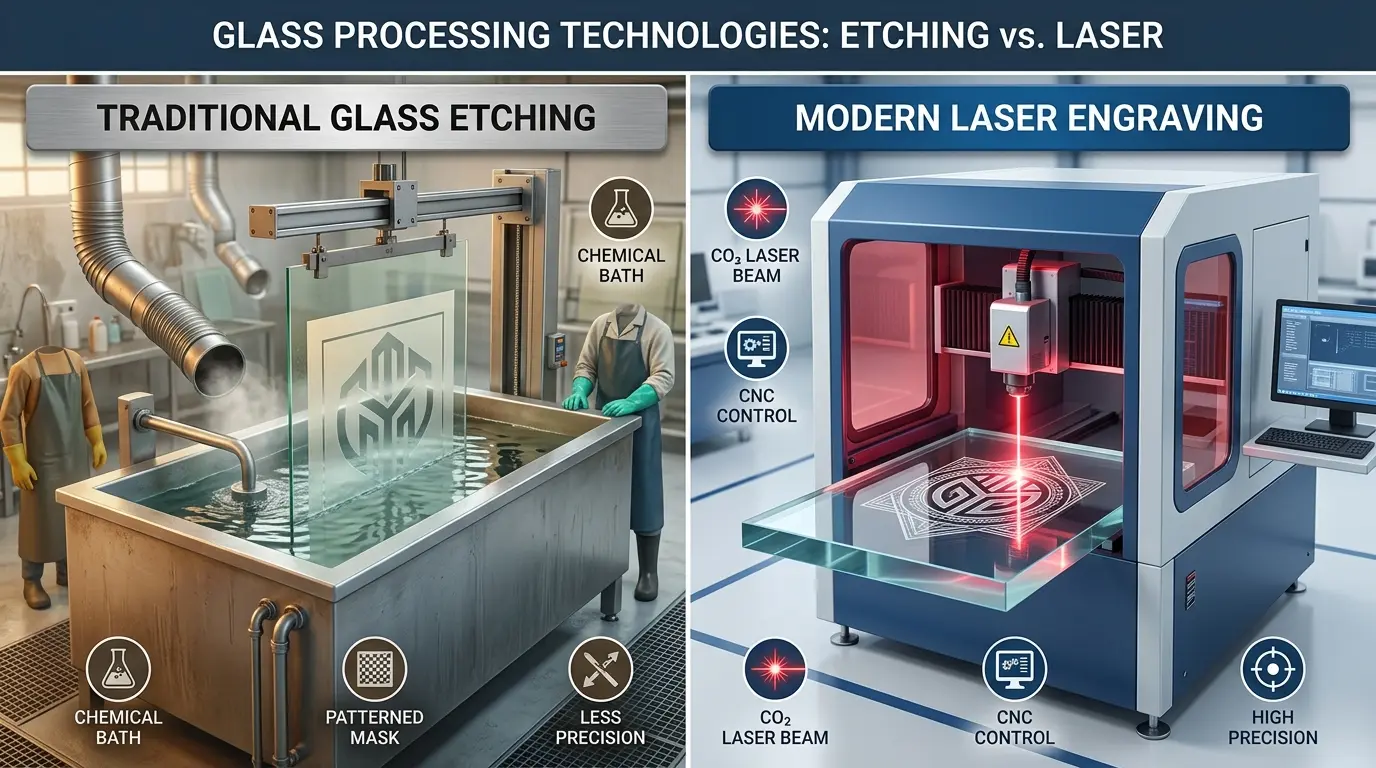
Glass fabricators routinely compare quotes for a glass etching machine against a laser engraver as if both solve the same production problem, yet the two processes diverge sharply in finish character, changeover speed, and labor profile. Etching workflows center on uniform frosted coverage across broad zones, often requiring resist preparation and stencil handling, while laser engraving places graphics directly from digital files with minimal physical setup. Before selecting equipment, buyers must decide whether their job queue prioritizes consistent large-area surface treatment or fast, variable customization—because that distinction determines which process delivers acceptable throughput and repeatability on the floor.

Why Shops Confuse These Two Processes

Walk through any glass fabrication facility and you will hear “etching” and “engraving” used interchangeably. Buyers compare quotes for a glass etching machine against a laser engraver as if they are solving the same problem. They are not. One process is built around creating a uniform frosted surface effect across a defined area. The other is a digitally controlled, non-contact system that places graphics, text, and linework directly from a CAD file. The machine labels sound similar, but the production logic behind them leads to very different labor profiles, changeover times, and finish characteristics.

The decision is not about which technology sounds more advanced. It is about which process delivers the finish quality, repeatability, and workflow flexibility your actual job queue demands. Shops that skip this distinction often end up with a machine that marks glass beautifully but cannot handle the large-area frosting their architectural work requires—or a system that frosts panels efficiently but struggles with the mixed short-run customization that drives their margins.

“Glass Etching Machine” Is a Process Category, Not a Single Machine Type

Part of the confusion comes from terminology. In production discussions, “glass etching machine” does not refer to one specific piece of equipment. It covers several approaches used to create a frosted, matte, or decorative etched appearance on glass. Some of these involve abrasive blasting through a resist or stencil. Others use chemical creaming or sandblasting systems. What they share is a focus on surface treatment: the goal is to alter the glass finish across a defined zone, not to cut or remove material with a focused beam.

A laser engraver, by contrast, is a specific machine type. It uses a focused beam to create markings or engraved effects directly from a digital file, with no physical tool contact and no stencil or mask preparation. That distinction matters because buyers sometimes compare a finish-driven process name with a specific digital machine type and assume they are evaluating the same thing.

In practical terms:

  • A glass etching machine is associated with producing a surface-etched look across part of the glass or across the entire design area.
  • A laser engraver is a specific machine type that uses a focused beam to create markings or engraved effects directly from a digital file.

The better comparison is not machine versus machine. It is finish style, process method, and workflow fit.

Process-Level Differences That Affect Your Floor

At the process level, the two approaches diverge in ways that directly impact setup time, labor, and repeatability.

A glass etching process is typically chosen when the goal is a consistent etched appearance, especially across broader decorative zones. Depending on the setup, this means preparing the artwork area, controlling where the surface is affected, and producing a uniform frosted result. For abrasive methods, that involves creating or applying a resist, positioning it on the glass, and then blasting or treating the exposed surface. Each of those steps carries labor and handling time. When the design changes, the resist or stencil must be remade or repositioned.

A laser engraver works differently. It uses a digitally controlled beam to place the design directly on the workpiece without physical tool contact. Artwork changes happen in software, not on the shop floor. That makes it easier to switch from one job to the next and handle variable designs without rebuilding masks or stencils for every run. For buyers reviewing digitally controlled non-metallic processing options, laser cutters and engravers are the closest category match for engraving-led workflows.

The key distinction is this:

  • Etching processes are typically chosen for the surface effect they create.
  • Laser engraving is often chosen for digital flexibility, fine placement control, and faster job-to-job changes.

The Finish Is Usually the Real Decision Point

In production, the visual result decides the machine choice faster than the machine label does. A glass etching process is often better suited to jobs where the etched appearance itself is the main requirement. That includes larger frosted zones, repeated decorative panels, privacy-style patterns, or jobs where the customer expects a broader matte field rather than a localized graphic.

A laser engraver is often the better fit when the value comes from detail, customization, and quick artwork changes. Logos, text, branding elements, serialized designs, and short-run decorative work tend to favor a digital process. The result on glass is still often frosted in appearance, but the workflow and production logic are different.

This is why many shops discover that the real choice is not “Which machine can mark glass?” It is “Do I need broad etched coverage or digitally controlled detail?”

Comparison at a Glance

Decision Factor Glass Etching Machine Laser Engraver
Core Process Logic Surface-etching workflow focused on creating an etched appearance Digitally controlled beam-based engraving or marking
Typical Visual Result More uniform frosted or matte surface effect Localized graphics, text, linework, and digitally placed decoration
Best Fit For Repeated etched designs, broader frosted areas, decorative glass workflows Short runs, mixed batches, changing artwork, branding, and variable designs
Changeover Speed Usually slower when artwork preparation or masking is involved Usually faster because artwork changes are digital
Large-Area Frosting Commonly stronger fit Possible in some cases, but not always the most efficient choice
Fine Detail And Custom Text More workflow-dependent Commonly stronger fit
Variable Data Less natural for frequent changes Strong fit for serialized or frequently changing designs
Labor Profile May involve more preparation and handling steps Often reduces manual artwork setup between jobs
Workflow Advantage Finish consistency for stable repeat jobs Flexibility, repeatability, and faster digital switching

When a Glass Etching Machine Usually Makes More Sense

A glass etching process is often the better choice when the finish requirement is broad, consistent, and repeated across similar parts. That usually includes cases such as:

  • Decorative or architectural glass panels with large frosted areas
  • Repeat jobs where the same design stays in production for long runs
  • Projects where the etched surface appearance matters more than digital changeover speed
  • Workflows where broader coverage is more important than variable customization

In those situations, the process is easier to justify because the output is stable, the artwork does not change often, and the shop is optimizing for consistent visual effect rather than flexible job switching. The setup labor is amortized across longer runs, and the finish character is predictable.

When a Laser Engraver Usually Makes More Sense

A laser engraver becomes more attractive when the production environment changes often or when the design itself carries more value than a broad etched field. That usually includes cases such as:

  • Short-run branded glass products
  • Mixed job queues with frequent artwork changes
  • Text, logos, linework, and fine decorative detail
  • Customization or variable design requirements
  • Workflows where reducing physical setup between jobs improves throughput

This is especially important for shops that do not want every design change to create extra preparation work. In that setting, a laser system supports a cleaner digital handoff from artwork to production. The operator loads the file, positions the workpiece, and runs the job. The same machine can handle a different design five minutes later without touching a stencil or resist.

Neither Process Is Universally Better

This is where many buyers make the wrong assumption. A laser engraver is not automatically a replacement for every glass etching workflow, and a glass etching process is not automatically the better choice just because the final look is “etched.” Each option carries tradeoffs.

An etching-focused process may deliver the appearance you want more naturally when the job is built around broad frosted coverage. But it can be less attractive when designs change often and setup labor starts slowing down the line. A laser engraver may simplify artwork changes and improve repeatability in custom or mixed production. But if the main requirement is a large-area etched finish with a specific visual character, laser may not always be the most efficient process choice.

Machine selection should follow the production objective, not the buzz around one technology.

Material Validation Still Matters

Glass is not a completely uniform production material. Surface condition, coatings, product type, and finish expectations all influence results. A process that looks right on one sample may need adjustment on another. That means sample validation is important before a purchase decision is locked in. Buyers should confirm:

  1. The visual finish they actually need.
  2. The level of detail the artwork requires.
  3. Whether the workload is stable and repetitive or mixed and changeable.
  4. How much setup labor the production team can absorb.
  5. Whether the glass work is a dedicated workflow or part of a broader non-metallic production mix.

That last point matters more than many buyers expect. If the same shop is also evaluating other digitally controlled equipment categories, the product catalog is the broadest starting point for comparing where different process families fit.

A Practical Rule for Buyers

If your main goal is a consistent etched appearance across larger decorative areas, a glass etching process is usually the more natural fit. If your main goal is digital flexibility, faster artwork changes, finer graphic control, and easier customization, a laser engraver is usually the stronger fit.

In other words:

  • Choose the etching route when finish style drives the decision.
  • Choose the laser route when workflow flexibility drives the decision.

The difference between a glass etching machine and a laser engraver is not just the tool itself. It is the production logic behind the tool. A glass etching machine is typically chosen for the etched surface effect it delivers, especially when the job calls for broader frosted coverage and repeatable decorative output. A laser engraver is typically chosen for digital control, fast design changes, and efficient handling of detailed or customized work. Neither is universally better. The right choice depends on the finish you need, how often the artwork changes, how much setup labor you can accept, and whether your production line values broad etched coverage or fast digital flexibility.
What Actually Drives the Cost of Glass Etching Machine vs Laser Engraver

When comparing a glass etching machine against a laser engraver, the purchase price is only the starting point. The real cost difference shows up in consumables, maintenance, and labor over the first year of operation. An abrasive etching setup consumes media—aluminum oxide, silicon carbide, or similar grit—along with resist materials, stencils, and masking tape. These are recurring costs that scale with production volume. A laser engraver consumes electricity and, depending on the tube type, may require periodic replacement of the laser source. The tube life varies by duty cycle and power level, so shops running multiple shifts should factor that into their operating budget.

Labor is often the larger line item. Etching workflows typically require an operator to prepare the resist, position it accurately, and then run the blasting or chemical treatment. That preparation time is not trivial. For a panel with a large frosted zone, the resist application alone can take several minutes, and any misalignment means rework. Laser engraving shifts that labor into software. The operator imports the file, sets the parameters, and starts the job. The physical setup is limited to positioning the glass on the bed. Over a week of mixed production, that difference can add up to several hours of saved labor.

Rework and scrap also behave differently. With etching, a misapplied resist or an uneven blast pass often means the panel is scrapped or must be reworked from the start. With laser engraving, the non-contact nature of the process reduces the risk of mechanical damage, and the digital preview allows operators to catch errors before the beam fires. That does not mean laser is error-proof—incorrect focus or power settings can still produce a poor result—but the failure mode is easier to diagnose and correct.

Throughput and Batch Size Considerations

Batch size is a decisive factor in choosing between these processes. For long runs of identical panels, an etching setup can be very efficient. The resist is prepared once, and the same stencil is used for hundreds of parts. The per-part cost drops as the run length grows, and the finish consistency is excellent because the process does not rely on a moving beam that might drift or vary in intensity.

For short runs, the opposite is true. If a shop processes ten different designs in a day, the etching route requires ten resist preparations, ten alignments, and ten cleanups. That is a significant amount of non-productive time. A laser engraver handles the same workload by loading ten files and adjusting the focus between jobs. The changeover is measured in minutes, not hours. This is why shops with a high mix of custom work often gravitate toward laser systems even when the finish quality is comparable.

There is also a middle ground. Some shops run a hybrid workflow where they use etching for the large frosted fields and a laser for the fine detail or variable data. That approach requires two machines and two process lines, but it can be the most cost-effective solution for products that combine broad coverage with customized elements. For example, a decorative glass panel might have a large frosted background produced by etching, with a company logo and serial number added by laser. The etching handles the area efficiently, and the laser handles the variability without slowing down the main line.

Finish Quality and Edge Characteristics

The visual and tactile quality of the finish differs between the two processes, and that difference matters for certain applications. Abrasive etching produces a slightly textured surface that scatters light evenly. The frosted effect is uniform across the treated area, and the depth of the etch can be controlled by adjusting the blast pressure and duration. This is often the preferred look for architectural glass, shower enclosures, and privacy panels where a consistent matte field is the design intent.

Laser engraving on glass produces a different result. The beam removes a thin layer of material, creating a frosted appearance that is typically lighter and more localized. The texture is finer, and the contrast can vary depending on the glass composition and the laser parameters. For fine linework, text, and logos, laser engraving often produces crisper edges and better definition than abrasive etching through a stencil. However, achieving a deep, uniform frost across a large area with a laser is slower and may require multiple passes, which reduces throughput.

Shops that serve the architectural market should also consider how the finish holds up over time. Abrasive etching creates a surface that is durable and resistant to handling, which is important for panels that will be installed and cleaned repeatedly. Laser engraving can also be durable, but the depth of the mark is shallower, and heavy cleaning with abrasive pads may wear the finish over time. For interior decorative pieces that are not subject to frequent handling, this is rarely a concern. For high-traffic installations, it is worth testing both processes on the actual glass type before committing to a production method.

Operator Skill and Training Requirements

The skill level required to run each process is another factor that affects the decision. An etching line demands an operator who understands resist application, alignment, blast pressure, and media flow. Mistakes in any of those areas produce inconsistent results. Training a new operator on an etching line takes time, and the quality of the output depends heavily on the operator’s attention to detail.

A laser engraver is more forgiving in some respects. The software handles the design placement, and the operator’s main tasks are loading the workpiece, setting the focus, and selecting the correct parameters. Most modern laser systems include presets for common materials, which reduces the risk of operator error. That does not mean the machine runs itself—the operator still needs to understand focus distance, power settings, and how different glass types respond to the beam—but the learning curve is generally shorter.

For shops with a high turnover of production staff, the laser route may be easier to sustain. The knowledge is captured in the software presets and the digital files, rather than in the hands of a skilled etcher. This is a practical consideration that many buyers overlook when they compare machine specifications. The cost of training and the risk of quality drift are real operational expenses, and they should be weighed alongside the equipment price.

Space, Ventilation, and Facility Requirements

The physical footprint of each process is different, and that affects how the equipment fits into an existing facility. An abrasive etching setup typically includes a blast cabinet or booth, a dust collection system, and a media recovery unit. The booth needs to be large enough to accommodate the largest panels the shop processes, and the dust collection system must be sized to handle the volume of media used. This equipment takes up floor space and requires regular maintenance to keep the media clean and the airflow balanced.

A laser engraver is more compact. The machine itself occupies a relatively small footprint, and the main facility requirement is adequate ventilation to remove fumes and particulates generated during the engraving process. Some shops install a dedicated exhaust system, while others use a portable fume extractor. The electrical requirements are also different—laser systems draw significant power, and the facility may need a dedicated circuit to avoid tripping breakers during operation.

Shops that are tight on space often find the laser route easier to integrate into an existing production line. The machine can be placed near the finishing area, and the operator can move from the cutting table to the engraver without crossing the entire facility. An etching booth, by contrast, is usually a dedicated area that cannot be easily relocated once it is installed. This is a planning consideration that should be addressed before the purchase, not after the equipment arrives.

Environmental and Safety Compliance

Both processes have environmental and safety implications that vary by local regulations. Abrasive etching generates silica dust from the glass and spent media. That dust must be captured and disposed of properly, and the blast booth must be ventilated to protect the operator from inhalation hazards. Some regions classify spent abrasive media as a regulated waste, which adds to the disposal cost. Chemical etching methods introduce additional concerns, including the handling and disposal of hydrofluoric acid or similar compounds. These chemicals require specialized storage, personal protective equipment, and emergency response procedures.

Laser engraving generates fumes and fine particulates from the glass surface. The composition of those fumes depends on the glass type and any coatings applied to the surface. A well-designed exhaust system is essential to keep the work area safe and to prevent the buildup of residue on the machine optics. Most laser systems include an interlock that prevents operation when the exhaust is not running, but the facility still needs a plan for regular filter replacement and cleaning.

Shops that operate in regions with strict environmental regulations should review both processes with their compliance team before making a purchase. The cost of permits, waste disposal, and safety equipment can be significant, and it varies by location. A process that looks economical on paper may become less attractive once the compliance costs are added.

Integration with Existing Production Workflows

The way each process fits into the surrounding production line is often the deciding factor for shops that already have established workflows. An etching line is typically a standalone station. Panels are cut, edged, and then moved to the etching booth for surface treatment. The process is sequential, and the etching step is often the bottleneck because it involves manual preparation and handling.

A laser engraver can be integrated more flexibly. It can be placed inline with a cutting table, or it can operate as a separate cell for short-run and custom work. The digital workflow means that artwork can be prepared in the office and sent to the machine without touching the shop floor. This is a significant advantage for shops that receive orders electronically and need to turn them around quickly.

For shops that already use nesting software and CNC equipment, the laser engraver fits naturally into the digital production chain. The same design files that drive the cutting process can be used for engraving, which eliminates the need to recreate artwork for a different process. This integration reduces the risk of errors and shortens the time from order receipt to finished product.

Make the Glass Etching Machine vs Laser Engraver Decision

The choice between a glass etching machine and a laser engraver comes down to the production profile of the shop. Shops that process large volumes of identical panels with broad frosted areas will find the etching route more efficient and cost-effective. Shops that handle a high mix of custom work, short runs, and frequent design changes will find the laser route more flexible and easier to sustain.

There is no universal answer, and the decision should be based on the actual job queue, not on the perceived sophistication of the technology. A shop that buys a laser engraver for large-area frosting will be disappointed by the slow cycle times. A shop that buys an etching line for custom short-run work will be frustrated by the setup labor. The right choice is the one that matches the production reality.

Before making a purchase, run sample parts through both processes. Evaluate the finish quality, measure the cycle time, and track the labor involved. Include the cost of consumables, maintenance, and compliance in the comparison. The machine that looks best in a brochure may not be the machine that performs best on the floor.

For shops that are still evaluating their options, the product catalog provides a starting point for comparing equipment across different process families. The goal is to find the tool that fits the workflow, not to force the workflow to fit the tool.

What you can read next

CNC for Dummies and CNC for Newbies: The Fastest Way to Understand the Basics
Edge Banding Machine Vs. CNC Processing Line: Where Each Fits Best In Panel Furniture Production
CNC Router for Aluminum: What Machine Rigidity and Spindle Power Do You Need?

Recent Posts

  • CNC Machine Plans When Plans Save Money and When They Create Rework

    CNC Machine Plans: When Plans Save Money and When They Create Rework

    CNC machine plans promise a lower purchase bill...
  • CNC Simulator Tools

    CNC Simulator Tools: When Virtual Testing Saves Time and Scrap

    Every CNC program that reaches the floor with a...
  • Laser Engraver for Wood

    Laser Engraver for Wood: Best Use Cases in Commercial Production

    Commercial wood shops routinely face a bottlene...
  • What Is a CNC Slicer

    What Is a CNC Slicer? Common Meanings and Use Cases

    When a purchasing team or production engineer s...
  • Big CNC Machine vs Small CNC Machine

    Big CNC Machine vs Small CNC Machine: How Size Changes Cost and Capability

    Production teams comparing CNC platforms often ...
  • Automatic Edgebander vs. Manual Edge Banding: Which One Delivers Better ROI?

    When edge finishing becomes the bottleneck, the...
  • Wall Saw

    Wall Saw Safety, Blade Selection, And Cutting Strategy For Controlled Structural Cuts

    Wall sawing fails most often before the blade e...
  • Metal Engraving: How To Choose the Right Machine for the Job

    Metal engraving decisions fail not at the demo ...
  • What Are CNC Bushings Used For?

    When an axis develops a vague roughness or surf...
  • Root CNC, RS CNC, and PrintNC-Style Open Builds

    Root CNC, RS CNC, and PrintNC-Style Open Builds: Which DIY Community Platform Fits You?

    Community CNC names like Root CNC, RS CNC, and ...
  • Laser Glass Cutter

    Laser Glass Cutter: Where It Fits in Production and Where It Does Not

    The production question comes before comparing ...
  • CNC Stone Cutting for Quartz, Granite, and Marble: How Material Differences Shape Machine Choice

    Quartz, granite, and marble share a fabrication...
  • Small CNC Mill vs Industrial CNC Mill

    Small CNC Mill vs Industrial CNC Mill: How Capacity Changes the Decision

    Shops comparing small CNC mills against industr...
  • Sheet Metal Laser Cutter

    Sheet Metal Laser Cutter Best Practices for Clean, Accurate Cuts

    Laser-cut defects rarely surface at the cutting...
  • What Is a Spiral Milling Cutter

    What Is a Spiral Milling Cutter?

    Buying a “spiral milling cutter” by...

Search for posts

Recent Posts

  • CNC Machine Plans When Plans Save Money and When They Create Rework

    CNC Machine Plans: When Plans Save Money and When They Create Rework

    0 comments
  • CNC Simulator Tools

    CNC Simulator Tools: When Virtual Testing Saves Time and Scrap

    0 comments
  • Laser Engraver for Wood

    Laser Engraver for Wood: Best Use Cases in Commercial Production

    0 comments

Recent Comments

    Support

    • About Us
    • Contact Us
    • Company Blog
    • Terms of Service
    • Privacy Policy
    • Sitemap

    Newsletter

    Subscribe for Pandaxis product updates, application insights, and practical news on CNC woodworking, stone fabrication, and laser processing solutions.

    GET IN TOUCH

    Email: info@pandaxis.com

    Whether you are looking to integrate a high-speed CNC woodworking line or deploy a heavy-duty stone cutting center, our technical engineers are ready to optimize your production. Reach out today to bring precision to every axis of your facility.

    • GET SOCIAL

    © 2026 Pandaxis. All Right Reserved.

    TOP