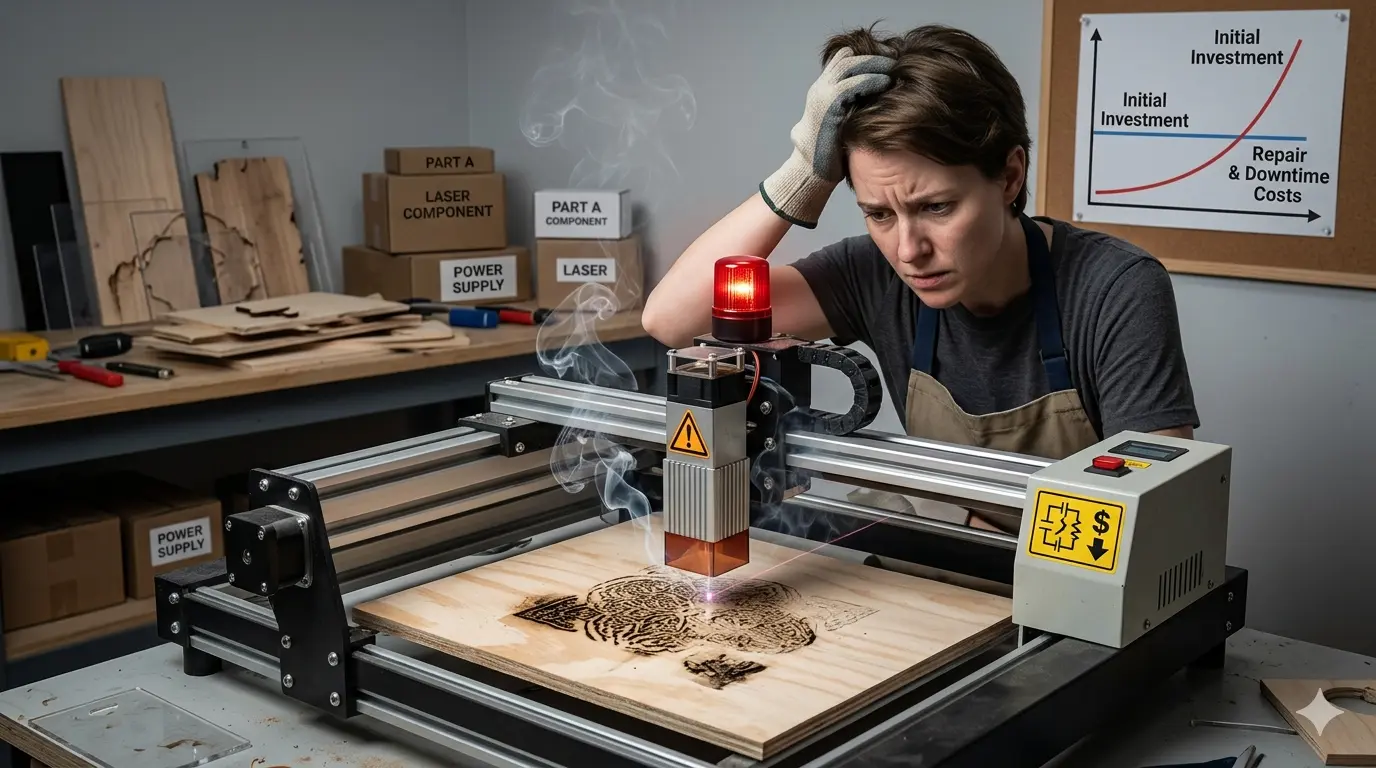
Procurement teams routinely approve laser engravers based on quote totals, only to discover that extraction ducting, air assist compressors, and chiller packages were stripped from the bid. Within weeks, operators battle engraving depth drift, residue buildup, and rising rework rates that erase the initial savings. This article dissects why a low purchase price rarely equals low installed cost, showing how motion system rigidity, software workflow, and commissioning scope determine whether a machine delivers repeatable parts or consumes labor stabilizing an unstable process. For shops running wood, acrylic, or coated boards, the real decision hinges on matching machine capability to actual production demand before comparing bids.
Why the Purchase Order Price Rarely Matches the Installed Cost
Every production manager has seen the same scenario play out. Procurement approves a laser engraver because the quote came in well below the competing bids. The machine arrives, gets positioned on the shop floor, and within the first week the hidden costs start surfacing. The extraction ducting was not included. The air assist compressor is undersized. The operator training consisted of a thirty-minute walkthrough instead of hands-on process work with your actual materials. By the time the machine is producing acceptable parts, the total investment has crept close to—or past—the price of the more expensive quote that was rejected in the first place.
The problem is not that someone chose a low-cost machine. The problem is that the comparison was made on the wrong basis. A quote total is not the same as an installed cost. It is not the same as a cost per acceptable part. And it is certainly not the same as the total cost of ownership over a three-to-five-year production cycle.
For shops processing wood, acrylic, coated boards, and similar non-metallic materials, the gap between purchase price and real cost tends to be wider than most buyers expect. Laser engraving looks simple from the outside—load a file, press start, watch the beam trace the design. But the machine is only one element of a processing system. The extraction, the focusing optics, the cooling, the motion control, the software workflow, and the operator’s ability to diagnose and correct process drift all determine whether that machine delivers usable output at the rate your production schedule demands.
What a Low Quote Actually Omits
When a supplier submits a price that is substantially lower than the competition, the reduction usually comes from somewhere specific. It is rarely the result of a more efficient manufacturing process or a better supply chain. More often, the price difference reflects a narrower scope of supply. The machine itself may be comparable, but everything around it has been stripped away or minimized.
The most common omissions fall into a few predictable categories. Extraction and filtration are frequently excluded from bare-machine quotes. A laser engraver produces smoke, fumes, and fine particulate matter, especially when processing wood and coated materials. Without adequate extraction, the beam path becomes contaminated, the lens degrades faster, and the work area accumulates residue that transfers onto parts. The machine still runs, but the quality drifts and the maintenance intervals shorten.
Air assist is another frequent omission. Many engraving applications require a focused stream of compressed air at the cutting or engraving point to keep the material from igniting and to blow debris away from the beam path. Without it, edge quality suffers, charring increases, and the risk of fire goes up—particularly with thin acrylic or dry wood. A supplier who excludes the air assist package from the quote is not saving you money; they are deferring a mandatory cost to your installation phase.
Cooling is the third area where cost gets stripped out. Higher-power laser sources generate significant heat. If the machine relies on ambient air cooling or an undersized chiller, the laser tube or source will drift in output power as the temperature rises. That drift shows up as inconsistent engraving depth across a batch, especially during summer months or in shops without climate control. A proper chiller adds cost to the quote, but it also adds repeatability.
Commissioning and training are the least visible omissions. A low quote may cover the physical delivery and setup of the machine, but not the process testing required to dial in parameters for your specific materials. It may not include operator training on job setup, focus adjustment, or troubleshooting. When the machine arrives, your team is left to figure out the process on their own—consuming test material, burning production hours, and building bad habits that persist for the life of the machine.
Where the Savings Are Actually Generated
It is worth understanding how a manufacturer can offer a laser engraver at a significantly lower price without losing money on the sale. The answer usually lies in component selection and feature reduction, not in manufacturing efficiency.
The motion system is a common place to cut cost. A cheaper machine may use lighter gantry components, lower-grade linear guides, or stepper motors with less precise control. These components work fine for occasional engraving or low-speed work. But when the machine is asked to run at higher speeds or maintain tight positional accuracy across a full worktable, the limitations become visible. Engraving depth varies across the table. Fine details lose sharpness. Registration shifts between passes.
The control software is another area where cost is reduced. A low-cost machine may ship with a basic driver package that requires manual parameter entry for every job. There is no recipe library, no job storage, no barcode scanning, no integration with your existing production management system. Every repeat job requires the operator to re-enter settings from memory or from a paper log. That adds minutes to every changeover, and it introduces variation because operators will not always enter the exact same parameters.
The laser source itself can be a cost-reduction target. Lower-priced machines may use a laser tube or source with a shorter rated lifespan, or one that requires more frequent maintenance. The initial price is lower, but the replacement cost arrives sooner. For a shop running the machine eight hours a day, five days a week, the difference in source lifespan can mean an extra replacement cycle within the first two years of ownership.
The frame and enclosure also matter. A cheaper machine may use thinner sheet metal, less rigid bracing, or a simpler door and interlock system. The machine works, but it vibrates more at speed, it allows more ambient light into the work area, and it may not seal the work envelope as effectively. For engraving applications where contrast and edge cleanliness matter, these factors degrade output quality.
The Failure Mode Is Drift, Not Catastrophic Breakdown
A low-cost laser engraver rarely fails in a dramatic way. The machine does not typically stop working altogether. Instead, it drifts. The first batch of parts looks acceptable. The second batch shows slightly lighter engraving on one corner of the table. The third batch has more residue buildup along the edges. The operator adjusts the power setting. The next batch comes out too dark. The operator adjusts again. By the end of the shift, the machine has produced parts with visible variation, and the operator has spent more time tweaking parameters than running jobs.
This drift pattern is the real cost of a low-cost machine. It is not a single point of failure that can be diagnosed and fixed. It is a collection of small inconsistencies that compound over time. The motion system loses a fraction of a millimeter of accuracy as the gantry heats up. The laser source output power fluctuates with temperature. The focus shifts slightly because the lens mount is not as rigid as it should be. The extraction is not pulling enough air, so residue accumulates on the lens and reduces effective power.
Each of these factors alone might be acceptable. Together, they create a process that requires constant operator attention to maintain acceptable output. That attention is not free. It consumes labor hours that could be spent on setup, inspection, or running additional jobs. It also introduces human judgment into a process that should be repeatable and predictable.
How Rework and Cleanup Consume the Initial Savings
The financial impact of a drifting laser engraver shows up in specific, measurable places. The most obvious is rework. When a part does not meet the appearance standard, it has to be redone. That means consuming additional material, additional machine time, and additional labor. For a shop running customer-facing parts with tight appearance requirements, the rework rate on a poorly performing machine can easily reach ten to fifteen percent.
Cleanup is a less obvious but equally damaging cost. Laser engraving on wood and coated materials produces residue, soot, and discoloration around the engraved area. A well-tuned machine with proper extraction and air assist leaves minimal residue. A machine with weak extraction or inconsistent focus leaves a visible film that must be wiped, brushed, or washed off before the part can be shipped. That cleanup labor adds seconds or minutes to every part, and it is rarely accounted for in the purchase decision.
Test pieces are another hidden cost. When a machine is not repeatable, operators burn test pieces before every job to verify that the parameters are still correct. They engrave a sample, inspect it, adjust the settings, and try again. On a stable machine, the first test piece is usually acceptable. On a drifting machine, the operator may go through two or three test pieces per job. Over a month of production, that wasted material and time adds up to a meaningful cost.
The most damaging cost is the one that is hardest to measure: lost production capacity. When operators are spending time stabilizing the machine, cleaning parts, and running test pieces, they are not running production. The machine’s effective throughput drops, and the shop either falls behind on delivery dates or has to run overtime to catch up. Overtime labor at time-and-a-half quickly erases any savings from the initial purchase price.
When a Lower-Cost Machine Is the Right Call
None of this means that every low-cost laser engraver is a bad investment. There are legitimate situations where a cheaper machine is the correct choice. The key is to match the machine’s capability to the actual production demand, rather than assuming that a lower price automatically means a worse outcome.
A low-cost machine makes sense when the workload is genuinely light. If the machine runs a few hours a day, a few days a week, the drift and repeatability issues are less likely to surface. The machine has time to cool down between jobs, the operator has time to make manual adjustments, and the volume is low enough that rework and cleanup do not become significant cost drivers.
A narrow material mix also favors a lower-cost purchase. If the shop only engraves one type of acrylic or a consistent wood species, the operator can dial in a set of parameters and reuse them indefinitely. The machine does not need to handle a wide range of materials with different power requirements, focus settings, and extraction needs. The process is simpler, and the machine’s limitations are less exposed.
Forgiving finish standards are another factor. If the parts are internal components, prototypes, or low-visibility items where minor contrast variation is acceptable, a cheaper machine may be perfectly adequate. The cost of drift is lower because the appearance tolerance is wider. The machine does not need to hold tight process control because the parts do not demand it.
The buyer also needs to be honest about throughput expectations. A low-cost machine will not match the throughput of a production-grade system. If the shop needs to engrave hundreds of parts per day with consistent quality, the cheaper machine will become the bottleneck. If the shop only needs dozens of parts per day, the lower throughput may be perfectly acceptable.
Define the Workload Before You Compare Quotes
The most effective way to avoid a bad low-cost purchase is to define the production requirements before looking at any quotes. Most buying mistakes happen because the buyer compares machines without first defining what the machine actually needs to do.
Start with the material mix. Which materials will consume the most weekly machine hours? Each material has different laser behavior. Wood produces more residue and requires careful power control to avoid charring. Acrylic requires clean cutting with minimal melting at the edges. Coated boards may produce fumes that require stronger extraction. If the machine will handle multiple materials, the process control requirements go up.
Define the job types. Is the machine primarily for engraving, or will it also do contour cutting? Engraving is generally more forgiving than cutting. Cutting requires consistent power delivery, precise focus, and adequate air assist to produce clean edges. A machine that engraves well may struggle with cutting, especially at higher thicknesses.
Clarify the finish standard. How sensitive are the finished parts to residue, contrast variation, or edge cleanliness? If the parts are customer-facing and appearance-critical, the machine needs to hold tight process control. If the parts are functional or low-visibility, the tolerance is wider.
Determine the changeover frequency. How often will operators switch between files, materials, or job types? Frequent changeovers require a machine with good recipe management and fast setup. A machine that requires manual parameter entry for every job will add minutes to every changeover, and those minutes add up quickly across a production week.
Finally, define the production role. Is the machine supporting prototyping, short-run custom work, or repeated batch production? Prototyping and short-run work are more forgiving because the volumes are low and the operator can adjust between jobs. Repeated batch production requires repeatability, because the same job will be run multiple times and the parts need to match across batches.
How to Test a Low-Cost Machine Before You Commit
If a low-cost machine looks like a reasonable fit for the workload, the next step is to test it properly. A generic demo pattern on a single piece of material tells you very little about how the machine will perform in your production environment.
Bring a real production file. Use an actual job from your shop, with the same artwork, the same material, and the same finish requirements. Run it on the machine and inspect the result. Look at the engraving depth, the contrast, the edge quality, and the residue level. Compare it to the output of your current process or to the output of a higher-priced machine.
Test multiple positions on the worktable. Engrave the same design in the center, at the corners, and along the edges. Measure the depth and contrast at each position. A machine with a rigid motion system and consistent focus will produce similar results across the table. A machine with flex or play in the gantry will show variation.
Run more than one cycle. Engrave the same design three or four times in a row, without adjusting any settings. Compare the output across cycles. If the results drift, the machine has a repeatability problem that will only get worse during a long production run.
Check the cleanup burden. After the test engraving, look at the residue on the parts. How much cleaning is required to bring the parts to an acceptable finish? Wipe the parts and time the cleanup. Multiply that time by your expected daily part count and compare it to the labor cost of a higher-priced machine that produces cleaner parts.
Ask about the full scope of supply. Get the supplier to itemize what is included in the quote. Is extraction included? Air assist? Chiller? Commissioning? Training? Spare parts? If any of these are excluded, add their cost to the quote total before comparing prices.
The Management Risk Is Often Bigger Than the Machine Risk
There is a second risk that buyers often overlook when choosing a low-cost laser engraver. The machine risk is manageable—you can test it, evaluate it, and decide whether it meets your requirements. The management risk is harder to control.
When management approves a low-cost machine, they often do so with the expectation that it will perform like a production-grade system. The price looks efficient, so the assumption is that the output will be efficient. When the machine fails to meet that expectation, the conflict moves to the shop floor.
Operators spend more time stabilizing the machine than running it. Supervisors carry more scheduling uncertainty because they cannot predict how long a job will take. Procurement believes the cost target was met, while production absorbs the losses in labor, rework, and missed deadlines. The business starts planning a replacement machine much earlier than expected, and the total cost of the low-cost purchase ends up higher than the cost of buying the right machine in the first place.
This is why the buying decision should be treated as a workflow decision, not just a purchasing decision. The machine is not a standalone asset. It is part of a production system that includes the operator, the materials, the extraction, the software, and the quality standards. A machine that does not fit that system will create friction regardless of its price.
Operating Guidance for Cheap Laser Engraver? When Lower Upfront Cost Turns Into Higher
The safest approach to buying a laser engraver is to compare machines on installed scope, workflow fit, repeatability, and support clarity—not on quote total alone. That does not mean choosing the most expensive machine. It means choosing the machine that is least likely to create hidden cost after it reaches the shop floor.
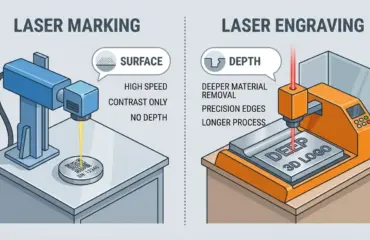
For shops that are still evaluating whether laser processing is the right route at all, or that want to compare laser engraving against other marking and cutting methods, reviewing the Pandaxis product catalog can provide a useful reference point. The goal is not to find the cheapest machine, but to find the machine that delivers acceptable output at the lowest total cost per part.
A cheap laser engraver only stays low-cost when the workload is light, the process is forgiving, and the buyer understands the operational limits in advance. Once the machine is expected to deliver repeatable quality, stable changeovers, and reliable daily production, the lowest upfront price can quickly become the highest-risk option. The purchase order is signed once, but the production floor pays for that decision every day the machine runs.