Choosing between a wood laser cutting machine and a CNC router is rarely about which machine looks more advanced on paper. In production, the real question is what happens before and after the cut: setup time, edge cleanup, drilled features, part complexity, material handling, and whether the machine supports the rest of the workflow without adding rework.
A wood laser cutting machine can be a strong fit for decorative geometry, mixed short runs, and jobs that combine cutting with engraving. A CNC router is usually the better fit when wood parts also need routing, grooving, pocketing, drilling, or more direct integration into cabinet and furniture production. The better machine is the one that removes friction from your actual process, not the one that wins a generic comparison.
The Decision Starts With Part Geometry and Process Flow
The first mistake many buyers make is comparing the two machines only by cutting ability. Both can process wood. That does not mean they belong in the same workflow.
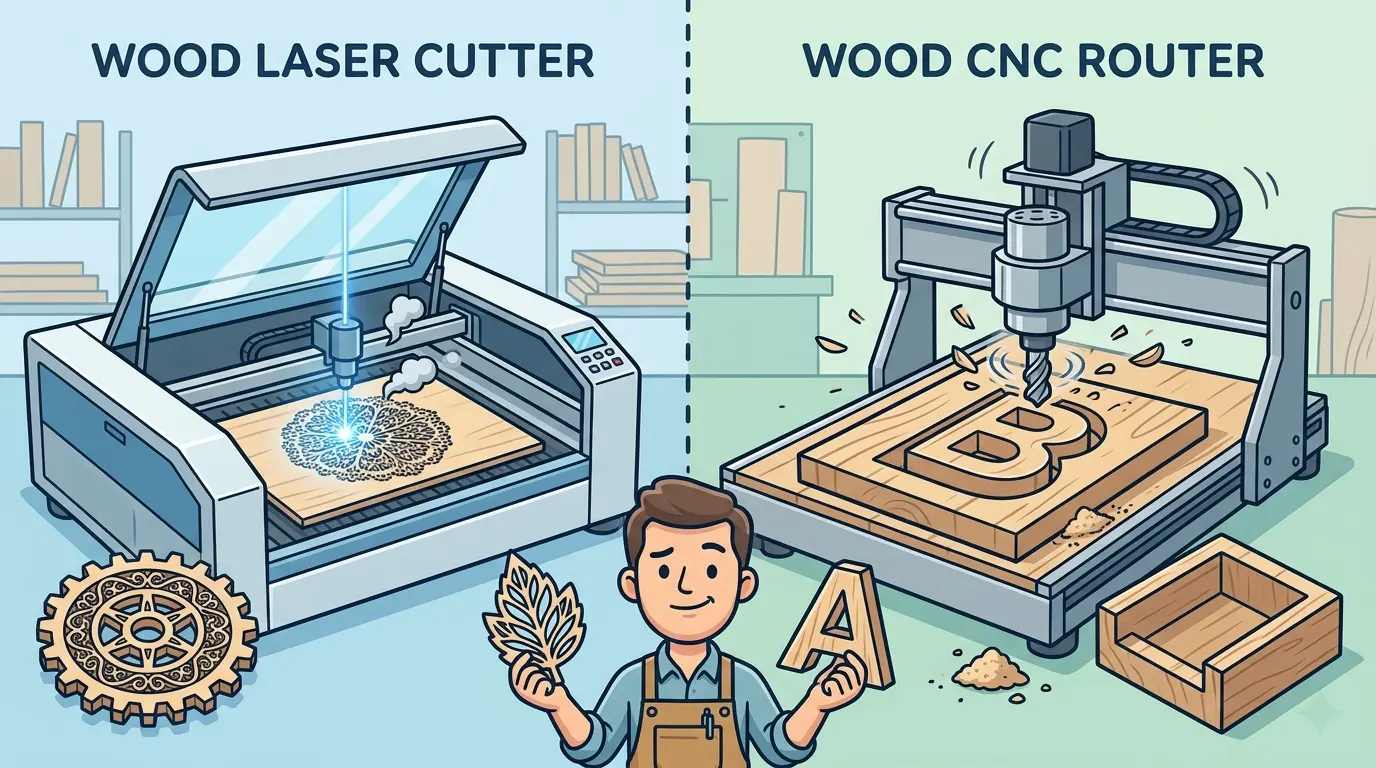
If your output is mostly decorative panels, signs, shaped inserts, ornaments, branded components, or thin wood parts with customer-facing detail, a laser often becomes attractive because it handles complex geometry without physical tooling changes.
If your output is cabinet parts, wardrobes, shelving components, furniture panels, or wood pieces that move directly into drilling, edge banding, and assembly, a CNC router usually makes more operational sense because the machine can do much more than separate the part from the sheet.
That is why this decision should start with the part family and the downstream process, not with a feature checklist.
Where a Wood Laser Cutting Machine Usually Fits Better
For buyers evaluating laser cutters and engravers for wood and similar non-metallic materials, the strongest use case is usually not general furniture production. It is precision-driven work where contour freedom, visual detail, and fast design changes matter more than broad machining capability.
A wood laser cutting machine is commonly well suited to workflows such as:
- Decorative Wood Panels And Signage
- Fine Contours And Internal Cutouts
- Short-Run Custom Orders With Frequent Design Changes
- Mixed Cutting And Engraving Work
- Production Where Tool Change Time Would Otherwise Slow Small Batches
The practical advantage is not simply that laser can cut wood. The advantage is that it can move from one geometry to another with very little mechanical setup change. That matters when your queue includes varied files, customer-specific designs, or parts with visual detail that would be slower to tool conventionally.
Laser also helps when very small internal features or sharp geometry matter. A router has to respect cutter diameter and toolpath behavior. A laser workflow does not depend on that same physical tool-radius constraint.
But there are real tradeoffs. Laser-processed wood can show edge darkening, surface residue, or burn-related cleanup depending on the material mix, glue content, finish requirements, and process control. That means a laser is not automatically the cleaner workflow just because it is non-contact.
Where a CNC Router Usually Fits Better
A CNC router becomes the stronger choice when the cut is only one part of a larger machining sequence. In panel-based woodworking, the ability to route, groove, pocket, profile, and drill on the same platform often matters more than the ability to make highly detailed decorative contours.
For factories centered on routing-led panel processing, CNC nesting machines are commonly chosen when cutting needs to stay connected to material utilization, drilled features, and downstream assembly readiness.
A CNC router is usually better suited to workflows such as:
- Cabinet And Wardrobe Component Production
- Nested Panel Cutting For Furniture Parts
- Grooving, Pocketing, And Joinery Preparation
- Drilling Integration For Hardware And Assembly Features
- Parts That Will Move Directly Into Edge Banding Or Assembly
- Production That Needs One Machine To Cover More Than Contour Cutting
This is where the router usually separates itself from the laser. It is not only cutting the outline. It is contributing to the machining logic of the part.
If a part needs blind features, channels, hinge-related preparation, hardware-hole positioning, or shaped edges that support later assembly, a router is often the more complete production tool. A laser may still cut the outer profile, but it does not replace those additional machining steps in most woodworking environments.
Edge Quality Is Not the Same as Workflow Fit
Buyers often talk about edge quality as though there is one universal definition of a good result. In practice, a good edge depends on what the part is for.
If the edge is customer-facing and the part is decorative, the relevant question may be whether the cut looks clean enough with minimal secondary finishing. In that situation, laser can be attractive because it handles complex shapes cleanly and consistently when the material and settings are well matched.
If the part will be machined again, edge banded, laminated into an assembly, or sanded before finishing, the better question is whether the cutting process supports the rest of production with minimal handling and correction. In those cases, a router’s mechanically cut edge may fit the workflow better even if the part geometry is less visually dramatic.
The same logic applies to burn marks and tool marks. A laser can avoid cutter tear-out, but it can introduce heat effects. A router avoids thermal discoloration, but it can require the right tooling strategy to control edge smoothness and small-feature accuracy. Neither process wins on edge quality in every situation.
Throughput Depends on the Full Job Cycle
One of the most common buying mistakes is comparing only visible cutting speed. Throughput is a workflow outcome, not a motion statistic.
For a laser, throughput may improve when:
- Jobs Change Frequently
- The Queue Includes Many Unique Shapes
- Engraving And Cutting Are Combined
- Operators Need Fast File-To-Part Turnaround
For a router, throughput may improve when:
- Parts Require Multiple Machining Operations
- The Production Mix Is Panel-Based And Repetitive
- Material Handling Needs To Feed Cabinet Or Furniture Assembly
- Fewer Machine Handoffs Matter More Than Decorative Detail
This is why a router can outperform a laser even when the laser looks faster on a complex demo file, and why a laser can outperform a router even when the router seems more versatile in theory. The deciding factor is how much setup, rework, manual handling, and secondary processing the job really demands.
Wood Laser Cutting Machine vs CNC Router at a Glance
| Workflow Priority | Wood Laser Cutting Machine | CNC Router |
|---|---|---|
| Decorative Contours And Fine Internal Detail | Usually A Strong Fit | Application Dependent |
| Cutting Plus Engraving In One Queue | Usually A Strong Fit | Limited |
| Cabinet Panels And Furniture Components | Limited | Usually A Strong Fit |
| Grooves, Pockets, And Joinery Prep | Limited | Usually A Strong Fit |
| Frequent Design Changes Across Short Runs | Usually A Strong Fit | Application Dependent |
| Material Breakdown With Integrated Drilling | Limited | Usually A Strong Fit |
| Customer-Facing Decorative Wood Parts | Often A Strong Fit | Application Dependent |
| Parts Moving Directly Into Edge Banding And Assembly | Limited | Usually A Strong Fit |
| Dust And Chip Extraction Workflow | Lower Chip Load But Fume Control Still Matters | Strong Extraction And Tool Management Matter |
| Mixed Wood And Acrylic Decorative Production | Often A Strong Fit | Less Natural Fit |
The table is useful only if it is read as workflow guidance. It is not a scorecard for which machine is more advanced.
The Hidden Tradeoff Is Secondary Processing
The right machine often becomes obvious once you look at what the team does after the cut.
If the current workflow loses time to changing tools, managing small-batch geometry, or manually adding decorative detail after mechanical cutting, laser may remove more friction than expected.
If the current workflow loses time because parts must move from one station to another for routing, drilling, grooving, and machining before they are ready for assembly, a router usually creates more value because it collapses more of the process into one platform.
This also changes how maintenance should be judged.
A laser workflow depends heavily on recipe control, optics condition, and fume extraction discipline. A router workflow depends heavily on tooling condition, spindle stability, hold-down reliability, dust extraction, and repeatable machining setup. The better maintenance profile is the one your team can support consistently while protecting output quality.
A Practical Selection Filter for Buyers
Before choosing between a wood laser cutting machine and a CNC router, buyers should answer a few questions as directly as possible:
- Are Most Parts Decorative Or Structural?
- Do You Need Engraving As Part Of Daily Production?
- Will Parts Need Grooves, Pockets, Or Drilled Features After Cutting?
- Are Edge Appearance And Fine Geometry More Important Than Machining Range?
- Is The Real Bottleneck Design Changeover, Secondary Machining, Or Manual Rework?
- Will The Machine Feed A Furniture Production Line Or A Custom Mixed-Batch Job Queue?
The answers usually reveal whether you are really buying a contour-and-detail workflow or a machining-and-integration workflow.
Practical Summary
A wood laser cutting machine is usually the better choice when your workflow depends on decorative geometry, sharp internal detail, mixed short runs, and the ability to combine cutting with engraving on wood and similar non-metallic materials. A CNC router is usually the better choice when production depends on broader machining capability, nested furniture parts, drilled features, joinery preparation, and smoother integration with downstream assembly.
Neither machine is universally better. The better fit comes from what the part needs after the first cut, how often jobs change, and whether your factory is trying to optimize visual detail or machining completeness. When you evaluate the full workflow instead of just the cut, the right answer becomes much easier to defend.