Pandaxis

  • Products
    • CNC Nesting Machines
    • Panel Saws (Beam Saws)
    • Sliding Table Saws
    • Edgebanders
    • Boring & Drilling Machines
    • Wide Belt Sanders
    • Laser Cutters and Engravers
    • Stone CNC Machines
  • About Us
  • Contact Us
  • EnglishEnglish
    • Español Español
    • Italiano Italiano
    • Deutsch Deutsch
    • Français Français
    • Português Português
    • العربية العربية
    • Türkçe Türkçe
    • Русский Русский
    • Tiếng Việt Tiếng Việt
    • 한국어 한국어
    • 日本語 日本語
    • 简体中文 简体中文
  • Home
  • Blog
  • Blog
  • Acrylic Laser Cutter vs CNC Knife Cutter: Which One Fits Better for Acrylic Work?

Acrylic Laser Cutter vs CNC Knife Cutter: Which One Fits Better for Acrylic Work?

by pandaxis / Friday, 10 April 2026 / Published in Blog

The production question comes before comparing beam sources or blade geometries, the real decision hinges on your material mix and what the part must look like when it leaves the table. Laser cutting vaporizes rigid acrylic, delivering clean, presentation-ready edges and fine contours that reduce downstream finishing labor, while a CNC knife cutter mechanically slices through the sheet, risking chipping and micro-cracks on visible parts. The tradeoff is finished acrylic quality versus multi-material flexibility. If acrylic is your core revenue driver, laser usually wins; if soft, printed substrates dominate, the knife table earns its keep. Match the process to your actual job mix before committing capital.

Start With the Material Mix, Not the Machine Brand

The acrylic laser cutter versus CNC knife cutter debate usually gets framed as a head-to-head technology showdown. In practice, the decision rarely comes down to which machine is objectively better at cutting acrylic. It comes down to what percentage of your daily output is actually rigid acrylic sheet, and what the part has to look like when it leaves the cutting table.

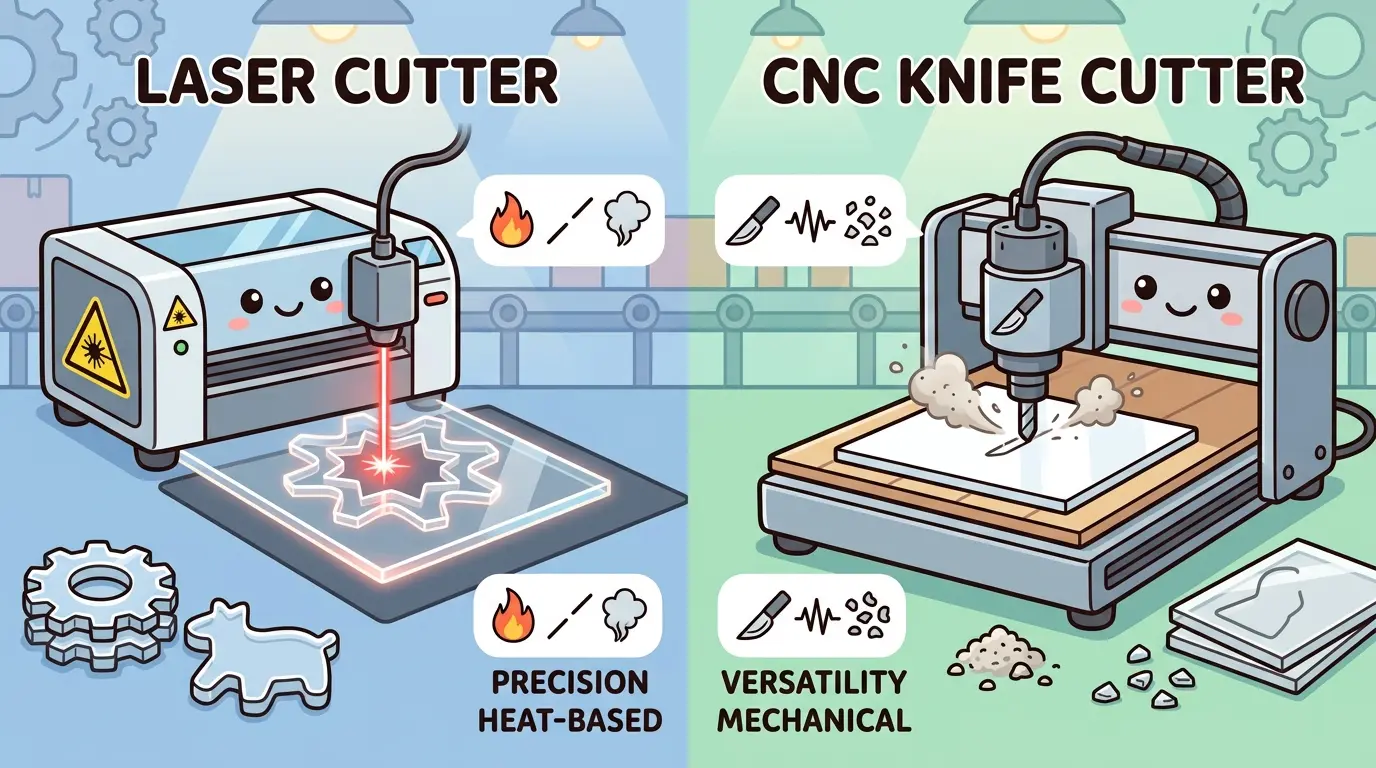
Both machines can separate acrylic sheet into parts. That is where the similarity ends. Laser cutting applies a focused thermal beam that vaporizes the material along the cut path. A CNC knife cutter uses a mechanical blade that presses and slices through the substrate. Those two mechanisms produce fundamentally different results on rigid acrylic, and they impose different constraints on the rest of your workflow.

Before comparing optics, power ratings, or blade types, settle the more basic question: is acrylic a core production material, or is it one substrate inside a broader digital-cutting operation? That answer determines which machine deserves your serious evaluation.

Why Laser Cutting Aligns With Rigid Acrylic Production

Rigid acrylic is often specified for parts that will be seen. Sign faces, retail displays, point-of-purchase fixtures, decorative panels, and architectural elements all share a common requirement: the cut edge and contour definition are part of the finished product. When the part edge is visible to the end user, the cutting process directly affects product quality.

An acrylic laser cutter earns its place in that workflow because it addresses the material’s real production demands:

  • Fine contours and small internal features that would be difficult or slow to produce with a mechanical blade
  • Repeatable shape accuracy across short runs and mixed batches without physical tooling changes
  • Cleaner-looking edges on many visual-grade acrylic parts, reducing downstream finishing labor
  • Fast geometry switching because the cut path is defined in software, not by tool setup

The thermal process does require disciplined process control. Stable power and speed settings, clean optics, effective fume extraction, and realistic expectations about the specific acrylic grade all affect cut quality. Cast and extruded acrylic require different process settings and quality expectations. But when the product value depends on visual edge quality and geometry flexibility, laser aligns with the material more directly than a knife process does.

Understanding How Acrylic Grades Affect the Laser Process

The distinction between cast and extruded acrylic is not a minor technicality; it changes how you set up the laser and what you can expect from the cut edge. Cast acrylic is produced by polymerizing liquid monomer in a mold, which yields a material with higher molecular weight and greater resistance to heat. When a laser beam travels through cast sheet, the cut edge tends to be cleaner and more consistent, with less tendency to develop micro-cracks or stress lines. Extruded acrylic, by contrast, is produced by forcing molten polymer through a die, which aligns the polymer chains and makes the material more susceptible to heat-related stress. Under the same laser settings, extruded sheet may show slightly more edge haze or small bubble formations along the cut line.

For a production shop, this means you cannot simply set one laser profile and assume it works for every acrylic job. You need separate parameter sets for cast and extruded material, and you need to verify the grade before the sheet reaches the cutting table. A shop that receives mixed pallets without clear labeling will spend extra time on test cuts and rework. A shop that standardizes on one grade for visual parts can dial in the process and hold it.

The grade question also affects thickness. Thin extruded acrylic, in the 1.5 mm to 3 mm range, cuts quickly and cleanly with moderate power. Thick cast acrylic, in the 10 mm to 25 mm range, requires slower speeds, higher power, and careful focus control to avoid taper on the cut edge. If your production mix spans both thin and thick material, you need a laser system with enough power reserve and a lens or focus arrangement that handles the range without constant manual adjustment.

Where the CNC Knife Cutter Earns Its Place

A CNC knife cutter becomes the stronger investment when the production model is broader than acrylic sheet fabrication. These systems are typically specified for shops that need one digital cutting platform to handle a wide range of softer, thinner, or printed materials where a non-thermal workflow is preferable.

Knife cutting is commonly the better fit when the shop is focused on:

  • Foam board, corrugated display board, gasket sheet, vinyl, and similar soft materials
  • Printed substrates where smoke, heat, or edge discoloration from a thermal process would ruin the part
  • Sample making, packaging prototypes, and short-run display work where speed to first part matters more than edge finish
  • Production cells where acrylic is not the main revenue-driving substrate

In that context, the knife cutter may be the better overall investment even though it is not the strongest answer for rigid acrylic sheet. The machine earns its keep by widening the shop’s usable material range, not by outperforming laser on presentation-grade acrylic parts.

How Knife Cutting Handles Different Material Families

The real strength of a CNC knife cutter is not acrylic; it is the breadth of the material library it can handle without changing tools. A single machine can process corrugated plastic sheet, foam board, rubber gasket material, magnetic sheet, vinyl, and a range of textile-based substrates. For a shop that builds point-of-purchase displays, the daily job list might include a corrugated base, a foam-backed graphic panel, and a thin acrylic accent piece. The knife table can handle the corrugated and foam work with high throughput, and it can also cut the acrylic if the part geometry is simple and the edge quality requirement is modest.

The key limitation is mechanical. A blade must physically penetrate the material and maintain consistent pressure along the entire cut path. On rigid acrylic, that means the blade has to overcome the material’s hardness and its tendency to chip or crack under point loading. Thin acrylic, in the 1 mm to 3 mm range, can be scored and snapped, but that approach does not produce the clean edge that a visual part requires. Thicker acrylic, above 6 mm, becomes increasingly difficult for a knife system because the blade must cut through a hard, brittle material without deflecting or causing fracture.

Knife cutting also has a speed advantage on soft materials. A drag knife or oscillating knife can move quickly through foam board or corrugated plastic, often faster than a laser can process the same geometry. For shops where those materials dominate the schedule, the knife table delivers higher parts-per-hour throughput. The tradeoff is that the same machine will be slower and more problematic on rigid acrylic, especially when the parts have fine detail or sharp internal corners.

The Core Tradeoff: Finished Acrylic Quality vs Multi-Material Flexibility

For most rigid acrylic applications, the decision comes down to one tradeoff. Laser is usually selected because acrylic parts often need detail, consistent contour quality, and a more presentation-ready result. Knife systems are more often selected because the shop needs one digital platform for many softer substrates and does not want heat in the process.

The better machine depends on what the cut must accomplish after the sheet leaves the table:

  • If the part will be sold, assembled, or visually inspected as an acrylic component, laser usually has the advantage.
  • If the job mix is dominated by non-acrylic display materials, a knife system may support the broader workflow better.
  • If the team is trying to avoid secondary edge cleanup on acrylic, laser is often the more practical fit.
  • If the business depends on printed-board conversion and soft-material prototyping, the knife table can be more valuable overall.

The mistake is to treat this as a pure machine-versus-machine comparison without looking at what percentage of daily output is actually rigid acrylic.

Acrylic Laser Cutter vs CNC Knife Cutter at a Glance

Production Factor Acrylic Laser Cutter CNC Knife Cutter
Rigid Acrylic Sheet Processing Often a strong fit Often more limited
Fine Internal Features and Complex Contours Often a strong fit More application dependent
Visual-Grade Acrylic Edges Often better suited Often requires more downstream work
Non-Thermal Cutting Need Less suitable Often a strong fit
Printed and Soft Display Materials More limited Often better suited
Multi-Material Sample Making More application dependent Often a strong fit
Reduced Tool-Change Dependency Often a strong fit Strong, but material dependent
Broad Soft-Material Workflow Flexibility More limited Often better suited

The table points to a simple conclusion: if the job is truly about acrylic, laser usually fits better. If the shop is really buying a broad digital cutting platform with acrylic as a secondary material, the knife workflow becomes more defensible.

Where the Cost Difference Actually Shows Up: Finishing and Rework

The financial difference between these two processes rarely appears at the machine itself. It shows up downstream, in the labor required to turn a separated part into a finished part.

If a laser-cut acrylic part leaves the machine close to the required visual standard, the shop saves labor in edge cleanup, contour correction, and manual finishing. That matters most in products where the part edge is visible to the end user. A clean laser edge on cast acrylic can often be used directly, or with minimal flame polishing, depending on the application.

If a knife-based workflow separates the material but still leaves the team handling extra trimming, polishing, contour correction, or rejection on brittle parts, the apparent process advantage disappears quickly. Rigid acrylic is not a forgiving material for mechanical cutting. Blade pressure can cause chipping, cracking, or micro-fractures along the cut line, especially on thinner sheets or intricate geometries. Those defects do not always appear immediately; they can show up during assembly or after the part is installed.

On the other hand, if the workload is mostly soft signage and printed display materials, the knife table may reduce finishing problems that a thermal process could create on those substrates. Heat can warp thin materials, discolor printed surfaces, or leave soot on edges that require additional cleaning.

The real cost comparison is never just the cut. It is the total effort from file to finished part.

Calculating the True Labor Burden on Acrylic Parts

To make the cost comparison concrete, walk through a typical acrylic job on both processes. Suppose the shop receives an order for 200 display stands, each requiring a 6 mm cast acrylic base with a complex contour and two internal mounting holes. On a laser system, the operator imports the CAD file, sets the power and speed for 6 mm cast sheet, and runs the batch. Each part leaves the table with a consistent edge that may need only light flame polishing or no finishing at all, depending on the customer’s specification. The total labor per part is the machine time plus a few seconds of inspection.

On a knife system, the same job requires a different approach. The blade must be set to the correct depth and pressure for 6 mm acrylic. The operator may need to run test cuts to verify that the blade is not chipping the top surface or leaving a rough bottom edge. If the part has sharp internal corners, the blade may need to stop and rotate, which adds cycle time. After cutting, each part may require manual deburring or edge sanding to remove the slight roughness that the blade leaves behind. If any parts show micro-cracks, they are scrapped and re-cut. The labor per part is higher, and the scrap rate is likely higher as well.

Now consider the same shop running a job of 500 corrugated plastic signs with printed graphics. On the knife table, the operator loads the printed sheets, runs the cut file, and the machine processes the batch quickly without any heat-related damage to the printed surface. On a laser, the operator must manage power settings carefully to avoid scorching the edges or discoloring the print. The laser may also produce fumes that require additional extraction or post-cut cleaning. In this scenario, the knife table delivers better throughput and lower finishing labor.

The point is that neither machine wins on every job. The cost analysis has to be based on the actual job mix, not on a single representative part.

When the Knife Cutter Still Belongs in the Conversation

There are valid cases where a CNC knife cutter should stay in the buying discussion even when acrylic is mentioned. That is usually true when:

  • Acrylic is thin, secondary, or only a small part of the material mix
  • The shop primarily produces packaging, POS displays, samples, or printed boards
  • Heat-sensitive materials dominate the daily schedule
  • One digital table must serve many substrates rather than one acrylic-focused workflow

In those situations, the real question is not “Which machine cuts acrylic better?” It is “Which machine supports the broader revenue mix better?” That framing is more honest and usually more useful for capital planning.

Production Scenarios That Clarify the Decision

Consider three typical shop profiles and how each would answer the acrylic question.

The first profile is a sign and display fabricator that builds retail fixtures. The shop cuts acrylic sign faces, decorative panels, and display components daily. The parts are visible in the final installation, and customers expect clean edges and precise contours. The material mix is heavily weighted toward rigid acrylic and other rigid plastics. For this shop, a laser system is the clear choice. The knife table would add flexibility for foam board and corrugated work, but it would not improve the core acrylic output, and it would likely increase finishing labor on the most profitable jobs.

The second profile is a packaging prototype shop that produces samples for consumer goods companies. The daily work includes corrugated board, foam, paperboard, and thin plastic sheet. Acrylic appears occasionally, usually as a thin accent piece or a simple base. The parts are prototypes, not production components, so edge finish is secondary to speed and dimensional accuracy. For this shop, a knife table is the stronger investment. It handles the dominant materials efficiently, and the occasional acrylic job can be processed with acceptable results if the geometry is simple.

The third profile is a mixed-production shop that does both acrylic components and soft-material display work. The owner is considering a single machine to replace an older manual cutting process. If the acrylic work is limited to simple rectangles and basic shapes, a knife table may handle it adequately. If the acrylic work includes complex contours, internal cutouts, or visible edges, the shop will need a laser for those jobs and a knife table for the soft materials. In that case, the decision is not either-or; it is a question of which machine to buy first and which jobs to route to each system.

Questions Buyers Should Answer Before Choosing

Before deciding between an acrylic laser cutter and a CNC knife cutter, define the production target as clearly as possible. Walk through these questions with the production team, not just the purchasing department:

  • Is rigid acrylic a core material or an occasional one?
  • Are part edges visible in the final product?
  • Does the shop need complex contours and internal cutouts on a routine basis?
  • How much manual finishing happens after cutting today?
  • Is the bigger goal acrylic quality or broad substrate flexibility?
  • Will the machine mostly support signage, display fabrication, packaging, or acrylic component production?
  • Is the team buying for the most profitable recurring jobs or for a broad list of possible jobs?

These questions usually expose whether the investment is really about acrylic fabrication or about building a flexible digital cutting cell for many material types.

Production Fit: Acrylic Laser Cutter vs CNC Knife Cutter

For most rigid acrylic sheet work, an acrylic laser cutter is the better fit because the process aligns more closely with the material’s real production demands: cleaner contour definition, better visual edge potential, and easier handling of detailed geometry with fewer tooling constraints. If your shop produces acrylic parts that must look finished and repeatable when they leave the cutting stage, laser is usually the more practical answer.

A CNC knife cutter still makes sense when the shop’s real priority is not acrylic optimization but mixed-material versatility across softer, printed, or non-thermal applications. The knife system is usually strongest when acrylic is part of a broader workflow, not when acrylic quality is the center of the decision.

If you are evaluating laser cutters and engravers for acrylic and similar non-metallic materials, focus your comparison on edge quality, contour precision, and downstream finishing requirements. Those factors, not the machine specifications alone, will tell you which process fits your production reality.

What you can read next

CNC Bit Types Explained: Straight, Compression, Ball Nose, and More
Wide Belt Sanders for High-Throughput Manufacturing: What Actually Improves Output
DIY Laser Engraver Setup
DIY Laser Engraver Setup: What Small Shops Should Know Before They Start

Recent Posts

  • CNC Machine Plans When Plans Save Money and When They Create Rework

    CNC Machine Plans: When Plans Save Money and When They Create Rework

    CNC machine plans promise a lower purchase bill...
  • CNC Simulator Tools

    CNC Simulator Tools: When Virtual Testing Saves Time and Scrap

    Every CNC program that reaches the floor with a...
  • Laser Engraver for Wood

    Laser Engraver for Wood: Best Use Cases in Commercial Production

    Commercial wood shops routinely face a bottlene...
  • What Is a CNC Slicer

    What Is a CNC Slicer? Common Meanings and Use Cases

    When a purchasing team or production engineer s...
  • Big CNC Machine vs Small CNC Machine

    Big CNC Machine vs Small CNC Machine: How Size Changes Cost and Capability

    Production teams comparing CNC platforms often ...
  • Automatic Edgebander vs. Manual Edge Banding: Which One Delivers Better ROI?

    When edge finishing becomes the bottleneck, the...
  • Wall Saw

    Wall Saw Safety, Blade Selection, And Cutting Strategy For Controlled Structural Cuts

    Wall sawing fails most often before the blade e...
  • Metal Engraving: How To Choose the Right Machine for the Job

    Metal engraving decisions fail not at the demo ...
  • What Are CNC Bushings Used For?

    When an axis develops a vague roughness or surf...
  • Root CNC, RS CNC, and PrintNC-Style Open Builds

    Root CNC, RS CNC, and PrintNC-Style Open Builds: Which DIY Community Platform Fits You?

    Community CNC names like Root CNC, RS CNC, and ...
  • Laser Glass Cutter

    Laser Glass Cutter: Where It Fits in Production and Where It Does Not

    The production question comes before comparing ...
  • CNC Stone Cutting for Quartz, Granite, and Marble: How Material Differences Shape Machine Choice

    Quartz, granite, and marble share a fabrication...
  • Small CNC Mill vs Industrial CNC Mill

    Small CNC Mill vs Industrial CNC Mill: How Capacity Changes the Decision

    Shops comparing small CNC mills against industr...
  • Sheet Metal Laser Cutter

    Sheet Metal Laser Cutter Best Practices for Clean, Accurate Cuts

    Laser-cut defects rarely surface at the cutting...
  • What Is a Spiral Milling Cutter

    What Is a Spiral Milling Cutter?

    Buying a “spiral milling cutter” by...

Support

  • About Us
  • Contact Us
  • Company Blog
  • Terms of Service
  • Privacy Policy
  • Sitemap

Newsletter

Subscribe for Pandaxis product updates, application insights, and practical news on CNC woodworking, stone fabrication, and laser processing solutions.

GET IN TOUCH

Email: info@pandaxis.com

Whether you are looking to integrate a high-speed CNC woodworking line or deploy a heavy-duty stone cutting center, our technical engineers are ready to optimize your production. Reach out today to bring precision to every axis of your facility.

  • GET SOCIAL

© 2026 Pandaxis. All Right Reserved.

TOP