Pandaxis

  • Products
    • CNC Nesting Machines
    • Panel Saws (Beam Saws)
    • Sliding Table Saws
    • Edgebanders
    • Boring & Drilling Machines
    • Wide Belt Sanders
    • Laser Cutters and Engravers
    • Stone CNC Machines
  • About Us
  • Contact Us
  • EnglishEnglish
    • Español Español
    • Italiano Italiano
    • Deutsch Deutsch
    • Français Français
    • Português Português
    • العربية العربية
    • Türkçe Türkçe
    • Русский Русский
    • Tiếng Việt Tiếng Việt
    • 한국어 한국어
    • 日本語 日本語
    • 简体中文 简体中文
  • Home
  • Blog
  • Blog
  • Handheld Laser Marking Machine vs Fixed Laser Marking System: Which One Fits Your Shop?

Handheld Laser Marking Machine vs Fixed Laser Marking System: Which One Fits Your Shop?

by pandaxis / Sunday, 12 April 2026 / Published in Blog
Handheld Laser Marking Machine vs Fixed Laser Marking System

When marking becomes a bottleneck, the real decision is not which laser source to buy but whether your shop’s primary cost is handling waste or process variation. Moving a 500-pound weldment to a dedicated station costs staging time, lifting risk, and lost orientation; a handheld unit removes that disruption. But if your daily penalty is unreadable codes, operator-dependent placement, or slow batch throughput on serialized parts, a fixed system with fixtures and nests delivers the repeatability that scanner verification demands. Walk the floor, identify where time actually disappears, and match the workstation style to that specific production penalty before comparing brands.

Start With the Constraint on Your Floor

Most shops do not ask this question at the start of a project. They ask it when marking becomes a friction point. Large assemblies are awkward to move, serialized parts need more consistent codes, or operators are spending too much time repositioning work just to add an ID mark.

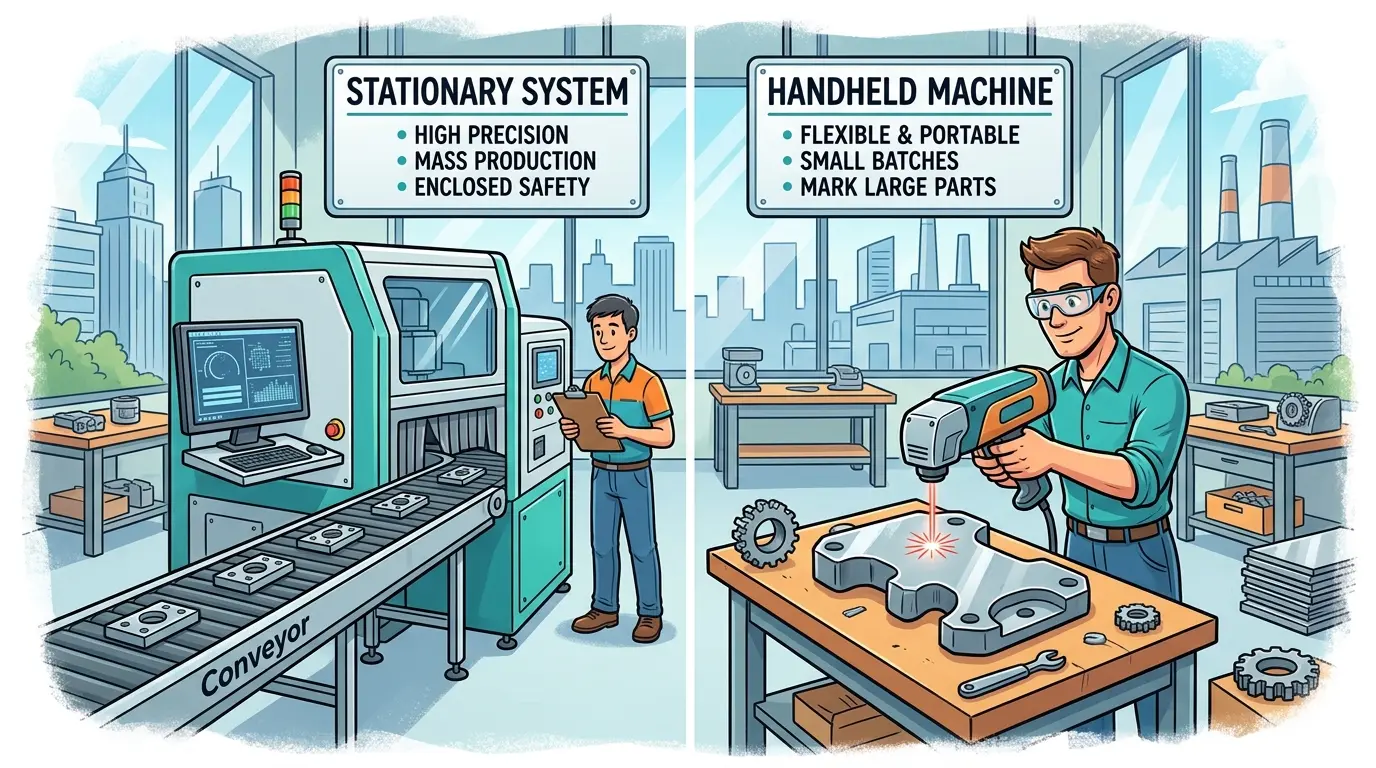
That is why the real decision is not which setup looks more advanced. It is whether your shop gains more from bringing the marking head to the part or bringing the part into a controlled marking station. A handheld laser marking machine can remove handling waste when parts are oversized, installed, or marked only occasionally. A fixed laser marking system usually becomes the stronger choice when repeatability, throughput, and verification discipline matter every day.

Shops often compare handheld and fixed marking systems as if they are simply two versions of the same machine. In practice, they solve different operational problems. If the biggest cost in your workflow is moving heavy, awkward, or already assembled parts, handheld marking can make sense because it reduces lifting, staging, and re-fixturing. If the bigger cost is variation in mark position, unreadable codes, inconsistent cosmetic quality, or slow batch handling, a fixed system usually deserves the first look.

The most useful question is simple: where is the real production penalty today? Walk the floor during a typical shift and watch where time actually disappears. You will usually find the penalty in one of these areas:

  • Part handling and repositioning between operations
  • Mark placement variation from operator to operator
  • Queue time at a shared marking station
  • Scanner readability problems on codes that fail downstream inspection
  • Rework caused by inconsistent setup or surface preparation
  • Safety and extraction control across multiple work areas

The answer usually points toward the right workstation style before you even compare brands or configurations. A shop that marks 50-pound weldments in a fabrication bay has a handling problem, not a laser problem. A shop that runs 2,000 serialized components per shift has a repeatability problem, not a portability problem. Naming the penalty correctly is half the buying decision.

Quick Comparison: Handheld vs Fixed Marking

Decision Factor Handheld Laser Marking Machine Fixed Laser Marking System
Best Fit For Part Size Large, heavy, awkward, or installed workpieces Small to medium parts that can be presented consistently
Main Workflow Benefit Reduces handling by bringing the mark to the part Improves repeatability by bringing the part to a controlled station
Placement Consistency More dependent on operator stability and reference methods Usually stronger with fixtures, nests, or stops
Batch Throughput Often slower on repeated jobs because positioning changes from part to part Usually better for repeated production and serialized batches
Small Code Readability Harder to control when placement tolerance is tight Easier to keep stable for scanner-based traceability
Safety And Fume Control Harder to standardize across changing work areas Easier to manage in one defined cell
Flexibility For Large Assemblies Strong advantage Often weaker if parts are difficult to move
Training Sensitivity Higher Lower once the process is standardized

This comparison shows why neither option is universally better. One removes transport waste. The other reduces process variation. The right choice depends on which cost is eating more of your margin today.

Do Not Confuse Workstation Style With Laser Source

Many buyers mix two separate decisions together. The first decision is workstation style: handheld or fixed. That choice is mainly about part access, fixturing, workflow control, and operator dependency. The second decision is process and material fit: what kind of mark is required, what material family is being processed, and how much contrast, permanence, or detail the application needs.

Those decisions overlap, but they are not the same. A shop may need a fixed system because it runs repeated serialized parts, regardless of which marking source it ultimately selects. Another shop may need handheld access because it marks large fabricated assemblies in place, even if the actual mark requirements are modest. You can pair either workstation style with different laser sources depending on the material and mark quality you need.

This is also where some buyers realize they are not really looking for a dedicated marking station at all. If the job is closer to engraving on wood, acrylic, or similar non-metallic parts than to industrial identification workflow, broader laser cutters and engravers may be the more relevant equipment category. The workstation style question only matters once you have confirmed that laser marking is actually the right process for your parts.

When Handheld Marking Earns Its Keep

Handheld marking usually creates the most value when the part is expensive to move. The cost of moving a workpiece is not just the lift itself. It includes staging time, waiting time, potential damage during transport, and the risk of losing orientation or reference points. When those costs are high, bringing the marking head to the part eliminates an entire class of waste.

Common examples where handheld marking makes sense include:

  • Large weldments and fabricated frames that require a crane or forklift to reposition
  • Installed equipment or in-place components that cannot be removed without disassembly
  • Heavy castings or machined parts that are difficult to reorient safely
  • Maintenance assets, tooling, and plant fixtures marked intermittently across different locations
  • High-mix, low-volume jobs spread across multiple work areas rather than a single cell

In these environments, the gain is not just portability. The real gain is reduced disruption. Operators spend less time lifting, staging, and waiting for a separate marking cell. Late-stage marking becomes easier because the part does not have to leave its work area simply to receive an ID, logo, or reference code. A fabrication shop that marks a completed frame in the welding bay avoids the cost of moving that frame to a dedicated station and back. A maintenance team that marks a pump in place avoids pulling it from service for an identification step.

That said, handheld marking is not free flexibility. It usually demands better operator discipline. Reference points matter more. Surface approach angle matters more. Consistent distance and alignment matter more. If the job requires small machine-readable codes in the exact same location every time, mobility can quickly become a source of variation instead of an advantage. An operator who marks a large weldment freehand may produce a perfectly readable logo but struggle to place a 2 mm Data Matrix code within a 0.5 mm tolerance zone on every unit.

Handheld units also require more attention to safety and fume extraction because the work area changes with every job. A fixed station can have integrated extraction, shielding, and interlocks. A portable unit needs procedural controls that operators follow consistently across different locations. If your shop has multiple shifts or high operator turnover, that procedural burden can become a hidden cost.

When a Fixed System Usually Delivers Better Results

Fixed laser marking systems are generally the stronger fit when the shop wants a repeatable process rather than a movable tool. The workstation becomes a controlled environment where part position, focus distance, and marking parameters stay consistent from cycle to cycle. That consistency translates directly into mark quality, code readability, and downstream verification confidence.

Fixed systems tend to pay back faster in situations such as:

  • Repeated production of similar part families where the same mark goes on every unit
  • Tight placement tolerance for codes or cosmetic marks that must appear in the same location
  • Scanner-based traceability workflows where a Data Matrix or QR code must read reliably every time
  • Stable part presentation using fixtures, nests, or stops that locate the workpiece precisely
  • Production cells where marking, verification, and data capture need to stay aligned in sequence

The workflow benefit is control. Once part positioning is standardized, it becomes easier to maintain mark placement, orientation, readability, and operator-to-operator consistency. Fixed systems also make it easier to support downstream inspection because the mark is created in a predictable zone under repeatable conditions. A machine shop running serialized components can load a part into a nest, trigger the cycle, and know that the code will land in the same spot every time. That predictability is what makes automated verification practical.

This matters most when the plant cares about usable marks per hour, not just whether a sample mark looks acceptable in a demo. If the same job runs every shift, a controlled station usually reduces variability, shortens operator decision time, and improves traceability confidence. The operator does not have to judge placement by eye or adjust focus for each part. The fixture does that work, and the laser does the rest.

Fixed systems also simplify integration with other automation. A marking station can be linked to a conveyor, a rotary indexer, or a robotic loading cell. It can trigger automatically when a part is present and send a completion signal to the next operation. Handheld units cannot easily participate in that kind of automated workflow because the human hand is part of the positioning loop.

The Hidden Cost Areas Buyers Often Miss

The wrong decision usually happens when teams compare sample marks instead of comparing operating conditions. A demo part marked in a clean, well-lit room tells you very little about how the equipment will perform on your floor with your operators, your part tolerances, and your production schedule. The real comparison is about how each setup behaves under your actual conditions.

Overlooked Issue Why It Changes the Decision
Part Referencing Handheld setups often rely more on visual alignment, while fixed stations can standardize position more easily
Operator Variation Free-positioning work usually depends more on individual skill and consistency
Verification Workflow Fixed stations are easier to pair with scanning, inspection, and data capture steps
Queue Management A fixed station can become efficient or congested depending on part flow; handheld avoids queues but may slow each cycle
Safety Discipline Portable work areas require stronger procedural control if the machine is used in multiple locations
Rework Exposure Misplaced or weak marks can erase the time saved by portable access

A good buying discussion should always include these questions:

  • How many usable marks per shift are actually needed? If the answer is fewer than 50, a fixed station may sit idle most of the day. If it is more than 500, handheld marking may not keep pace.
  • How small or position-sensitive are the codes? Tight tolerances favor fixed presentation.
  • Will multiple operators use the equipment? If yes, how much training variation can you absorb?
  • How often does the job change? Frequent changeovers favor flexibility, while stable jobs favor repeatability.
  • What happens immediately after marking? If the mark feeds inspection, assembly, shipping, or traceability records, process stability matters more than convenience.

When marks support inspection or traceability, the production cell should prioritize repeatable positioning over the convenience of moving the head by hand. A code that fails to scan downstream creates a chain of delays that quickly outweigh any time saved by portable access. Conversely, if the mark is purely cosmetic or informational, placement tolerance may be loose enough that handheld marking works perfectly well.

A Simple Shop-Fit Decision Table

Shop Profile Better Starting Point Why
Fabrication Shop Marking Large Welded Assemblies Handheld Moving the part may cost more than moving the marking head
Machine Shop Running Repeated Serialized Components Fixed Repeatable placement and code readability usually matter more than mobility
Maintenance Team Marking Tools, Fixtures, And Plant Assets Handheld The work is scattered and intermittent rather than cell-based
Production Line With Scanner Verification Fixed Controlled presentation and downstream verification are easier to standardize
Mixed Job Shop With Both Oversized Parts And Repeated Batches Hybrid One setup often cannot solve both access and repeatability equally well

This table is a starting point, not a rulebook. Shops with mixed workloads often discover that one setup handles their exception work while the other supports their daily volume. The key is to be honest about which jobs drive the majority of your marking cost. If 80 percent of your marks go on small repeated parts, a fixed station should be the priority even if you occasionally need to mark something large. If 80 percent of your marks go on large assemblies, handheld capability should come first.

When a Hybrid Approach Is the Smarter Answer

Some buyers force an either-or decision because they want one system to cover every job. That often creates unnecessary compromise. A single setup that tries to serve both large installed assemblies and high-volume serialized parts will usually be mediocre at both. The fixture that works for a small component does not help with a 500-pound weldment, and the portability that helps in the field does not deliver the repeatability a production line needs.

A mixed environment may benefit from:

  • A fixed station for repeated serialized parts where placement and readability are critical
  • A handheld unit for oversized or installed workpieces that would otherwise create handling waste
  • Separate job rules for high-precision codes versus general identification marks

This split is often more honest operationally. A fixed system can protect daily output where repeatability matters, while handheld capability can serve low-frequency jobs that would otherwise create handling waste. Instead of asking one setup to do everything adequately, the shop gives each type of work the process it actually needs. The fixed station runs the high-volume jobs with tight tolerances. The handheld unit handles the exceptions, the field work, and the large assemblies that would disrupt the cell if they had to be moved.

The hybrid approach also spreads risk. If one system goes down for maintenance, the other can cover critical jobs. If a new product line changes the mix, you have flexibility to shift work between the two setups. That operational resilience is often worth more than the cost of the second unit.

Production Fit: Handheld Laser Marking Machine vs Fixed Laser Marking System

A handheld laser marking machine usually makes more sense when the part is difficult to move, the job is intermittent, or the mark must be applied late in the workflow without sending the workpiece back through a dedicated station. A fixed laser marking system usually makes more sense when the plant depends on repeatable placement, stable code quality, predictable throughput, and easier integration with verification.

The better choice depends on what your shop is trying to remove: handling waste or process variation. If moving the part is the expensive step, handheld marking deserves the stronger look. If inconsistency, unreadable codes, and operator dependence are the bigger risks, a fixed system is usually the safer production decision.

Before you commit to either approach, run a simple audit of your current marking workflow. Count how many parts you mark per shift, how much time operators spend positioning workpieces, how many marks fail downstream inspection, and how much rework those failures create. That data will tell you which problem is actually costing you money. Then match the workstation style to the problem, not to the marketing materials.

For teams reviewing marking requirements alongside broader machinery planning, the Pandaxis product catalog gives a wider view of production-oriented equipment categories and process-fit decisions. The right marking setup is one part of a larger production system, and it should fit the way your shop actually moves work, not the way a spec sheet describes an ideal workflow.
What you can read next

CNC Laser Cutter vs CNC Router
CNC Laser Cutter vs CNC Router: Which One Should You Choose?
What Is Groove Machining in CNC?
QueenBee CNC vs Ultimate Bee CNC: Which DIY Router Platform Is Better?

Recent Posts

  • CNC Machine Plans When Plans Save Money and When They Create Rework

    CNC Machine Plans: When Plans Save Money and When They Create Rework

    CNC machine plans promise a lower purchase bill...
  • CNC Simulator Tools

    CNC Simulator Tools: When Virtual Testing Saves Time and Scrap

    Every CNC program that reaches the floor with a...
  • Laser Engraver for Wood

    Laser Engraver for Wood: Best Use Cases in Commercial Production

    Commercial wood shops routinely face a bottlene...
  • What Is a CNC Slicer

    What Is a CNC Slicer? Common Meanings and Use Cases

    When a purchasing team or production engineer s...
  • Big CNC Machine vs Small CNC Machine

    Big CNC Machine vs Small CNC Machine: How Size Changes Cost and Capability

    Production teams comparing CNC platforms often ...
  • Automatic Edgebander vs. Manual Edge Banding: Which One Delivers Better ROI?

    When edge finishing becomes the bottleneck, the...
  • Wall Saw

    Wall Saw Safety, Blade Selection, And Cutting Strategy For Controlled Structural Cuts

    Wall sawing fails most often before the blade e...
  • Metal Engraving: How To Choose the Right Machine for the Job

    Metal engraving decisions fail not at the demo ...
  • What Are CNC Bushings Used For?

    When an axis develops a vague roughness or surf...
  • Root CNC, RS CNC, and PrintNC-Style Open Builds

    Root CNC, RS CNC, and PrintNC-Style Open Builds: Which DIY Community Platform Fits You?

    Community CNC names like Root CNC, RS CNC, and ...
  • Laser Glass Cutter

    Laser Glass Cutter: Where It Fits in Production and Where It Does Not

    The production question comes before comparing ...
  • CNC Stone Cutting for Quartz, Granite, and Marble: How Material Differences Shape Machine Choice

    Quartz, granite, and marble share a fabrication...
  • Small CNC Mill vs Industrial CNC Mill

    Small CNC Mill vs Industrial CNC Mill: How Capacity Changes the Decision

    Shops comparing small CNC mills against industr...
  • Sheet Metal Laser Cutter

    Sheet Metal Laser Cutter Best Practices for Clean, Accurate Cuts

    Laser-cut defects rarely surface at the cutting...
  • What Is a Spiral Milling Cutter

    What Is a Spiral Milling Cutter?

    Buying a “spiral milling cutter” by...

Support

  • About Us
  • Contact Us
  • Company Blog
  • Terms of Service
  • Privacy Policy
  • Sitemap

Newsletter

Subscribe for Pandaxis product updates, application insights, and practical news on CNC woodworking, stone fabrication, and laser processing solutions.

GET IN TOUCH

Email: info@pandaxis.com

Whether you are looking to integrate a high-speed CNC woodworking line or deploy a heavy-duty stone cutting center, our technical engineers are ready to optimize your production. Reach out today to bring precision to every axis of your facility.

  • GET SOCIAL

© 2026 Pandaxis. All Right Reserved.

TOP