Pandaxis

  • Products
    • CNC Nesting Machines
    • Panel Saws (Beam Saws)
    • Sliding Table Saws
    • Edgebanders
    • Boring & Drilling Machines
    • Wide Belt Sanders
    • Laser Cutters and Engravers
    • Stone CNC Machines
  • About Us
  • Contact Us
  • EnglishEnglish
    • Español Español
    • Italiano Italiano
    • Deutsch Deutsch
    • Français Français
    • Português Português
    • العربية العربية
    • Türkçe Türkçe
    • Русский Русский
    • Tiếng Việt Tiếng Việt
    • 한국어 한국어
    • 日本語 日本語
    • 简体中文 简体中文
  • Home
  • Blog
  • Blog
  • Hobby Laser Cutter Vs. Commercial Laser Machine: When It Makes Sense To Upgrade

Hobby Laser Cutter Vs. Commercial Laser Machine: When It Makes Sense To Upgrade

by pandaxis / Friday, 10 April 2026 / Published in Blog
Hobby Laser Cutter Vs. Commercial Laser Machine

When order volume climbs and repeat customers start demanding consistent lead times, the hobby laser that validated your business model quietly becomes the bottleneck that shapes your pricing, scheduling, and quality outcomes. The upgrade decision is not about wattage or bed size—it is about whether the machine can support a production workflow where throughput, repeatability, and scheduling confidence matter more than flexibility. Before comparing specifications, measure where operator time, material waste, and rework labor are actually draining margin, because the clearest signal to upgrade is not machine failure but the rising cost of staying put.

When A Hobby Laser Stops Being A Tool And Starts Being A Bottleneck

Most fabrication shops enter laser processing through the same door. They buy a compact, affordable machine to learn material behavior, test design ideas, and validate whether there is real demand for a product. That approach makes sense. It keeps initial capital low and lets you build confidence with wood, acrylic, and other non-metal materials before committing serious money to production equipment.

The problem appears gradually. Order volume climbs. Repeat customers start asking for consistent lead times. Jobs begin queuing behind the laser instead of moving through the shop on schedule. At that point, the machine that helped you prove the business model starts limiting it.

The upgrade decision is rarely about wattage or bed size alone. It is about whether the laser can support a production workflow where throughput, repeatability, and scheduling confidence matter more than flexibility. A hobby machine can produce excellent parts. The question is whether it can produce them on demand, at a predictable cost, with acceptable consistency, day after day.

The Real Dividing Line: Workflow Pressure, Not Machine Age

A laser engraver or cutter that works well for occasional projects becomes a bottleneck when jobs must move through quoting, setup, cutting, cleanup, packing, and dispatch on a reliable schedule. The machine itself may still function perfectly. The workflow around it has changed.

Typical pressure points include:

  • Job queues that stretch beyond what the sales schedule can tolerate
  • Repeated manual repositioning because the work area is too limited for efficient sheet use
  • Inconsistent cut quality between short runs and longer production sessions
  • Too much operator attention tied up in setup, supervision, and cleanup
  • Scrap or rework rates that erode job margins
  • Quoting errors because actual machine time varies too much from job to job
  • Turning down repeat business because you cannot promise delivery dates with confidence

When these issues become routine rather than occasional, the upgrade discussion becomes practical instead of aspirational. The machine has moved from being a creative tool to being production infrastructure, and it is not performing well in that role.

What Actually Separates Hobby And Commercial Laser Machines

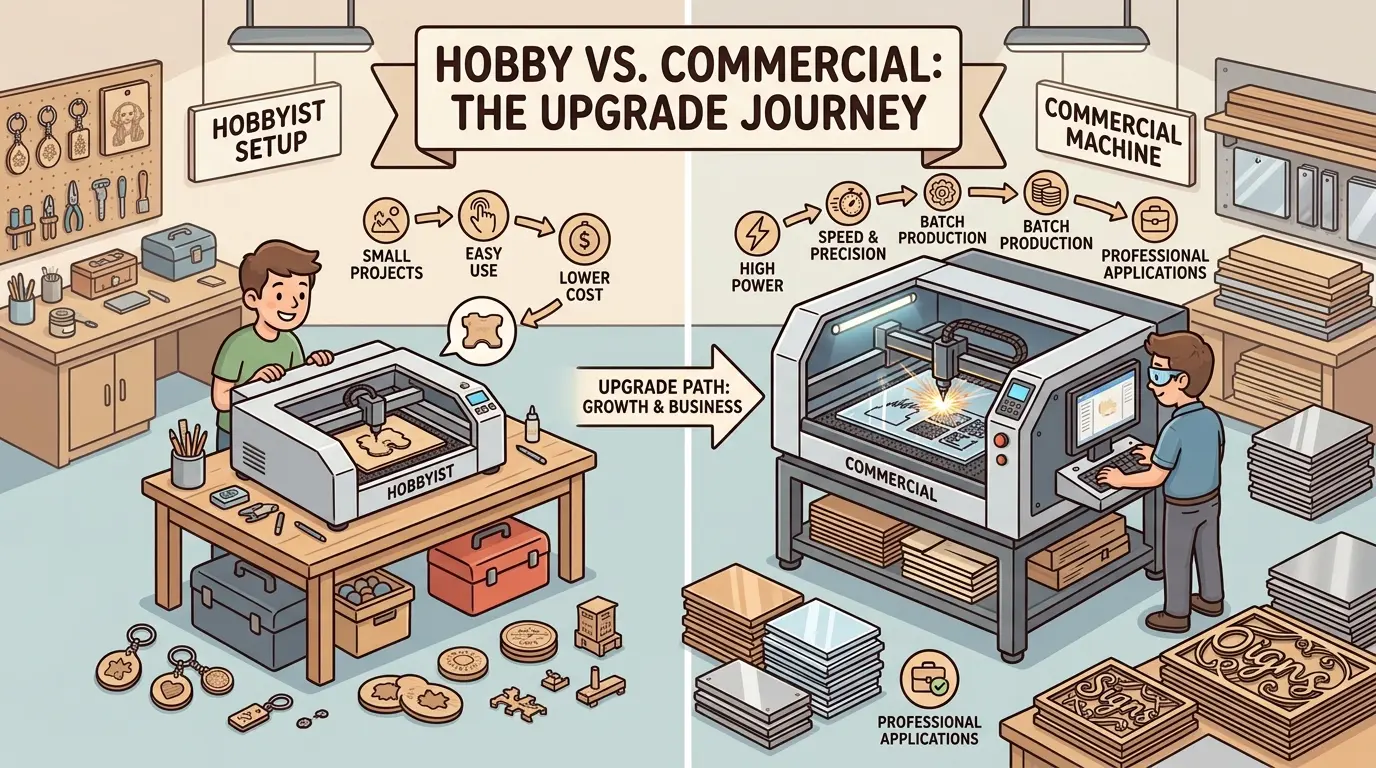
The difference between a hobby laser cutter and a commercial machine is rarely one headline feature. It is the combined effect of machine stability, material handling, daily runtime expectations, process control, and how well the equipment fits repeat production.

Decision Factor Hobby Laser Cutter Commercial Laser Machine Workflow Impact
Runtime Expectation Better suited to intermittent use and shorter sessions Better suited to sustained daily operation More reliable production scheduling
Material Handling Often limited to smaller sheets and more manual positioning Usually easier to stage, align, and process larger or more regular batches Fewer setup interruptions and alignment errors
Batch Consistency Acceptable for prototypes and one-off work Better aligned with repeat jobs and stable output Lower rework and more predictable finish quality
Extraction And Process Cleanliness Often more basic Usually more production-oriented Cleaner cuts, less residue, and easier shop control
Setup Efficiency More operator-dependent More structured for recurring jobs Faster changeovers and simpler quoting logic
Downtime Tolerance Can be manageable if deadlines are flexible Downtime carries higher cost but the machine is chosen for business-critical use Better fit when customer commitments depend on machine availability
Growth Headroom Good for learning and early-stage sales Better fit for scaling production Supports business growth without constant workarounds

This is why many buyers underestimate the upgrade decision at first. They compare machines as objects rather than as parts of a workflow. In practice, the commercial machine wins when the shop needs a more dependable process, not just a more impressive specification sheet.

How A Hobby Laser Raises Production Cost Without Failing

An upgrade usually makes sense before the old machine completely breaks down. The stronger signal is that the current machine is quietly raising your production cost through inefficiency.

Consider a typical scenario. A shop produces branded acrylic signs for local businesses. The hobby laser handles the work, but each job requires careful manual placement of the acrylic sheet on the bed. The operator must align the material against reference marks, run a test cut, adjust positioning, and then run the actual job. For a single sign, that is acceptable. For a batch of twenty signs, the setup time repeats for every sheet, and the operator cannot walk away during the run because a slight shift in material position ruins the cut.

The cost shows up in labor hours, not in machine failure. The laser still cuts. But the shop is paying an operator to babysit a process that should run with minimal intervention.

Another common situation involves material waste. A hobby machine with a smaller work area forces the operator to split larger sheets into multiple setups. Each split creates a new alignment point, and each alignment point introduces the possibility of error. Scrap from misaligned cuts, scorched edges, or incomplete passes becomes part of normal production. The shop starts pricing those losses into every job, which makes quotes less competitive or margins thinner.

The same pattern appears with engraving consistency. A hobby machine may produce excellent engraving depth on the first piece of a run, then drift slightly on the fifth piece as the machine warms up or the material surface varies. For a prototype, that drift is invisible. For a repeat order of fifty identical pieces, the variation becomes a quality complaint.

When A Hobby Laser Cutter Is Still The Right Choice

Not every shop should upgrade immediately. In some cases, keeping a hobby laser is the more disciplined choice.

A smaller machine can still be the right fit when:

  • The laser is mainly used for prototyping, sampling, or internal development
  • Order volume is irregular and does not justify a dedicated production asset
  • Most work is personalized, experimental, or artist-led rather than batch-oriented
  • Lead times are flexible enough that occasional slowdowns do not harm the business
  • The laser supports another core process instead of carrying the main revenue load

In those situations, the hobby machine is not a mistake. It is simply being used within its natural operating role. The problem begins when a prototype-oriented tool is expected to behave like production infrastructure.

A shop that produces one-off custom gifts, for example, may never need a commercial machine. The work is inherently variable, batch sizes are small, and the customer expects a handmade product with natural variation. A hobby laser delivers exactly what that business needs.

The same logic applies to a woodworking shop that uses a laser occasionally for inlay work or decorative details. The laser is a supporting tool, not the primary production asset. The cost of a commercial machine would not be justified by the volume of laser work the shop actually runs.

What A Commercial Upgrade Changes In Daily Production

For shops working with wood, acrylic, and similar non-metal materials, moving into dedicated laser cutters and engravers is usually less about chasing a larger headline claim and more about stabilizing the production process.

In practical terms, a commercial upgrade often improves the workflow in four ways.

First, it supports better throughput planning. Jobs can be grouped more logically, scheduled more confidently, and moved through the shop with fewer special handling steps. Instead of fitting each job to the machine’s limitations, the operator fits the machine to the job’s requirements.

Second, it improves repeatability. Settings, positioning, and output become easier to standardize. When the same file must produce the same visual result across multiple runs, the commercial machine delivers that consistency without requiring the operator to compensate for drift or variation.

Third, it reduces labor waste around the machine. Less babysitting, less manual repositioning, and less cleanup effort mean the operator can focus on production rather than constant correction. That labor saving often justifies a significant portion of the upgrade cost on its own.

Fourth, it raises downstream quality. Cleaner edges, more stable engraving results, and fewer incomplete cuts improve assembly, finishing, packaging, and customer acceptance. A part that comes off the laser cleanly does not need secondary sanding, scraping, or touch-up work.

Material Handling: The Overlooked Upgrade Driver

Many buyers focus on laser power or engraving speed when comparing machines. In practice, material handling often determines whether a commercial upgrade pays off.

A hobby machine typically requires the operator to place each piece of material individually, align it by eye or with simple reference marks, and run the job. For small parts, that is manageable. For larger sheets or higher batch volumes, the manual handling becomes the dominant cost.

Commercial machines usually offer more structured material handling. Larger beds accept full sheets without splitting. Positioning systems reduce alignment time. Extraction systems handle the smoke and residue from longer production runs without requiring constant monitoring.

For example, a shop cutting acrylic display stands may value a different balance of edge appearance and changeover speed. On a hobby machine, each sheet must be cut into smaller pieces before processing, then each piece must be aligned and processed separately. The operator spends more time handling material than the laser spends cutting. On a commercial machine with a larger bed, the full sheet goes in once, the cutting pattern runs automatically, and the operator removes finished parts.

The difference is not just speed. It is the number of opportunities for error. Every time material is handled, there is a chance of misalignment, damage, or contamination. Reducing handling steps reduces those risks.

Batch Consistency And The Cost Of Rework

Rework is one of the most expensive problems in any fabrication shop. It consumes material, labor, and machine time, and it delays delivery. A hobby laser that produces inconsistent results forces the shop to inspect every part, sort out the failures, and rerun the rejects.

The cost of that inspection and sorting is easy to underestimate. An operator who spends ten minutes per batch checking edge quality, measuring engraving depth, and pulling out defective parts is not spending that time on productive work. Over a week, those ten-minute checks add up to hours of lost capacity.

Commercial machines reduce the need for inspection by producing more consistent output. The settings that worked for the first part of a run work for the last part as well. The operator can trust the process and focus on moving work through the shop rather than checking it.

This is especially important for shops that sell to other businesses. A client who orders branded wooden boxes expects every box to look identical. If the laser produces visible variation between pieces, the client rejects the batch or demands a discount. The shop loses margin on the job and risks losing the client entirely.

How To Decide Without Overbuying

The safest buying decision is grounded in the jobs you already run, not the machine category you hope to grow into someday.

Use this selection logic before upgrading:

  1. Measure where time is actually being lost. Separate design time, setup time, machine runtime, cleanup, and rework. You may find that the bottleneck is not cutting speed but setup or material handling.
  2. Review your real job mix. Look at part size, material type, batch frequency, and the balance between cutting and engraving. A machine that excels at engraving may not be the right choice if most of your revenue comes from cutting.
  3. Identify the most expensive bottleneck. It may be work area limits, inconsistent finish quality, manual setup, or unreliable daily output rather than raw speed alone. Address the constraint that costs the most money.
  4. Define the required finish standard. Decorative work, branded products, architectural pieces, and repeat retail orders do not tolerate the same level of variation. Know your quality bar before you compare machines.
  5. Buy for the next stable workflow stage. Choose a machine that fits the production level you can sustain, not the one justified only by an optimistic future scenario. Overbuying ties up capital that could support other parts of the business.

If the upgrade is part of a broader move from bench-scale production toward a more organized equipment roadmap, reviewing the wider Pandaxis product catalog can also help clarify how laser processing should fit alongside other fabrication steps.

Upgrade Timing Matters More Than Machine Labels

Many buyers ask whether they should upgrade as soon as sales increase. A better question is this: has the laser become a recurring source of delay, inconsistency, or unnecessary labor?

If the answer is yes, the upgrade may already be justified. If the answer is no, a hobby laser may still be doing exactly what it should.

That distinction protects buyers from two expensive mistakes. One is upgrading too early and carrying industrial equipment costs before production demand is stable. The other is upgrading too late and losing margin, delivery reliability, and repeat business because the machine has fallen behind the workflow.

Calculating The Real Cost Of Staying Put

Before committing to an upgrade, it helps to quantify what the current machine is costing the business. The calculation is straightforward, but most shops never do it.

Start with labor. Track how much operator time goes into setup, monitoring, and cleanup for a typical week. Multiply that by the shop’s loaded labor rate. If the operator spends ten hours per week babysitting the laser, that is a direct cost that a commercial machine could reduce.

Add material waste. Estimate the percentage of material lost to misaligned cuts, scorched edges, or failed engraving passes. Apply that percentage to your monthly material spend. Even a five percent waste rate on a material budget of several thousand dollars per month is significant.

Add rework labor. Every part that must be recut consumes machine time and operator time that could have been spent on new work. If rework accounts for ten percent of machine time, the shop is effectively losing ten percent of its laser capacity.

Add lost opportunity. Jobs that are turned down because lead times cannot be promised are revenue that never enters the pipeline. This is harder to quantify, but it is often the largest cost of all.

When these numbers are added together, the case for a commercial upgrade often becomes clear. The machine may cost more upfront, but the monthly savings in labor, material, and rework can justify the investment within a predictable period.

Production Fit: Hobby Laser Cutter Vs. Commercial Laser Machine

The right time to move from a hobby laser cutter to a commercial machine is when production discipline matters more than basic capability. If the laser is now expected to support repeat orders, predictable lead times, cleaner cuts, easier material handling, and lower rework, a commercial upgrade is usually a workflow decision rather than a luxury purchase.

If the work is still experimental, irregular, or prototype-driven, a hobby laser may remain the right tool. But once machine limits begin to shape pricing, scheduling, and quality outcomes, the business has usually outgrown hobby equipment even if the machine itself still runs.

That is the clearest upgrade signal: not whether the laser can still cut, but whether it can still support the way your shop needs to produce.
What you can read next

Handheld Laser Marking Machine vs Fixed Laser Marking System
Handheld Laser Marking Machine vs Fixed Laser Marking System: Which One Fits Your Shop?
Beam Saw Accuracy Over Time
Beam Saw Accuracy Over Time: What Affects Cut Quality and Why It Drifts
Panel Saw for Sale What to Check Before You Buy
Panel Saw for Sale: What to Check Before You Buy

Recent Posts

  • CNC Machine Plans When Plans Save Money and When They Create Rework

    CNC Machine Plans: When Plans Save Money and When They Create Rework

    CNC machine plans promise a lower purchase bill...
  • CNC Simulator Tools

    CNC Simulator Tools: When Virtual Testing Saves Time and Scrap

    Every CNC program that reaches the floor with a...
  • Laser Engraver for Wood

    Laser Engraver for Wood: Best Use Cases in Commercial Production

    Commercial wood shops routinely face a bottlene...
  • What Is a CNC Slicer

    What Is a CNC Slicer? Common Meanings and Use Cases

    When a purchasing team or production engineer s...
  • Big CNC Machine vs Small CNC Machine

    Big CNC Machine vs Small CNC Machine: How Size Changes Cost and Capability

    Production teams comparing CNC platforms often ...
  • Automatic Edgebander vs. Manual Edge Banding: Which One Delivers Better ROI?

    When edge finishing becomes the bottleneck, the...
  • Wall Saw

    Wall Saw Safety, Blade Selection, And Cutting Strategy For Controlled Structural Cuts

    Wall sawing fails most often before the blade e...
  • Metal Engraving: How To Choose the Right Machine for the Job

    Metal engraving decisions fail not at the demo ...
  • What Are CNC Bushings Used For?

    When an axis develops a vague roughness or surf...
  • Root CNC, RS CNC, and PrintNC-Style Open Builds

    Root CNC, RS CNC, and PrintNC-Style Open Builds: Which DIY Community Platform Fits You?

    Community CNC names like Root CNC, RS CNC, and ...
  • Laser Glass Cutter

    Laser Glass Cutter: Where It Fits in Production and Where It Does Not

    The production question comes before comparing ...
  • CNC Stone Cutting for Quartz, Granite, and Marble: How Material Differences Shape Machine Choice

    Quartz, granite, and marble share a fabrication...
  • Small CNC Mill vs Industrial CNC Mill

    Small CNC Mill vs Industrial CNC Mill: How Capacity Changes the Decision

    Shops comparing small CNC mills against industr...
  • Sheet Metal Laser Cutter

    Sheet Metal Laser Cutter Best Practices for Clean, Accurate Cuts

    Laser-cut defects rarely surface at the cutting...
  • What Is a Spiral Milling Cutter

    What Is a Spiral Milling Cutter?

    Buying a “spiral milling cutter” by...

Search for posts

Recent Posts

  • CNC Machine Plans When Plans Save Money and When They Create Rework

    CNC Machine Plans: When Plans Save Money and When They Create Rework

    0 comments
  • CNC Simulator Tools

    CNC Simulator Tools: When Virtual Testing Saves Time and Scrap

    0 comments
  • Laser Engraver for Wood

    Laser Engraver for Wood: Best Use Cases in Commercial Production

    0 comments

Recent Comments

    Support

    • About Us
    • Contact Us
    • Company Blog
    • Terms of Service
    • Privacy Policy
    • Sitemap

    Newsletter

    Subscribe for Pandaxis product updates, application insights, and practical news on CNC woodworking, stone fabrication, and laser processing solutions.

    GET IN TOUCH

    Email: info@pandaxis.com

    Whether you are looking to integrate a high-speed CNC woodworking line or deploy a heavy-duty stone cutting center, our technical engineers are ready to optimize your production. Reach out today to bring precision to every axis of your facility.

    • GET SOCIAL

    © 2026 Pandaxis. All Right Reserved.

    TOP