Pandaxis

  • Products
    • CNC Nesting Machines
    • Panel Saws (Beam Saws)
    • Sliding Table Saws
    • Edgebanders
    • Boring & Drilling Machines
    • Wide Belt Sanders
    • Laser Cutters and Engravers
    • Stone CNC Machines
  • About Us
  • Contact Us
  • EnglishEnglish
    • Español Español
    • Italiano Italiano
    • Deutsch Deutsch
    • Français Français
    • Português Português
    • العربية العربية
    • Türkçe Türkçe
    • Русский Русский
    • Tiếng Việt Tiếng Việt
    • 한국어 한국어
    • 日本語 日本語
    • 简体中文 简体中文
  • Home
  • Blog
  • Blog
  • Laser Cutting Machine Price: What Actually Drives the Final Quote?

Laser Cutting Machine Price: What Actually Drives the Final Quote?

by pandaxis / Friday, 01 May 2026 / Published in Blog
Laser Cutting Machine Price

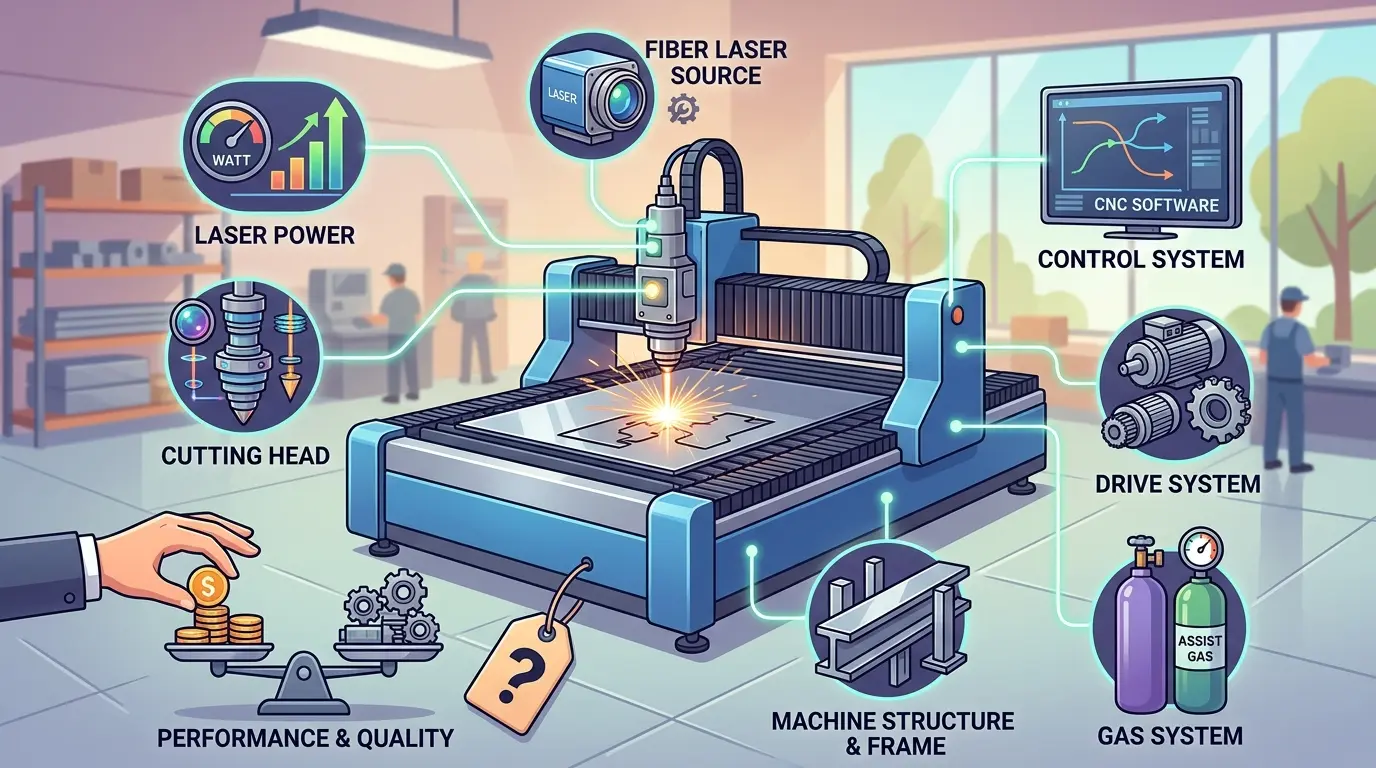
When laser cutting machine quotes arrive with wide price gaps for seemingly identical equipment, the difference rarely lives in the machine itself—it lives in what each supplier left out of the proposal. One bid may cover a bare unit with a basic controller; another includes extraction, cooling, software, commissioning, and operator training. For shops moving from prototype work to daily batch production on acrylic, wood, and other non-metals, comparing headline numbers without normalizing the commercial scope produces misleading results. The real decision hinges on defining your material mix, part sizes, finish standards, and changeover expectations before any supplier price becomes meaningful.

Why the First Number on a Laser Quote Is Rarely the One That Matters

A buyer comparing laser cutting machine prices will often see a wide spread between supplier quotations for what appears to be similar equipment. The gap usually has little to do with the machine itself and much more to do with what each supplier actually included in the proposal. One quote may cover a bare machine with a basic controller. Another may include extraction, cooling, software, installation, and operator training. A third may look expensive simply because it is the only complete proposal on the table.

For shops evaluating laser cutters and engravers for wood, acrylic, and similar non-metallic materials, the practical question is not “What does a laser cutter cost?” but rather “What exactly is in this quote, and which line items actually affect my production output?”

Comparing Quotes Without a Defined Job Scope Produces Misleading Results

Two suppliers can both quote a “laser cutting system” and still be pricing entirely different production solutions. One machine may suit occasional shape cutting on acrylic sheets. Another may be configured for daily batch production, larger workpieces, tighter finish requirements, or a mixed cut-and-engrave workflow. On paper both are laser machines. In practice they solve different shop-floor problems.

The lowest number on a quotation sheet does not automatically represent the lowest real investment. In many cases it simply reflects how much of the required production system has been left out of the proposal.

Before comparing supplier prices, define the operating realities of the job:

  • Which materials will consume most of the weekly runtime?
  • Is the work primarily cutting, or cutting combined with engraving?
  • Are parts small, detailed, and finish-sensitive, or large and throughput-driven?
  • Is production mostly repeated batch work or frequent job changes?
  • Do operators need fast recipe recall across multiple materials?
  • Do appearance defects, burn marks, or edge cleanup create customer risk?

These questions matter because a machine bought for occasional sign blanks is not priced the same way as a machine expected to hold stable quality across daily acrylic parts, decorative wood panels, and short-run custom orders. If the workload extends into metal sheet cutting, tube processing, or industrial marking, treat that as a separate equipment-selection path rather than folding it into the same quote comparison. Those systems follow different cost logic and should not be benchmarked as if they belong to one machine class.

The Main Factors That Move the Final Quote

The biggest price drivers are usually the parts of the system that change workflow fit, usable output, and operating stability.

Quote Driver Why It Changes the Price When It Matters Most
Material Fit and Process Scope A machine configured for simple cutting is priced differently from one expected to support broader cutting and engraving needs across several non-metal materials Mixed-material production, custom fabrication, and decorative work
Work Area and Table Size Larger working zones usually increase machine footprint, structural scope, and handling expectations Larger panels, bigger acrylic sheets, or nested multi-part layouts
Power Matched to Routine Work The quote changes when buyers need more comfortable processing across thicker or more demanding routine materials Shops where cycle time and stable cut-through both matter
Motion Stability and Positioning Control Better control helps reduce variation, protects detail quality, and lowers placement errors Customer-visible parts, repeat orders, and tighter tolerance expectations
Extraction, Cooling, and Process Environment Supporting equipment affects residue control, thermal stability, and overall production cleanliness Acrylic appearance, wood edge quality, and longer daily runtime
Software and Job Management Better workflow tools reduce setup variation and help standardize repeat work High-mix shops, frequent file changes, and multiple operators
Material Handling and Fixtures Better part support and positioning can improve throughput and reduce operator correction Small-part batching, repeated layouts, and short-run production
Commissioning, Training, and Service Scope Installation support changes how quickly the machine becomes productive after delivery First-time laser buyers and factories adding a new process

Read every quote through that lens. If one proposal is lower because it strips out the items that protect output consistency, then it may only be cheaper in the narrowest purchasing sense.

Why the Same Machine Category Can Produce Very Different Quotes

Even within the same broad machine category, final quotations move based on how the supplier defines the project. One buyer may request a machine only. Another may require a more complete installed solution with process-support equipment, operator onboarding, and a clearer startup path. The second quote often looks higher because it reflects the real factory handoff, not just the crate price.

This situation is especially common when buyers are moving from prototype use to commercial production. At that point, the purchase is no longer just about whether the beam can cut the material. It becomes a question of whether the workflow can stay stable over time without creating extra cleanup, rework, operator dependency, or lost hours during changeovers. That shift is what turns a simple machine price into a final quote.

The Costs Buyers Often Miss Outside the Base Machine

One of the most common pricing mistakes is treating the base machine number as the full investment. In practice, buyers should normalize every quote to include the same commercial buckets before comparing suppliers.

Cost Area Why It Should Be Separated Clearly
Extraction and Cooling These are often essential to stable daily operation, not optional extras
Software or Job Preparation Tools Workflow control can materially affect repeatability and setup time
Fixtures or Positioning Aids These can influence part placement accuracy and operator efficiency
Installation and Commissioning Startup speed and early production stability often depend on this support
Operator Training Training changes how quickly the machine reaches consistent output
Spare and Maintenance Items Early downtime risk is easier to manage when essential support items are planned upfront
Freight, Import Terms, and Site Preparation Commercial terms can shift the real purchase cost significantly even when the machine itself is unchanged

Without this normalization, buyers are often comparing different purchasing scopes rather than different machines.

How Work Area and Table Size Change the Quote Structure

The working envelope is one of the first specification points that separates a low quote from a high one, and it is also one of the most frequently misunderstood. A machine with a compact bed may handle small acrylic plaques, nameplates, and engraved panels efficiently. The same machine will struggle when a shop starts receiving orders for full-size cabinet doors, large decorative wall panels, or acrylic sheets that need to be cut in one pass rather than repositioned manually.

When the work area grows, several things happen to the quote. The frame becomes larger and more rigid to maintain consistent motion across a bigger span. The gantry system may need heavier construction to resist flex at speed. The table itself may require a different support structure to hold sheet material flat across the entire surface. These changes add cost, but they also change what the machine can produce in a single cycle. A shop cutting nested layouts on 4×8-foot panels will see a very different quote than a shop processing 12×12-inch blanks, and that difference is justified by the production capability, not by supplier markup.

The practical question for the buyer is whether the larger work area will actually be used. If the shop occasionally handles a large piece but spends most of its time on small parts, a bigger machine may not pay for itself. If the order pipeline consistently includes large panels or multi-part nesting, the larger table becomes a throughput tool rather than a luxury.

Power Selection: Matching the Beam to the Material Thickness

Laser power is another line item that moves the final quote, and it is often where buyers make the most expensive mistake. A lower-power system may cut thin acrylic and veneer-faced wood cleanly, but it will slow down noticeably on thicker stock. The operator may need multiple passes, which increases cycle time and can introduce heat-affected zones along the cut edge. For a shop running daily production, that slowdown translates directly into labor hours and missed delivery windows.

A higher-power system, by contrast, cuts through thicker material in a single pass and maintains a more consistent edge quality across variable material thickness. The tradeoff is that higher power usually costs more upfront and may require a more robust cooling system to maintain thermal stability during long runs. The quote difference between a 60-watt and a 100-watt system is not just the cost of the tube or source; it is the supporting infrastructure that keeps that power stable over an eight-hour shift.

The correct power level depends on the material mix and the acceptable cycle time. A shop cutting 3 mm acrylic for display stands may find a mid-range system perfectly adequate. A shop processing 12 mm acrylic sheets or dense hardwood for furniture components will need a different configuration. Buyers should ask suppliers for cutting speed data at the specific thicknesses they process most often, rather than relying on maximum power ratings that may not reflect real-world performance.

Motion Control and Positioning Accuracy: The Hidden Quality Driver

The motion system is the part of the machine that determines whether a cut edge is clean and whether engraved details hold their shape across a full sheet. A machine with basic stepper motors and a simple controller may produce acceptable results on simple geometries. When the job involves tight corners, small lettering, or repeated registration across multiple parts, the limitations become visible.

Higher-end motion systems use closed-loop control, which means the controller continuously verifies the actual position of the cutting head against the commanded position. This reduces the risk of missed steps, drift, or positioning errors that accumulate over a long cutting path. For a shop producing customer-facing parts with strict appearance standards, this difference is not academic. A misaligned cut on a decorative panel or a distorted engraving on a branded product becomes scrap, and scrap costs more than the machine price difference.

The quote reflects this in the cost of the servo drives, the controller, and the software that manages the motion profile. Buyers should ask how the machine handles corner rounding, acceleration ramps, and small-radius cuts. These details determine whether the machine can hold detail quality at production speeds or whether the operator has to slow the machine down to protect the part.

Extraction and Cooling: The Supporting Systems That Protect Output

Laser cutting produces smoke, fumes, and residue, especially when processing wood, acrylic, and other non-metallic materials. Without proper extraction, that residue settles on the optics, the work surface, and the surrounding equipment. Over time, it degrades cut quality, increases maintenance frequency, and creates a safety hazard in the work area.

Extraction systems vary widely in capacity and filtration quality. A basic shop vacuum may be sufficient for occasional engraving, but daily cutting of acrylic or wood generates a much larger volume of airborne particulates. A properly sized extraction system with adequate airflow and filtration will keep the cutting area clear, protect the lens and mirrors, and reduce the need for frequent cleaning. The cost of this system is often quoted separately, and it is one of the first items buyers try to cut from the budget.

Cooling is equally important. Laser sources generate heat, and that heat must be managed to maintain consistent output power. A machine with an undersized cooling system may experience power drift during long runs, which changes cut depth and edge quality from the first part to the last. A properly sized chiller or cooling loop keeps the source temperature stable, which directly affects repeatability. Buyers should ask what cooling capacity is included and whether it is matched to the duty cycle of the machine.

Software and Job Management: The Difference Between a Machine and a Workflow

The software that controls the laser is often the most underestimated part of the quote. A basic driver package may allow the operator to send a file to the machine and start cutting. A more complete software package includes nesting tools, job libraries, material parameter presets, and the ability to store and recall recipes for different materials and thicknesses.

For a shop running frequent job changes, this software difference is significant. An operator who has to manually re-enter cutting parameters for every new material is more likely to make errors, and those errors produce scrap or rework. A machine with a well-organized recipe library allows the operator to select the material, confirm the settings, and start the job with minimal setup time. Over a week of production, those saved minutes accumulate into hours of additional usable capacity.

The quote should clearly state what software is included, whether it supports the file formats the shop uses, and whether training is provided. Some suppliers offer a basic package and charge separately for advanced features. Buyers should ask for a demonstration of the software workflow before committing, because the software experience is what the operator will live with every day.

Material Handling and Fixtures: Reducing Operator Intervention

The way material is loaded, positioned, and held during cutting affects both throughput and part quality. A machine with a flat, well-supported table allows the operator to place a sheet and start cutting immediately. A machine with a poorly designed table may require the operator to manually level the material, clamp it in multiple places, or adjust the focus height for different material thicknesses.

Fixtures and positioning aids can reduce this setup time significantly. A honeycomb table supports thin materials and allows smoke to pass through, which improves cut quality on acrylic and veneer. A pin table or a vacuum hold-down system may be better for larger sheets that need to stay flat across the entire surface. These options add cost to the quote, but they also reduce the labor required for each job.

For shops running repeated layouts, a fixture that holds the material in the same position every time eliminates the need to re-align the file to the sheet. This is especially valuable for batch production, where the same part is cut repeatedly over days or weeks. The cost of a good fixture is often recovered quickly through reduced setup time and fewer positioning errors.

Commissioning, Training, and Service Scope: The Cost of Getting Productive

The final quote often includes or excludes installation, commissioning, and operator training. These items are not optional extras in practice; they determine how quickly the machine becomes productive after delivery. A machine that arrives and sits on the shop floor for a week while the buyer figures out the electrical connections, the extraction hookup, and the software setup is not generating revenue.

A supplier that includes commissioning will send a technician to install the machine, verify that it is cutting correctly, and train the operators on the specific workflows the shop will use. This support shortens the learning curve and reduces the risk of early mistakes that damage parts or the machine itself. For a first-time laser buyer, this support is often the difference between a smooth startup and a frustrating one.

The service scope also matters for ongoing operations. Buyers should ask what spare parts are stocked, what the response time is for service calls, and whether remote diagnostics are available. A machine that is down for a week waiting for a replacement part can cost more in lost production than the price difference between suppliers.

A Lower Quote Can Still Mean a Higher Cost Per Good Part

The final quote should be judged against production outcome, not just against budget approval. A cheaper machine can become more expensive when it introduces problems such as:

  • More setup drift between jobs
  • More edge cleanup or surface residue
  • More operator intervention during production
  • More variation across repeated parts
  • More rework on customer-facing components
  • More time lost solving startup or maintenance issues

For industrial buyers, this is the real pricing issue. The better question is not whether the machine costs less on day one. The better question is whether it produces acceptable parts with manageable labor, stable repeatability, and less friction across normal production conditions. That is usually what separates a low quote from a strong quote.

When Paying More Usually Makes Sense

Higher pricing is not automatically justified. But paying more often makes sense when the business depends on lower process risk. That usually includes situations such as:

  • Repeated daily production across several operators or shifts
  • Customer-facing parts with strict appearance standards
  • Frequent material changes that need reliable recipe control
  • Combined cutting-and-engraving workflows in one system
  • Faster ramp-up after delivery with less trial-and-error on the shop floor

In those cases, the additional spend is not about prestige. It is about reducing waste, shortening the learning curve, and protecting usable throughput. By contrast, if the workload is simple, infrequent, and operationally forgiving, a more basic purchase scope may be fully reasonable. The right quote level depends on workflow risk, not on the assumption that every buyer needs the same configuration.

Do Not Compare Different Laser Process Families With One Price Logic

Buyers sometimes search for a general laser cutting machine price and then try to compare every laser system they find under one budget framework. That usually creates confusion. A non-metal laser system for acrylic, wood, and similar materials should not be priced the same way as a sheet-metal cutting system, a tube-cutting platform, or a dedicated marking system. Material class, process demands, safety requirements, and downstream workflow all change the quote structure.

If the buying team is still deciding between non-metal cutting, metal fabrication, tube processing, or marking applications, the first step is not price negotiation. The first step is clarifying which production problem the machine is actually meant to solve. Only then does quote comparison become meaningful.

Questions Buyers Should Ask Before Approving a Quote

Before moving forward, industrial buyers should be able to answer the following clearly:

  • What materials will use most of the machine hours?
  • Is the workflow mainly cutting, or cutting plus engraving?
  • What part sizes and finish standards define acceptable output?
  • Which costs are included in the quote, and which are left outside it?
  • How much changeover time is acceptable between jobs?
  • What support is available during installation, startup, and early production?
  • What process problems would be most expensive for the plant: scrap, cleanup, slow changeovers, or downtime?

These questions usually produce a better buying decision than asking for a generic market average. They force the quote discussion back toward real production needs.

Cost Decision: Laser Cutting Machine Price

Laser cutting machine price is rarely one clean number. The final quote is usually driven by application scope, material fit, work area, supporting equipment, software workflow, installation support, and the level of repeatability the buyer expects in daily production. The strongest way to compare quotes is to define the job first, normalize the commercial scope second, and judge the system by the cost of producing good parts rather than by the smallest headline figure. That approach gives industrial buyers a much more useful answer than any isolated price tag ever will.
What you can read next

What Are CNC Bushings Used For?
Steel CNC Machining vs Aluminum CNC Machining: Key Differences in Cost and Process
Laser Cut Plywood How to Reduce Burn Marks and Improve Cut Quality
Laser Cut Plywood: How to Reduce Burn Marks and Improve Cut Quality

Recent Posts

  • CNC Machine Plans When Plans Save Money and When They Create Rework

    CNC Machine Plans: When Plans Save Money and When They Create Rework

    CNC machine plans promise a lower purchase bill...
  • CNC Simulator Tools

    CNC Simulator Tools: When Virtual Testing Saves Time and Scrap

    Every CNC program that reaches the floor with a...
  • Laser Engraver for Wood

    Laser Engraver for Wood: Best Use Cases in Commercial Production

    Commercial wood shops routinely face a bottlene...
  • What Is a CNC Slicer

    What Is a CNC Slicer? Common Meanings and Use Cases

    When a purchasing team or production engineer s...
  • Big CNC Machine vs Small CNC Machine

    Big CNC Machine vs Small CNC Machine: How Size Changes Cost and Capability

    Production teams comparing CNC platforms often ...
  • Automatic Edgebander vs. Manual Edge Banding: Which One Delivers Better ROI?

    When edge finishing becomes the bottleneck, the...
  • Wall Saw

    Wall Saw Safety, Blade Selection, And Cutting Strategy For Controlled Structural Cuts

    Wall sawing fails most often before the blade e...
  • Metal Engraving: How To Choose the Right Machine for the Job

    Metal engraving decisions fail not at the demo ...
  • What Are CNC Bushings Used For?

    When an axis develops a vague roughness or surf...
  • Root CNC, RS CNC, and PrintNC-Style Open Builds

    Root CNC, RS CNC, and PrintNC-Style Open Builds: Which DIY Community Platform Fits You?

    Community CNC names like Root CNC, RS CNC, and ...
  • Laser Glass Cutter

    Laser Glass Cutter: Where It Fits in Production and Where It Does Not

    The production question comes before comparing ...
  • CNC Stone Cutting for Quartz, Granite, and Marble: How Material Differences Shape Machine Choice

    Quartz, granite, and marble share a fabrication...
  • Small CNC Mill vs Industrial CNC Mill

    Small CNC Mill vs Industrial CNC Mill: How Capacity Changes the Decision

    Shops comparing small CNC mills against industr...
  • Sheet Metal Laser Cutter

    Sheet Metal Laser Cutter Best Practices for Clean, Accurate Cuts

    Laser-cut defects rarely surface at the cutting...
  • What Is a Spiral Milling Cutter

    What Is a Spiral Milling Cutter?

    Buying a “spiral milling cutter” by...

Support

  • About Us
  • Contact Us
  • Company Blog
  • Terms of Service
  • Privacy Policy
  • Sitemap

Newsletter

Subscribe for Pandaxis product updates, application insights, and practical news on CNC woodworking, stone fabrication, and laser processing solutions.

GET IN TOUCH

Email: info@pandaxis.com

Whether you are looking to integrate a high-speed CNC woodworking line or deploy a heavy-duty stone cutting center, our technical engineers are ready to optimize your production. Reach out today to bring precision to every axis of your facility.

  • GET SOCIAL

© 2026 Pandaxis. All Right Reserved.

TOP