When a manufacturer needs clean shapes, repeatable detail, and faster design changes without swapping physical tooling for every new job, a laser cutter becomes a practical production asset. It uses a concentrated beam of light to process material along a programmed path, making it useful for shaped cutting, surface engraving, and detailed marking in workflows where precision and flexibility matter.
In industrial settings, the value of a laser cutter is not just that it can cut. The larger advantage is that it can turn a digital design into a finished part or surface pattern with minimal contact, consistent geometry, and less manual intervention between setup and output. For wood, acrylic, and similar non-metal materials, that makes laser processing especially relevant for decorative work, display fabrication, branded components, and detailed panel applications.
What a Laser Cutter Actually Does
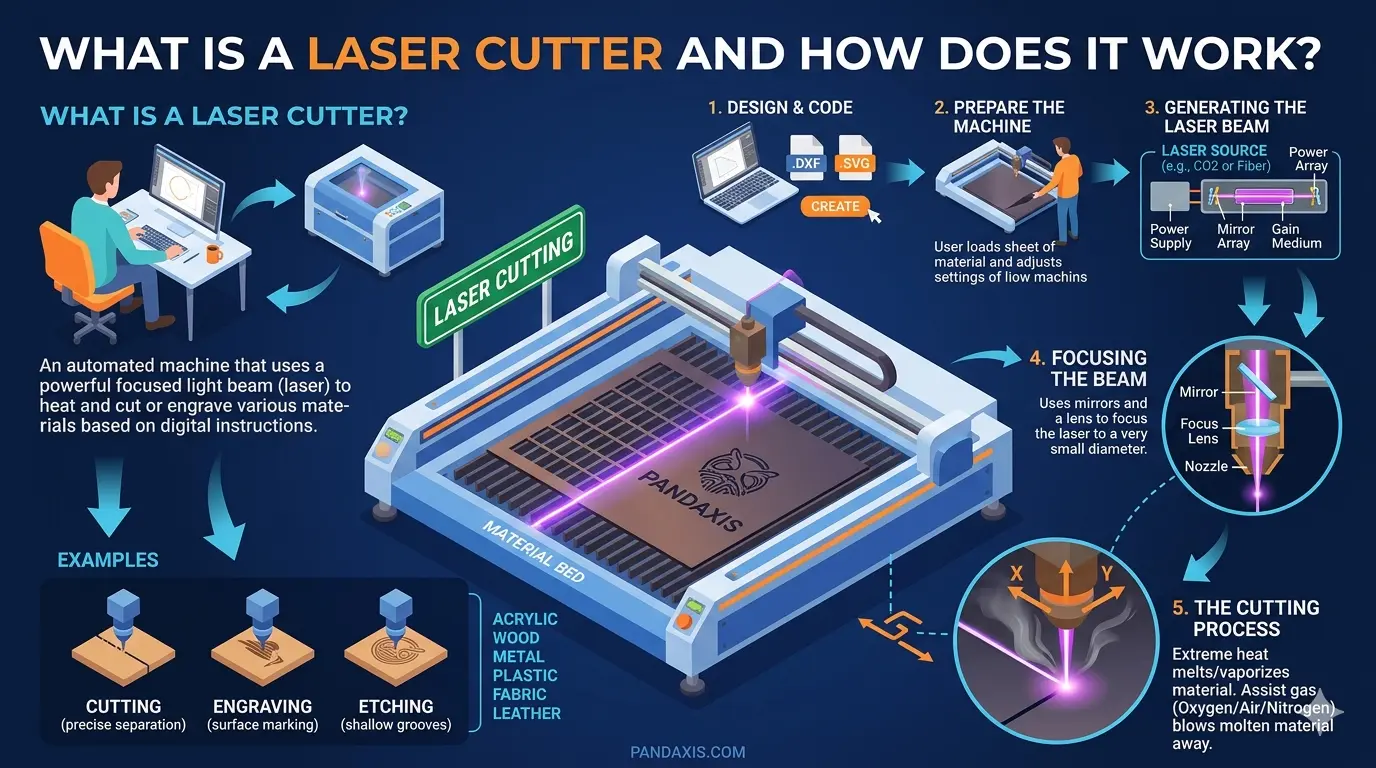
A laser cutter uses focused light energy to remove or alter material according to a digital file. Depending on the job and machine settings, it can handle three different process goals:
- Cutting All The Way Through A Material
- Engraving The Surface To Create Graphics, Text, Or Texture
- Marking The Surface With Limited Depth Or Contrast Change
That flexibility matters in production because one machine can often support several output types without requiring a new blade, bit, or physical die. A shop may cut acrylic letters in one batch, engrave wood branding panels in the next, and then switch to shaped decorative components with the same basic platform and a different program.
The Main Parts of a Laser Cutter
| Component | What It Does | Why It Matters In Production |
|---|---|---|
| Laser Source | Generates the beam used for cutting or engraving | Shapes how the machine interacts with different materials |
| Optics And Focusing Head | Direct the beam and concentrate it to a fine point | Strongly affects detail, edge quality, and consistency |
| Motion System | Moves the head, the worktable, or both along the programmed path | Influences accuracy, repeatability, and cycle time |
| Worktable | Supports sheets and parts during processing | Affects material stability and part handling |
| Controller And Software | Convert design files into machine instructions | Determine setup efficiency and workflow integration |
| Air Assist And Exhaust | Clear smoke, debris, and fumes from the process zone | Help protect cut quality, optics, and the work environment |
| Cooling System | Stabilizes the temperature around the laser source | Supports consistent output during longer runs |
A laser cutter should be evaluated as a system, not as a list of separate features. A strong laser source alone will not produce reliable results if motion control is unstable, focus is inconsistent, or extraction is poorly managed.
How a Laser Cutter Works Step by Step
- The operator prepares a machine-ready design file.
- The controller converts that file into movement, power, and sequence instructions.
- The laser source generates a beam.
- Optics guide the beam to the cutting head and focus it onto the material.
- The motion system follows the programmed path across the work area.
- The focused beam heats the material until it melts, burns, or vaporizes, depending on the substrate and process settings.
- Air assist and exhaust help remove smoke, particles, and heat from the cut zone.
- The finished part, cutout, or engraved surface moves to the next production step.
That sequence is straightforward in theory, but cut quality depends on how well the machine settings match the material. In real production, laser cutting is a controlled process rather than a one-button shortcut.
What Determines Cut Quality
Several variables affect whether a laser-cut part comes off the machine clean and usable or requires extra finishing work:
- Material Type: Wood, acrylic, MDF, veneer-faced panels, leather, fabric, and similar substrates respond differently to heat.
- Material Thickness: Thicker materials usually demand tighter control of power, speed, and focus.
- Focus Position: Small changes in focus can affect kerf behavior, engraving clarity, and edge sharpness.
- Cutting Speed: Too fast can leave incomplete cuts. Too slow can increase burning, melt buildup, or discoloration.
- Air Assist: Better debris control usually improves cut cleanliness and helps protect the optics.
- Motion Stability: Strong repeatability helps maintain small details, corner quality, and batch consistency.
- Exhaust Performance: Poor extraction can reduce visibility, contaminate optics, and affect process stability over time.
This is why experienced buyers look beyond headline claims. A laser cutter delivers value when the full process stays stable, not just when the machine has impressive top-line specifications.
Cutting, Engraving, And Marking Are Different Jobs
Many buyers use these terms loosely, but they point to different production needs.
Cutting means the beam separates the part from the material by going all the way through it. This is used for shapes, openings, letters, inserts, and other finished profiles.
Engraving removes surface material without cutting through the sheet. It is commonly used for logos, decoration, text, pattern work, and product identity elements.
Marking usually creates a visible surface effect with limited depth. The goal is readability or contrast rather than deep removal.
The difference matters because the best machine setup for clean through-cutting is not always the same setup that gives the best engraved detail. Shops planning to offer both functions should evaluate the workflow around both, not only the cutting side.
Where Laser Cutters Fit Best In Production
Laser cutting fits best when the workflow rewards digital flexibility, fine detail, and lower-contact material processing. Typical industrial applications include:
- Acrylic Display Parts And Signage
- Wood Decorative Panels And Interior Features
- Custom Branding, Lettering, And Surface Graphics
- Small To Mid-Sized Batches With Frequent Design Changes
- Prototype Runs Before Full Production Scaling
- Intricate Profiles That Are Less Efficient With Conventional Tooling
For manufacturers focused on wood, acrylic, and similar substrates, laser cutters and engravers are usually most valuable when the goal is cleaner detailing, shaped part flexibility, and less manual rework after processing.
That does not mean laser replaces every other production method. It means laser becomes valuable where non-contact precision and faster changeovers improve the workflow.
Laser Cutter vs CNC Router: Which One Makes More Sense?
This is one of the most important comparison questions because both technologies can process sheet-based materials, but they serve different priorities.
A laser cutter is often the better fit when:
- Fine Detail And Small Internal Features Matter
- Surface Engraving Is Part Of The Product Offer
- The Job Mix Changes Frequently
- Tool Contact Could Damage Fragile Features
- Faster Design-To-Part Changeovers Matter More Than Heavy Material Removal
A CNC router is often the better fit when:
- Thicker Panel Processing Is A Core Requirement
- Routing, Grooving, Or Joinery Operations Matter
- Deeper Material Removal Is Needed
- The workflow is closely tied to cabinet, panel furniture, or nesting operations
- Broader mechanical cutting flexibility is more important than engraving capability
The right decision is not which technology is better in general. It is which one matches the material, geometry, finish expectation, and production sequence more effectively.
How to Evaluate a Laser Cutter Before Buying
A useful buying process starts with application fit rather than marketing language. Ask practical questions such as:
- What Materials Will The Machine Process Most Often?
- Is The Main Goal Cutting, Engraving, Or A Mix Of Both?
- How Much Detail Does The Product Require?
- How Often Do Jobs Change From One Batch To The Next?
- What Sheet Size Or Part Format Does The Workflow Need?
- How Important Are Exhaust, Cleanliness, And Operator Environment?
- What Downstream Steps Depend On Edge Quality Or Surface Finish?
- How Will The Machine Fit With Existing Design And Production Software?
This kind of evaluation helps buyers avoid a common mistake: choosing a machine based on isolated feature claims instead of the actual production bottleneck the machine is supposed to solve.
Why Laser Cutting Can Improve Workflow Efficiency
The strongest production advantage of laser cutting is not just precision. It is the combination of precision and flexibility.
Because the geometry is driven by software, design changes usually happen in the file instead of through new physical tooling. That can reduce setup friction, especially in shops handling short runs, custom orders, or parts with frequent revision cycles. Laser processing can also improve repeatability on detail-heavy work because the path is digitally controlled rather than manually guided.
For operations producing custom graphics, decorative panels, display components, branded parts, or frequently changing outlines, that combination can help reduce manual intervention between design approval and finished output.
Final Thoughts
A laser cutter is a digitally controlled machine that uses a focused beam of light to cut, engrave, or mark material with high precision. It works by generating the beam, focusing it onto the material, and moving it along a programmed path while motion control, air assist, exhaust, and cooling help keep the process stable.
In practice, the more important question is not only how the technology works. It is whether the technology fits the job. For wood, acrylic, and other compatible non-metal applications, laser cutting is often most useful when detail, fast changeovers, and cleaner shaped processing matter more than heavy mechanical cutting.
If a workflow depends on decorative precision, digital flexibility, and repeatable non-contact processing, a laser cutter can be a strong addition to the broader production line.