Most new users think laser safety starts when the beam turns on. In practice, the bigger mistakes usually happen earlier: the wrong material goes on the bed, ventilation is treated as optional, or a small flare-up is dismissed as normal. In a home workshop, garage, or side-production space, those mistakes escalate faster because the room is smaller, storage is closer, and separation from living areas is often weaker.
For buyers comparing compact workshop units with larger laser cutters and engravers used for wood, acrylic, and similar non-metallic materials, the basic rule does not change. Safety planning comes before power, speed, or engraving detail. A cleaner setup is usually a safer setup, and a safer setup is usually more repeatable.
Why Home Laser Safety Needs More Discipline Than Many New Users Expect
A home laser setup can look simple on day one. The machine fits on a bench, the first sample cuts well, and the workflow feels easier than a saw, router, or other mechanical cutting process. That early convenience can hide the real risk profile.
The main hazards are usually not exotic. They are smoke, fumes, small fires, unknown materials, poor airflow, exposed beam paths, and electrical shortcuts that seem harmless until the machine is used more often. In a commercial setting, these risks are often controlled through room design, extraction systems, operator training, and stricter housekeeping. New home users have to build those controls intentionally.
That is why the safest first approach is conservative. Run known materials only. Keep the process supervised. Build the room around the machine instead of forcing the machine into a room that was never meant for heat, smoke, and residue.
Start With a Simple Risk-Control Checklist
Before the first serious job, new users should be able to answer a few basic safety questions clearly.
| Risk Area | Why It Matters | Minimum Control |
|---|---|---|
| Unknown Material | Unknown chemistry can create dangerous fumes, corrosive residue, or unstable burning | Cut only materials you can identify and verify |
| Weak Ventilation | Smoke and fumes build quickly in small rooms and can spread into shared spaces | Use dedicated extraction and confirm airflow before every job |
| Unattended Operation | A minor flare-up can become a real fire in a short time | Stay with the machine during active cutting |
| Dirty Cutting Area | Scrap, dust, and residue raise ignition risk and reduce cut consistency | Clean the bed, tray, and surrounding area routinely |
| Poor Electrical Setup | Unstable or overloaded power increases fire and reliability risk | Use a grounded, suitable power source and avoid improvised wiring |
| No Shutdown Routine | Heat and smoldering residue can continue after the job appears finished | Inspect the part, the bed, and the exhaust area after each run |
This table is deliberately simple. The goal is not to create paperwork. The goal is to make sure the operator can recognize where small shortcuts become expensive mistakes.
Ventilation Is a Safety System, Not a Comfort Upgrade
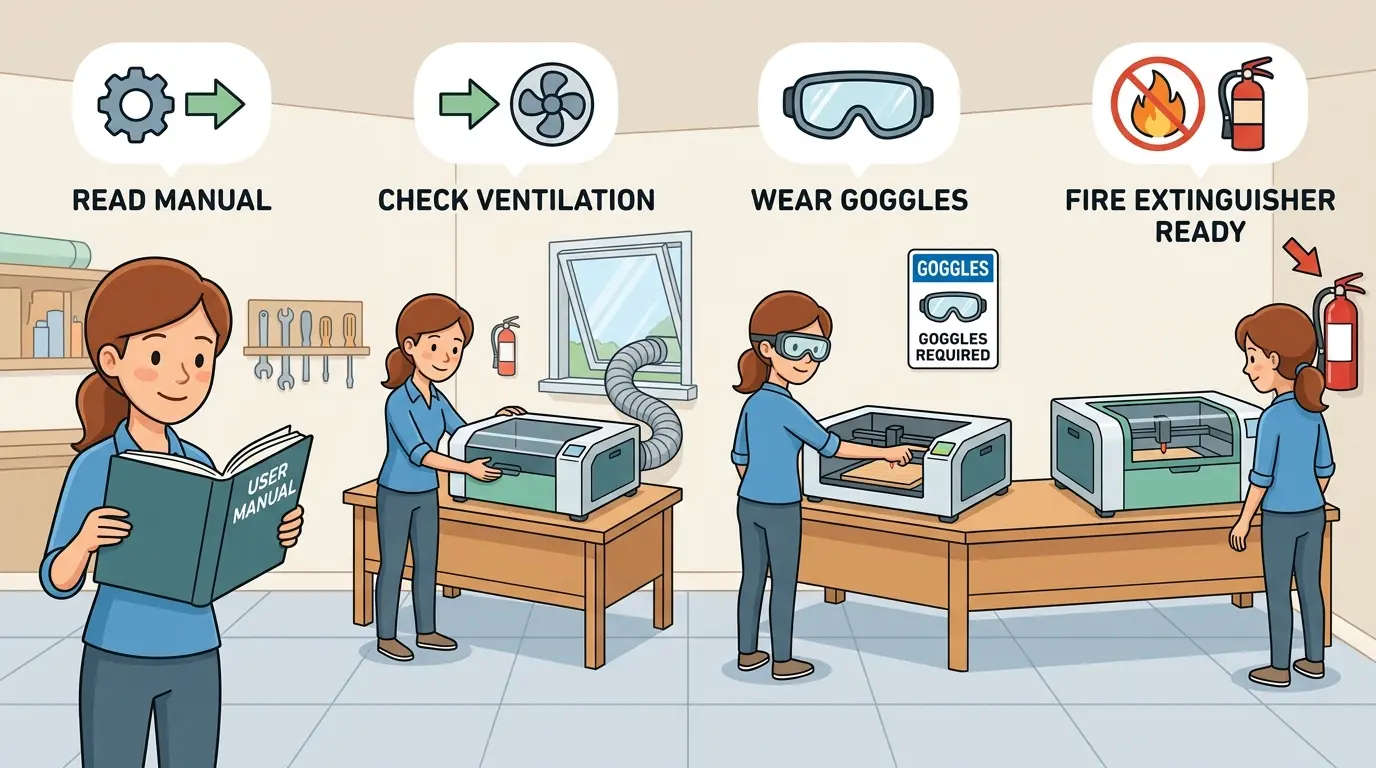
The first major mistake in home laser use is treating ventilation as an optional accessory. It is not. Extraction is part of the machine’s safe operating envelope.
At a practical level, good ventilation should do three things:
- Remove Smoke At the Cut Zone Before It Spreads Across the Room
- Move Fumes Out of the Workspace Rather Than Just Diluting Them Indoors
- Keep Residue From Building Up Inside the Machine and Around the Operator
For most new users, that means a dedicated exhaust path, short and direct ducting where possible, and a workspace that is separated from bedrooms, kitchens, and general living areas. If a system uses filtration instead of direct outdoor exhaust, users should treat filter condition as a real maintenance item, not as a set-and-forget solution. Odor reduction is not the same thing as verified air safety.
Ventilation also affects output quality. Smoke that stays around the cut zone can stain surfaces, increase residue, and make results less repeatable. Safety and cut consistency usually move together.
Material Control Matters More Than Power Settings
Many first-time users spend too much time thinking about speed and power and too little time thinking about what they are actually cutting.
The safest approach is to divide materials into known, verified stock and everything else. That sounds restrictive, but it prevents the most common beginner error: putting scrap or unknown plastic on the machine just to see what happens.
| Material Situation | Practical Safety Position | Why |
|---|---|---|
| Known Wood and Plywood From a Reliable Source | Commonly processed, but still monitor for flare-ups, resin, and smoke load | Natural variation, glue layers, and dryness still affect burn behavior |
| Identified Acrylic Approved for Laser Processing | Commonly processed with strong extraction and close supervision | Different plastics behave differently, so exact material identification matters |
| Painted, Laminated, Adhesive-Backed, or Coated Sheets | Verify before cutting | Coatings and adhesives can change fumes, residue, and ignition behavior |
| Unknown Plastic, Mixed Scrap, or Recycled Sheet | Do not cut | Unknown chemistry is a larger risk than a delayed sample |
| PVC, Vinyl, or Materials Not Explicitly Approved by the Supplier for Laser Use | Avoid | They can release corrosive or hazardous fumes and may damage both the machine and the workspace |
If the material supplier cannot clearly say the material is appropriate for laser processing, the safe assumption is to stop and verify before testing it. That is especially important in home spaces, where the margin for ventilation mistakes is smaller.
Fire Prevention Is a Daily Operating Habit
Laser users do not need to panic about every spark, but they do need to respect how quickly a small ignition can become a real problem.
Most cutting fires start from ordinary conditions:
- Slow Cutting on a Material That Chars Easily
- Excess Residue or Debris Under the Workpiece
- Poor Airflow at the Cut Area
- A Job Running Too Long Without Supervision
- Repeated Passes on a Part That Is Already Heat-Loaded
That is why new users should build a strict rule early: never leave the machine running unattended during active cutting. If the machine has air-assist, flame sensing, or enclosure interlocks, those are useful backups. They are not a license to walk away.
It also helps to keep an appropriate extinguisher nearby, maintain clear access to the machine’s stop controls, and avoid storing cardboard, wipes, solvents, scrap wood, or packaging directly around the laser bench. Good housekeeping is not separate from fire prevention. It is fire prevention.
Enclosures, Eye Protection, and Bystander Control Still Matter
New users often focus only on the operator. A safer mindset is to think about everyone who shares the room.
If the machine relies on a closed enclosure, the enclosure should stay closed during operation and its interlocks should not be bypassed. If the setup has a more exposed beam path, users need much tighter control over line of sight, reflections, and room access. Generic tinted glasses are not a safety plan. Any protective eyewear has to match the source it is meant to protect against.
Bystander control matters just as much. Children, pets, and casual observers should not move through the work area during operation. The more open the machine and the busier the room, the more likely a small distraction becomes a safety event.
Electrical Setup and Routine Maintenance Are Part of Safety
A laser cutter that is electrically unstable or poorly maintained is harder to operate safely even if the cut settings look correct.
New users should keep the electrical side simple and predictable:
- Use a Grounded Power Source Suitable for the Machine
- Avoid Overloaded Power Strips and Improvised Extension Arrangements
- Keep Cabling, Connectors, and Switches Easy to Inspect
- Follow the Maker’s Guidance for Cooling, Extraction, and Start-Up Checks
Routine maintenance matters for safety as well as finish quality. Dirty optics, smoke residue, clogged extraction paths, and debris under the work area all increase friction in the process. Friction in laser work usually means more heat, more smoke, and less control.
For new users, the safest maintenance rule is simple: if the machine is getting dirtier, smokier, or less consistent, stop assuming it is normal and inspect the system before pushing production further.
Build a Safe First-Job Routine Instead of Relying on Memory
A written startup and shutdown routine helps new users reduce avoidable mistakes. It does not need to be complicated.
- Confirm the Material Is Known and Appropriate for Laser Use.
- Check That Exhaust, Cooling, and Any Airflow Support Systems Are Running Normally.
- Clear the Bed, Tray, and Machine Surroundings of Dust, Offcuts, and Packaging.
- Start with an Observed Test Pass Rather Than a Long Unwatched Run.
- Stay With the Machine During Cutting and Watch for Flame, Residue, or Unusual Smoke.
- Inspect the Part, the Bed, and the Machine Interior Before Leaving the Area.
This kind of routine is not just for beginners. It is the same operating discipline that keeps larger production environments stable, only scaled down for a smaller workspace.
When a Home Setup Stops Being the Right Setup
Many users start with a home workshop because it lowers the barrier to entry. That can be reasonable for light, well-controlled work. But the operating model should change if the workload starts to look more like regular production.
Warning signs include:
- The Machine Runs for Long Periods Most Days
- Material Storage Is Expanding Faster Than the Workspace
- Smoke Control Is Becoming Harder To Manage
- More Than One Person Is Using the Machine Regularly
- Post-Processing, Cleaning, and Rework Are Filling the Same Room
At that point, the question is no longer just how to use the machine safely at home. The question becomes whether the process needs a more appropriate room, stronger extraction, clearer operator controls, and a more production-minded layout.
Practical Summary
For new users, laser safety is less about one dramatic hazard and more about controlling a chain of ordinary risks before they stack up. Known materials, proper ventilation, close supervision, clean housekeeping, stable electrical setup, and a disciplined operating routine do more for safety than any single convenience feature.
The safest first cut is usually the one made in a controlled room, on a verified material, with the operator still standing at the machine. If new users build that habit early, they usually get two benefits at the same time: lower risk and better process consistency.