An acrylic laser cutter usually gets approved on sample quality. The harder test comes later, when the daily schedule mixes branded sign panels, clear display parts, machine guards, functional covers, and short-run custom work that all need to leave the machine looking consistent and fitting correctly.
For acrylic fabricators and sign makers evaluating laser cutters and engravers for non-metallic processing, the practical decision is not whether the machine can cut acrylic once. It is whether the system can hold edge appearance, dimensional repeatability, and usable throughput across the jobs that actually drive the business.
Fabricators and Sign Makers Do Not Judge the Same Output
Sign makers and acrylic fabricators often buy from the same machine category, but they do not always measure success the same way.
| Buyer Type | Usually Cares Most About | What Creates Expensive Problems |
|---|---|---|
| Sign Makers | Clean visible edges, engraving clarity, repeatability across branded panels, and fast short-run changeovers | Haze, residue, inconsistent small features, and delays between design revisions |
| Acrylic Fabricators | Dimensional fit, repeatable slots and holes, stable cut-through, and efficient sheet handling | Assembly drift, operator-dependent setup, extra sorting, and too much cleanup before downstream work |
| Mixed Shops | A balance of presentation quality and part accuracy across different job types | Buying a machine tuned for one workload while the real schedule keeps changing |
That distinction matters because the best buying decision is usually driven by the dominant workflow, not by the most attractive sample part. A sign-focused shop may reject output that is dimensionally correct but visually inconsistent. A fabrication-focused shop may accept a less decorative edge if the parts fit reliably and move downstream without rework.
Start With the Actual Acrylic Job Mix
Before comparing suppliers, define which acrylic jobs will consume the most machine hours. That usually reveals more than a feature list.
- Clear Display Panels And Retail Fixtures
- Engraved Logos, Wayfinding Pieces, And Branded Inserts
- Functional Covers, Guards, And Enclosure Components
- Small Nested Repeat Parts
- Short-Run Custom Orders With Frequent File Changes
These jobs can all be called acrylic cutting, but they do not stress the machine in the same way. Clear display work is often judged by edge appearance and surface cleanliness. Functional components usually put more pressure on repeatability, part handling, and stable fit in assembly. Mixed short-run jobs expose whether the machine loses too much time between files, materials, or setups.
If buyers skip this step, the machine is often selected around a generic demo part rather than around the workload that will determine output quality and margin every week.
Why Acrylic Forces a Different Buying Standard
Acrylic is often less forgiving than buyers expect because the cut edge is frequently part of the finished product. A part can be fully cut and still be commercially weak if the edge looks inconsistent, if residue affects surface appearance, or if repeated jobs drift enough to slow assembly.
Material variation can make that worse. Clear and colored sheets may be judged differently by the customer. Cast and extruded acrylic can behave differently in production. Protective film, part density on the sheet, and the amount of detail in the geometry can all change how stable the process feels in a real shift.
That is why acrylic machine selection should be based on process stability, not only on whether one sample came off the bed cleanly. Buyers should be looking for consistency in:
- Edge Appearance Across Repeated Parts
- Stable Small-Feature Definition
- Surface Cleanliness Near the Cut Zone
- Reliable Job Recall From One Batch to the Next
- Predictable Part Removal and Sheet Turnover
In short, acrylic buying is usually a quality-control decision and a workflow-control decision at the same time.
The Machine Factors That Matter Most in Production
The most useful buying discussion is not about isolated features. It is about which machine conditions protect output when jobs become repetitive, varied, or time-sensitive.
| Buying Factor | Why It Matters in Acrylic Work | What Buyers Should Check |
|---|---|---|
| Motion Stability And Positioning | Helps keep contours, corners, repeated features, and assembly-critical geometry more consistent | Compare repeated parts from different positions on the bed, not just one center sample |
| Focus Control Across the Work Area | Supports more uniform edge quality and engraving consistency across full sheets | Inspect whether output changes near the edges of the working area or between sheets |
| Air Assist And Extraction Stability | Helps reduce residue, smoke staining, and quality drift during longer runs | Look at both edge condition and surrounding surface cleanliness after repeated cutting |
| Bed Size And Sheet Handling | Affects nesting efficiency, operator movement, and how quickly one sheet becomes the next job | Compare the machine layout with the actual acrylic sheet sizes and part mix you run |
| Software And Job Recall | Reduces setup dependence and speeds repeated work across shifts or operators | Confirm whether recurring acrylic jobs can be saved, recalled, and adjusted clearly |
| Maintenance Access | Daily cleaning and inspection strongly affect long-run stability | Check how practical it is to reach optics, nozzles, and cleaning points without disrupting the shift |
| Part Unloading And Scrap Handling | Small acrylic parts can reduce net throughput even when cut time looks good | Watch how operators separate finished parts, scrap, and the next sheet during a realistic cycle |
What matters here is the production outcome. Stable motion helps protect repeatability. Better extraction helps protect visible quality. Easier maintenance helps keep a good process from drifting. Faster job recall helps recover time that would otherwise disappear between short-run orders.
Where Laser Usually Wins and Where It Does Not
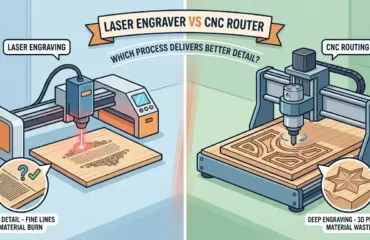
Laser processing is commonly a strong fit when the shop needs shaped acrylic parts, visible finished edges, integrated engraving, and frequent design changes. It is often well suited to workflows where non-contact cutting and detail control matter more than mechanical removal alone.
That does not mean laser is the best answer for every acrylic job. Some production cells still depend on other processes when the work includes heavier routing, edge profiling, additional machining features, or utility-focused blanks where cosmetic edge quality is not the main decision driver.
| Production Need | Acrylic Laser Cutter | Other Mechanical Cutting or Routing |
|---|---|---|
| Fine Contour Letters and Decorative Cutouts | Strong Fit | Often More Setup-Heavy for Intricate Geometry |
| Engraving and Cutting in the Same Workflow | Strong Fit | Usually Requires Separate Operations |
| Customer-Facing Acrylic Parts With Visible Edges | Strong Fit When the Process Is Stable | Application Dependent |
| Parts Requiring Additional Machining Beyond the Cut Outline | Limited | Often Stronger Fit |
| Utility Blanks Where Cosmetics Matter Less | Application Dependent | Often Practical |
| Workflows Dominated by Rapid Design Revisions | Strong Fit | Application Dependent |
For teams comparing laser investment with broader equipment planning across the Pandaxis product catalog, the better question is not whether laser can do the job in theory. It is how many downstream steps the laser cell removes, how many it leaves untouched, and whether that matches the production model of the shop.
The Questions That Separate a Good Demo From a Good Investment
Before placing the order, buyers should be able to answer a few operational questions without guessing.
- Are Most of Your High-Value Parts Judged by Edge Appearance, By Dimensional Fit, or By Both?
- How Often Will the Team Switch Between Signage, Display, and Functional Acrylic Jobs?
- Do You Need Engraving Capability to Sit Naturally Inside the Same Workflow as Cutting?
- How Much Production Time Is Lost Today to Setup Drift, Inspection, Cleanup, or Part Sorting Rather Than to the Cut Itself?
- Will the Machine Spend Most of Its Time on One Repeated Product Family or on Constantly Changing Orders?
- Are Small Features, Narrow Bridges, or Customer-Facing Clear Parts Common in the schedule?
- Does the Shop Need a Laser Cell Only, or a Larger process that still includes routing, secondary finishing, or assembly preparation?
These questions usually expose the real buying criteria faster than a longer technical checklist. They keep the decision anchored to the business model of the shop instead of to whichever sample happened to look best on demonstration day.
Practical Summary
The right acrylic laser cutter is usually the one that stays predictable when real production starts. For sign makers, that often means protecting visible edge quality, engraving consistency, and quick changeovers between custom jobs. For acrylic fabricators, it often means protecting repeatable geometry, efficient sheet handling, and smoother downstream fit.
In both cases, the best machine is rarely the one with the most impressive isolated demo. It is the one whose motion stability, airflow control, job management, maintenance practicality, and workflow fit help the shop produce more acceptable parts with less cleanup, less rework, and fewer surprises between one order and the next.