Pandaxis

  • Products
    • CNC Nesting Machines
    • Panel Saws (Beam Saws)
    • Sliding Table Saws
    • Edgebanders
    • Boring & Drilling Machines
    • Wide Belt Sanders
    • Laser Cutters and Engravers
    • Stone CNC Machines
  • About Us
  • Contact Us
  • EnglishEnglish
    • Español Español
    • Italiano Italiano
    • Deutsch Deutsch
    • Français Français
    • Português Português
    • العربية العربية
    • Türkçe Türkçe
    • Русский Русский
    • Tiếng Việt Tiếng Việt
    • 한국어 한국어
    • 日本語 日本語
    • 简体中文 简体中文
  • Home
  • Blog
  • Blog
  • Laser Engraver vs CNC Router for Wood Products: Which Process Delivers Better Detail?

Laser Engraver vs CNC Router for Wood Products: Which Process Delivers Better Detail?

by pandaxis / Tuesday, 21 April 2026 / Published in Blog
Laser Engraver vs CNC Router for Wood Products

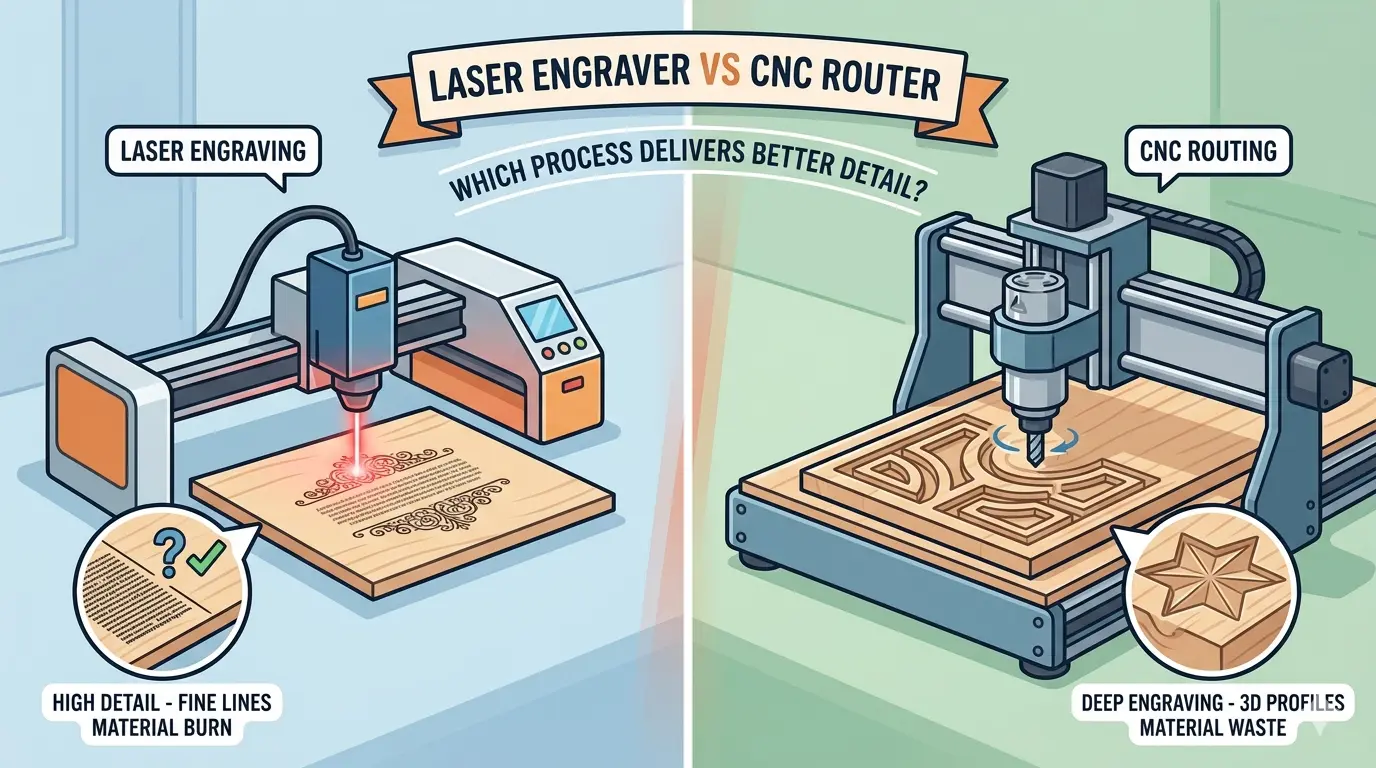
Wood product shops comparing laser engravers and CNC routers often frame the decision as a contest of raw precision, but the real question is which process matches the detail your parts actually sell. Surface graphics, geometric cuts, and machined depth features demand different capabilities: a laser handles fine text and sharp internal corners without cutter-radius limits, while a router delivers carved depth, profiled edges, and assembly-ready pockets. Before committing capital, separate your product drawings into these categories, test against your real substrates and finish schedule, and account for per-part cleanup—thermal residue from the beam or mechanical fuzz from the bit—because the cleanest sample rarely predicts the cleanest production run.

Start With The Part, Not The Machine

Every month, a wood product shop walks into a machinery decision with the same question: which machine gives me better detail, a laser engraver or a CNC router? The question sounds practical, but it is usually hiding a more important one. Detail is not one thing. It is a collection of different requirements that often pull in opposite directions.

A factory producing branded gift boxes, decorative wall panels, or engraved signage is chasing one kind of detail. A shop cutting carved cabinet doors, profiled furniture components, or routed joinery features is chasing another. Those two shops will not arrive at the same answer, and they should not. The process that wins depends on whether the detail lives on the surface of the wood or inside the geometry of the part.

Before comparing machines, separate the detail requirements on your actual production drawings. In wood manufacturing, detail falls into three practical categories:

  • Visual surface detail — logos, text, patterns, artwork, and decorative marking that is read from the face of the part.
  • Geometric cut detail — tight internal shapes, small openings, and complex outlines that must be dimensionally accurate.
  • Machined depth detail — relief carving, V-grooves, pockets, chamfers, and profiled edges that change the physical form of the material.

Once you sort your product line into these categories, the machine comparison becomes much clearer. A laser engraver is strongest when detail has to look crisp from the face of the part. A CNC router is strongest when detail has to be felt, assembled, coated, or machined into the body of the material. The mistake is trying to make one platform carry both workloads without checking which one drives your revenue.

Where A Laser Engraver Delivers Better Detail

For wood products that depend on visible graphics and fine decorative definition, laser cutters and engravers are commonly the stronger choice. That is usually true when the job requires:

  • Small text and fine branding elements that must remain legible at production scale
  • Dense decorative linework or repeating patterns that would be impractical to toolpath with a cutter
  • Sharp internal corners or narrow open areas where a router bit radius would leave visible rounding
  • Fast switching between custom designs without tool changes or spindle speed adjustments
  • Consistent surface marking across a batch without physical tool wear affecting the result

The core advantage is that the laser is not limited by cutter diameter. A router bit has a physical radius. If your artwork includes a tight internal corner, a narrow letterform, or a delicate contour transition, the toolpath must respect that radius. A 3 mm bit cannot cut a 1 mm internal radius, and pushing a small bit harder to compensate will produce deflection rather than clean geometry. A laser beam, focused to a small spot, reproduces those details directly from the design file without the same mechanical constraint.

This matters for products such as branded wooden packaging, decorative wall panels, signage and display components, personalized wood products, and thin decorative inserts or face panels. In these applications, the customer is buying the visual impression. The detail has to look sharp from arm’s length, and it has to look consistent across every piece in the order.

Laser engraving also helps when short-run variety is part of the business model. If each order carries different artwork, names, logos, or decorative patterns, the changeover advantage matters as much as the visual detail itself. There is no tool to swap, no bit to size, and no spindle speed to match to the material. The design file is the only thing that changes between jobs. A shop running 20 custom orders per day can keep the laser busy while a router would spend a meaningful share of the shift on setup.

But the tradeoff is real and shows up on the shop floor. On wood products, laser detail can come with edge darkening, smoke residue, or contrast variation across plywood, MDF, veneer-faced panels, and solid wood. If your finish standard is sensitive to burn marks, the crispest detail on paper may still create more cleanup than expected. Operators need to understand how different wood species and adhesive layers react to the beam before committing to a laser-only workflow. Alder and poplar behave differently than oak or walnut, and the glue lines in plywood can produce uneven contrast that is difficult to predict from a sample board.

Where A CNC Router Delivers Better Detail

When detail must have depth, shape, or structural function, a CNC router usually becomes the better tool. For router-led panel and component processing, CNC nesting machines are commonly more relevant because the workflow is not only about marking or contour definition. It is also about profiling, pocketing, grooving, and machining features that support later assembly.

A CNC router delivers better detail when the part needs:

  • Deep carved lettering or logos that remain visible after sanding and coating
  • Relief patterns with visible depth that change how light hits the surface
  • Pockets, grooves, and functional recesses that hold hardware or joinery
  • Profiled edges, chamfers, or decorative moulding shapes that become part of the product silhouette
  • Three-dimensional contours or textured surfaces that cannot be produced by a surface marking process
  • One-setup integration with routing and drilling operations so the part moves downstream complete

This is where router detail becomes more valuable than laser detail. A router cuts detail into the material, not just onto it. That matters for cabinet doors, carved furniture components, sign blanks with dimensional lettering, and wood products where the finished look depends on physical depth rather than only visual contrast. A routed V-groove catches light differently than an engraved line. A carved panel has a tactile presence that a surface mark cannot replicate.

The tradeoff is that small mechanical details are constrained by tool size and toolpath behavior. Very tight internal corners, very small text, and narrow linework may require smaller cutters, slower cycle times, and stricter tooling discipline. Tool wear and sanding requirements also affect whether the theoretical detail level shows up consistently on the finished part. A 3 mm bit cannot cut a 1 mm internal radius, and pushing a small bit too hard will produce deflection rather than clean geometry. On softwoods or materials with pronounced grain, routed edges can carry fuzz that requires a sanding pass before coating.

There is also the question of tooling cost and inventory. A router shop needs a range of bit sizes and geometries to cover different detail requirements. Each tool change adds setup time, and each worn bit affects edge quality. The laser has no consumable tool in the same sense, but it has its own operating costs in power consumption, extraction, and maintenance of optics and the beam delivery system.

Laser Engraver vs CNC Router For Wood Detail At A Glance

Detail Priority Laser Engraver CNC Router Better Fit
Small Text And Logos Usually Very Strong Limited By Tool Size Laser Engraver
Fine Surface Patterns Usually Very Strong Application Dependent Laser Engraver
Sharp Internal Corners Usually Very Strong Limited By Cutter Radius Laser Engraver
Deep Carved Lettering Limited Usually Very Strong CNC Router
Relief Carving And Tactile Texture Limited Usually Very Strong CNC Router
Grooves, Pockets, And Recessed Features Limited Usually Very Strong CNC Router
Decorative Face Marking With Frequent Artwork Changes Usually Very Strong Slower To Adapt Laser Engraver
Profiled Edges And Shaped Part Geometry Limited Usually Very Strong CNC Router
Combination Of Detail And Assembly Features Limited Usually Very Strong CNC Router
Thin Decorative Geometry With Minimal Tooling Change Usually Very Strong Application Dependent Laser Engraver

The table only works if detail is defined by the product requirement. It is not a universal scorecard. A shop that runs carved doors and also engraves a logo on the inside panel will need to decide which operation drives the purchase decision, not which one produces the more impressive sample. The sample always looks good. The production reality is what matters.

The Hidden Tradeoff Is Cleanup, Not Just Precision

Many buyers compare detail quality without looking closely at secondary work. That is where the real production cost often shows up. The machine that produces the cleanest sample is not always the machine that produces the cleanest finished part at volume.

With laser engraving, the cleanup risk is usually thermal. The concern is smoke residue, darkened edges, or surface discoloration that may need wiping, sanding, or finish compensation. On some wood species, the contrast between engraved and unengraved areas is exactly what sells the product. On others, the same beam leaves a sooty deposit that must be removed before coating, adding a manual step to every part. This is not a one-time setup issue. It is a per-part variable that depends on species, moisture content, adhesive layers, and beam settings. A shop that runs mixed species through the same laser will spend time tuning parameters between batches.

With CNC routing, the cleanup risk is usually mechanical. The concern is tool marks, edge fuzz, small-feature instability, or the need for sanding before coating or assembly. A routed pocket may be dimensionally correct but carry visible cutter marks that require a secondary pass or hand sanding, especially on softwoods or materials with pronounced grain. Tool wear compounds the problem. A bit that starts the shift producing clean edges may leave tear-out by mid-afternoon, and the operator has to catch that before the parts move downstream.

That means the better-detail process is often the one that reaches finish quality faster, not the one that creates the most impressive sample in isolation. If the product is customer-facing and lightly finished, laser detail may look better and require less manual shaping. If the product needs carved dimension, edge shaping, or deep decorative features before coating, routed detail may reduce compromise even if it needs more sanding discipline. The decision has to include the full process cost, not just the machining step.

Production Situations That Change The Answer

The comparison shifts when you look at real production scenarios rather than isolated sample cuts. Consider a few common situations.

Situation one: a shop making branded gift boxes and presentation packaging. The product is thin plywood or MDF, the artwork changes frequently, and the customer buys the visual impression. Small text, fine logos, and sharp internal corners are the selling points. A laser engraver fits this workflow well. The design file changes between orders, there is no tooling to swap, and the detail level is consistent across the batch. A router would struggle with the fine text and would add setup time on every order change.

Situation two: a shop producing carved cabinet doors and raised panels. The product needs depth, profile, and a tactile surface that becomes part of the door design. The detail is dimensional, not just visual. A CNC router is the right platform. The laser can mark a surface, but it cannot carve a raised panel or produce a profiled edge that matches the rest of the door line. Trying to force a laser into this workflow would require a secondary routing operation anyway, which defeats the purpose of a single-machine solution.

Situation three: a shop that does both. A furniture maker engraves a logo on the inside of a cabinet door and also routes the door profile, hinge pockets, and assembly holes. This is where the buying mistake happens. One machine will not do both jobs well. The shop either accepts compromise on one operation or invests in a hybrid workflow with both platforms. The decision has to be driven by which operation generates more revenue and which one is harder to outsource or secondary-process.

Situation four: a sign shop with mixed orders. Some orders are flat engraved plaques with fine text. Others are dimensional signs with carved letters and profiled edges. The order mix determines the answer. If 80 percent of the work is flat engraving, a laser is the workhorse and the dimensional work can be routed on a smaller secondary machine or outsourced. If the mix is reversed, the router should drive the purchase and the laser becomes a supplementary tool for fine face detail.

Material Behavior Changes The Detail Outcome

Wood is not a uniform material, and the same detail requirement can produce different results depending on what you are cutting. This is often overlooked in the machine comparison because samples are usually cut on a single species that flatters the process.

Laser engraving on solid hardwoods like oak or walnut produces strong contrast but can leave darkened edges that need attention. On plywood, the adhesive layers can create uneven burning and contrast variation that is difficult to control. On MDF, the laser produces a clean, consistent mark with less smoke residue, which is why MDF is often the preferred substrate for laser-engraved products. On veneer-faced panels, the thin face layer can burn through if the power settings are not tuned carefully, ruining the part.

CNC routing on softwoods like pine or cedar produces fuzz and tear-out along the grain, especially on profiled edges and shallow pockets. On hardwoods, the routed detail is cleaner but tool wear becomes a factor, and the cost of tooling for small features adds up. On MDF, routing produces a clean edge but generates fine dust that requires strong extraction. On plywood, the router can tear the face veneer at the edges of pockets and grooves if the toolpath and feed rate are not matched to the material.

The practical takeaway is that the machine choice has to be validated against the materials you actually run, not against a sample board that was selected to make the process look good. Run your own test parts with your own substrates, your own finish schedule, and your own quality standard before committing capital.

Which Process Fits Common Wood Product Lines Better?

For most buyers, the decision becomes easier when it is tied to the actual product family. The following list reflects common production patterns in wood product manufacturing:

  • Branded gift boxes, presentation packaging, and personalized products: laser engraver usually fits better
  • Decorative signage and fine surface graphics: laser engraver usually fits better
  • Thin decorative panels with tight artwork or intricate openings: laser engraver usually fits better
  • Carved cabinet doors, raised decorative panels, and relief work: CNC router usually fits better
  • Furniture components with grooves, pockets, and profiled edges: CNC router usually fits better
  • Wood parts that need detail plus drilling or machined assembly features: CNC router usually fits better
  • Product lines combining surface branding with dimensional machining: a hybrid workflow may make more sense than forcing one machine to do everything

This is also where many buying mistakes happen. A laser is sometimes chosen because the sample detail looks cleaner, even though the production line really needs dimensional routing. A router is sometimes chosen because it feels more versatile, even though the selling value of the product depends on fine face detail and quick artwork changes. Both are capable machines, but they are not interchangeable for the same detail requirement.

Buying Guidance: What To Check Before You Commit

Before you make the capital decision, work through a short checklist with your production team. The answers will point you toward the right platform more reliably than any sample comparison.

Define the detail requirement on your actual parts. Pull five representative drawings from your current order mix. Mark which features are surface graphics, which are geometric cuts, and which are machined depth features. Count how many parts in a typical week need each category. That count, not the most impressive sample, should drive the decision.

Check your finish schedule. If your parts are coated, ask whether the coating process covers up laser burn marks or routed tool marks. Some finishes amplify surface defects. Others hide them. Run a test part through your full finishing line, not just the machining step, before you compare the two processes.

Review your order mix and changeover frequency. If you switch artwork daily, the laser’s file-based changeover is a real production advantage. If you run longer batches of the same part, the router’s tooling setup is amortized over more pieces and matters less.

Consider the downstream operations. If your parts need drilling, grooving, or edge profiling before assembly, a router can often combine those operations in one setup. A laser cannot. If your parts are purely decorative and move straight to finishing, the laser may be the simpler workflow.

Look at the secondary work. Estimate the cleanup, sanding, or touch-up time per part for each process on your actual materials. A process that produces a slightly less impressive sample but requires no secondary work may be the better production choice.

Production Fit: Laser Engraver vs CNC Router for Wood Products

If better detail means fine text, decorative linework, sharp internal geometry, and repeatable surface graphics on wood products, a laser engraver usually has the advantage. If better detail means carved depth, profiled geometry, tactile relief, and machined features that become part of the part itself, a CNC router usually has the advantage.

Neither process is universally better. Laser detail is usually better for visual precision. Router detail is usually better for dimensional precision. The right choice comes from the kind of detail your product sells, the finish standard you must hit, and how much secondary cleanup the process adds before the part is ready for the next step.
Review your actual part drawings, your coating schedule, and your order mix before you commit capital to either platform. If your operation leans toward fine face detail and frequent artwork changes, a laser engraver is worth a serious look. If your parts need depth, shape, and assembly features, a CNC router is the more practical investment. For shops that run both kinds of work, plan for a hybrid workflow rather than forcing one machine to cover every detail requirement. That is the approach that keeps production moving and quality consistent across the full product line.

What you can read next

Laser Cutter vs Plasma Cutter
Laser Cutter vs Plasma Cutter: Which Process Fits Your Fabrication Workflow?
CNC Cutting Explained: Which Process Fits Which Material?
CNC Lathe Machine Buying Guide for Metal Part Production

Recent Posts

  • CNC Machine Plans When Plans Save Money and When They Create Rework

    CNC Machine Plans: When Plans Save Money and When They Create Rework

    CNC machine plans promise a lower purchase bill...
  • CNC Simulator Tools

    CNC Simulator Tools: When Virtual Testing Saves Time and Scrap

    Every CNC program that reaches the floor with a...
  • Laser Engraver for Wood

    Laser Engraver for Wood: Best Use Cases in Commercial Production

    Commercial wood shops routinely face a bottlene...
  • What Is a CNC Slicer

    What Is a CNC Slicer? Common Meanings and Use Cases

    When a purchasing team or production engineer s...
  • Big CNC Machine vs Small CNC Machine

    Big CNC Machine vs Small CNC Machine: How Size Changes Cost and Capability

    Production teams comparing CNC platforms often ...
  • Automatic Edgebander vs. Manual Edge Banding: Which One Delivers Better ROI?

    When edge finishing becomes the bottleneck, the...
  • Wall Saw

    Wall Saw Safety, Blade Selection, And Cutting Strategy For Controlled Structural Cuts

    Wall sawing fails most often before the blade e...
  • Metal Engraving: How To Choose the Right Machine for the Job

    Metal engraving decisions fail not at the demo ...
  • What Are CNC Bushings Used For?

    When an axis develops a vague roughness or surf...
  • Root CNC, RS CNC, and PrintNC-Style Open Builds

    Root CNC, RS CNC, and PrintNC-Style Open Builds: Which DIY Community Platform Fits You?

    Community CNC names like Root CNC, RS CNC, and ...
  • Laser Glass Cutter

    Laser Glass Cutter: Where It Fits in Production and Where It Does Not

    The production question comes before comparing ...
  • CNC Stone Cutting for Quartz, Granite, and Marble: How Material Differences Shape Machine Choice

    Quartz, granite, and marble share a fabrication...
  • Small CNC Mill vs Industrial CNC Mill

    Small CNC Mill vs Industrial CNC Mill: How Capacity Changes the Decision

    Shops comparing small CNC mills against industr...
  • Sheet Metal Laser Cutter

    Sheet Metal Laser Cutter Best Practices for Clean, Accurate Cuts

    Laser-cut defects rarely surface at the cutting...
  • What Is a Spiral Milling Cutter

    What Is a Spiral Milling Cutter?

    Buying a “spiral milling cutter” by...

Search for posts

Recent Posts

  • CNC Machine Plans When Plans Save Money and When They Create Rework

    CNC Machine Plans: When Plans Save Money and When They Create Rework

    0 comments
  • CNC Simulator Tools

    CNC Simulator Tools: When Virtual Testing Saves Time and Scrap

    0 comments
  • Laser Engraver for Wood

    Laser Engraver for Wood: Best Use Cases in Commercial Production

    0 comments

Recent Comments

    Support

    • About Us
    • Contact Us
    • Company Blog
    • Terms of Service
    • Privacy Policy
    • Sitemap

    Newsletter

    Subscribe for Pandaxis product updates, application insights, and practical news on CNC woodworking, stone fabrication, and laser processing solutions.

    GET IN TOUCH

    Email: info@pandaxis.com

    Whether you are looking to integrate a high-speed CNC woodworking line or deploy a heavy-duty stone cutting center, our technical engineers are ready to optimize your production. Reach out today to bring precision to every axis of your facility.

    • GET SOCIAL

    © 2026 Pandaxis. All Right Reserved.

    TOP