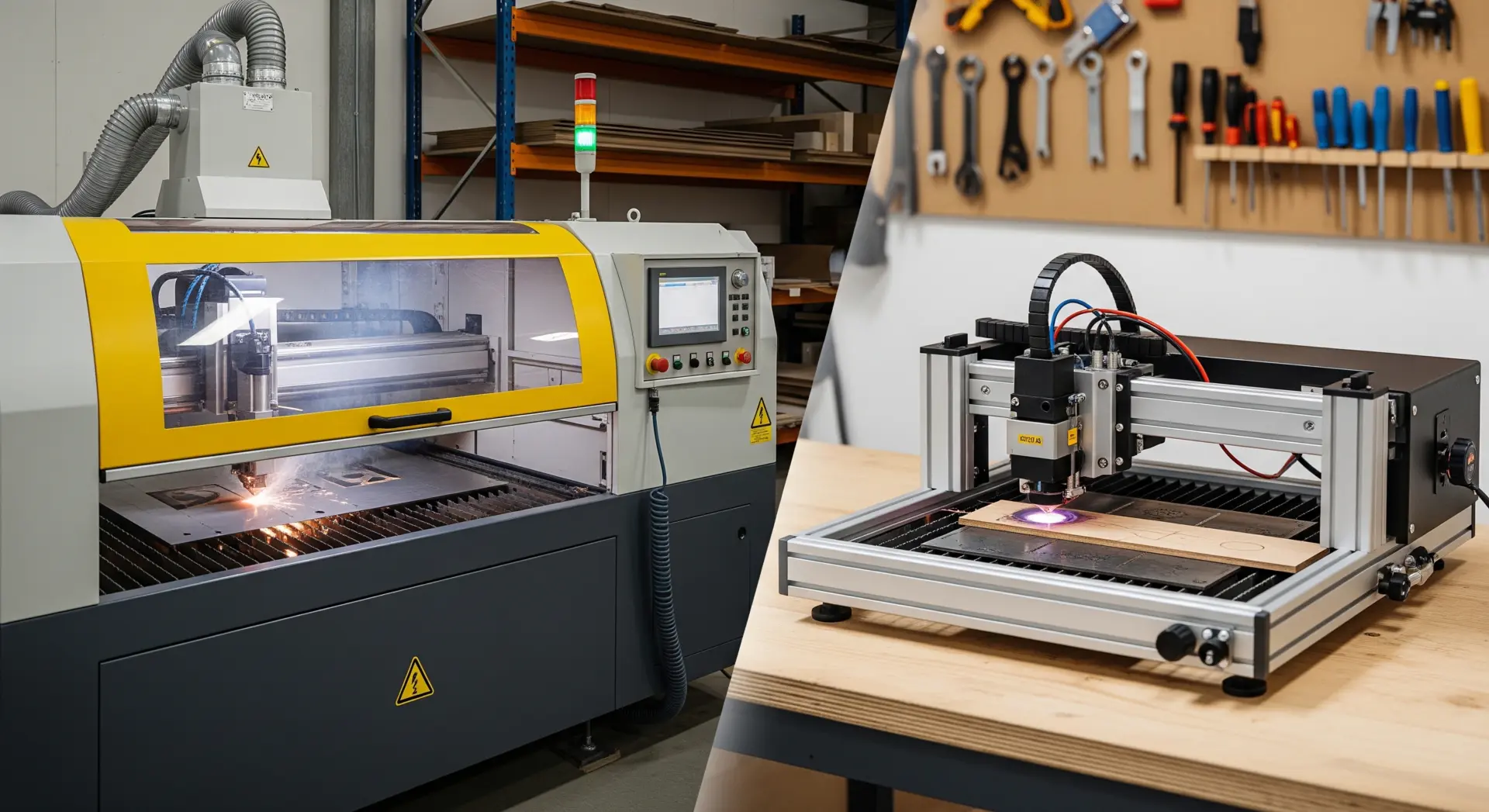
An industrial laser cutter fits shops that need repeatable commercial output, longer runtimes, larger work areas, and cleaner integration into daily production. A desktop laser cutter fits prototyping, sampling, light short-run work, and smaller shops that need laser capability without committing to a full production-scale system.
Choosing between an industrial laser cutter and a desktop laser cutter is rarely just a budget decision. The real issue is whether your laser workflow is supporting your shop’s production goals or quietly becoming a constraint on lead time, material handling, edge quality, and labor efficiency.
This comparison is most useful for shops working with wood, plywood, acrylic, decorative panels, templates, signage parts, and similar non-metal materials. If that is your workload, the wrong machine size can leave you either under-equipped for real production or over-invested in capacity you will not use consistently.
What Is the Difference Between an Industrial Laser Cutter and a Desktop Laser Cutter?
An industrial laser cutter is a production-oriented laser system designed for repeatable commercial output, while a desktop laser cutter is a smaller system built mainly for prototyping, light-duty cutting, short runs, and limited-space operation.
That difference matters more than simple machine size. In real shops, “industrial” usually means the machine is built around production stability: longer operating windows, stronger extraction, more predictable motion behavior, better support for larger parts, and a layout that makes daily use easier. “Desktop” usually means lower entry cost, smaller footprint, easier installation, and better fit for shops that are still validating demand or handling lighter workloads.
The labels can still be misleading. Some compact machines are built with industrial intent, and some larger desktop-branded systems remain light-duty. The better question is this: are you buying a prototyping tool or a production asset?
| Decision Factor | Desktop Laser Cutter | Industrial Laser Cutter |
|---|---|---|
| Primary Role | Sampling, Prototyping, Small-Batch Jobs | Daily Production, Repeatable Commercial Output |
| Runtime Expectation | Intermittent Use And Short Runs | Longer Operating Cycles And Higher Workload Stability |
| Part Size Handling | Smaller Parts And Restricted Sheet Sizes | Larger Workpieces And Better Batch Layout Potential |
| Labor Pattern | Heavier Manual Loading And More Hands-On Monitoring | Better Fit For Dedicated Operators And Structured Workflow |
| Output Consistency | Good For Light Work If Job Volume Stays Controlled | Better Suited To Stable Quality Across Repeated Runs |
| Shop Integration | Useful As A Standalone Process Tool | Better Fit For Planned Production Cells And Upstream/Downstream Coordination |
| Growth Path | Best For Testing Demand Before Scaling | Best For Shops Already Committed To Recurring Laser Work |
Why the Difference Matters in Real Production
Many shops focus first on whether a desktop system can technically cut the required material. That is only part of the decision. A machine can be capable of making the part and still be the wrong choice for the workflow.
In production, the real pressure points usually show up elsewhere:
- Lead Times Start Stretching Because Jobs Queue Behind A Single Small Machine
- Operators Spend Too Much Time Loading, Unloading, And Monitoring Rather Than Moving Work Forward
- Sheet Handling Becomes Awkward, Forcing Extra Manual Prep Before Cutting Begins
- Smoke Extraction And Cut Stability Start Affecting Edge Quality Or Rework Rates
- Prototype Work And Customer Orders Compete For The Same Machine Time
- Growth Becomes Difficult Because The Laser Cell Was Never Designed For Sustained Throughput
This is why the industrial versus desktop question should be tied to production behavior, not just initial purchase price. A lower-cost machine can become expensive if it slows delivery, increases manual handling, or forces you to outsource overflow work. On the other hand, a full industrial system can be the wrong move if your laser demand is still occasional and uncertain.
Where a Desktop Laser Cutter Fits Best
A desktop laser cutter is often the right choice when the shop needs flexibility, controlled investment, and a practical way to add laser capability without redesigning the whole floor plan.
Desktop systems usually make the most sense in these situations:
- Product Development And Sample Approval
- Low-Volume Acrylic, Wood, Or Decorative Part Production
- Custom Personalization And Small Job-Shop Orders
- Design Validation Before Scaling Into Larger Runs
- Supplemental Laser Work Alongside Core Saw, Router, Or CNC Processes
For many small workshops, design studios, sign makers, and early-stage commercial shops, a desktop machine can be enough for months or even years. It helps the team learn material behavior, pricing, nesting habits, and customer demand before making a bigger capital decision.
The main risk appears when the desktop machine starts doing production work it was never meant to carry. Once a shop depends on it for recurring daily output, the limitations usually show up in runtime pressure, operator time, staging inefficiency, and delayed order flow.
Where an Industrial Laser Cutter Makes Sense
An industrial laser cutter becomes the better fit when laser processing is no longer occasional support work and is starting to function as a true production step.
That shift usually happens when the shop needs:
- Repeatable Daily Output Rather Than Occasional Laser Jobs
- Better Part Yield Per Setup Through Larger Or More Efficient Layouts
- Cleaner Workflow Control Across Repeated Commercial Orders
- A Dedicated Laser Cell Instead Of A Shared Prototyping Station
- Stronger Extraction, Safer Material Handling, And Better Process Discipline
- Capacity That Supports Business Growth Without Immediate Workarounds
If your team is moving from sample making into recurring commercial output, it makes sense to evaluate production-oriented laser cutters and engravers rather than asking a small desktop platform to behave like a factory asset.
Industrial systems are not just about cutting more parts. They are about running the laser as a predictable part of the shop. That includes how material is staged, how operators move jobs through the machine, how edge quality holds across batches, and how the laser fits with deadlines, quoting, and downstream assembly or finishing.
How to Choose Based on Your Shop, Not the Marketing
The fastest way to make the right choice is to evaluate the machine against the job pattern already happening in your shop.
1. Look at Your True Job Mix
If most orders involve prototypes, custom one-offs, small signs, or light decorative work, desktop may be enough. If the shop is cutting recurring part families, repeat commercial orders, or larger sheet-based jobs, industrial logic becomes stronger.
2. Look at Runtime Pressure
If laser work happens in occasional bursts, a desktop system may stay productive. If laser work is present every day and starts driving scheduling decisions, you are already thinking like an industrial user.
3. Look at Material Handling, Not Just Cutting
Many buying mistakes come from focusing only on whether the beam can cut the material. The real workflow also includes loading, staging, offloading, smoke control, part sorting, and how easily the operator can keep jobs moving.
4. Look at What the Laser Is Replacing
If the laser is replacing manual cutting, knife trimming, or outsourced decorative work, a desktop unit can be a good first step. If it is expected to become a core production cell, industrial structure matters much more.
5. Look at Adjacent Bottlenecks
If the real pain point is panel breakdown, boring accuracy, or routing throughput, a larger laser may not solve the problem. In some shops, the better investment is in a panel saw, CNC nesting machine, or another process step rather than scaling the laser first.
Common Buying Mistakes
Shops usually get this decision wrong in one of two ways: they either buy too small and outgrow the machine quickly, or they buy too large before stable demand exists.
The most common mistakes are:
- Buying On Beam Power Alone Without Reviewing Workflow Fit
- Treating Prototype Demand As Proof Of Production Demand
- Ignoring Extraction, Layout, And Operator Handling Requirements
- Assuming A Larger Machine Automatically Fixes Weak Scheduling Or Part Flow
- Choosing By Upfront Price Without Calculating Labor And Delay Costs
- Forgetting That Future Growth Changes The Real Cost Of The First Purchase
The safest approach is to match the machine to current production behavior while leaving enough room for realistic growth. That usually produces a better result than buying the cheapest entry point or the largest machine the budget can carry.
Final Recommendation
Choose a desktop laser cutter if your shop needs flexibility, prototyping speed, short-run capability, and a lower-risk entry into laser processing. Choose an industrial laser cutter if laser work is already becoming a dependable production function and your shop needs stronger throughput, larger-format handling, better consistency, and cleaner workflow integration.
In practical terms, the right machine is the one that matches your order pattern, labor structure, and production goals. If the laser is still a supporting tool, desktop can be enough. If it is becoming a daily revenue-critical process, industrial is usually the smarter long-term fit.
FAQ
- Is A Desktop Laser Cutter Enough For A Small Commercial Shop?
Yes, if the shop mainly handles prototypes, small batches, custom items, or light recurring orders. Once daily production depends on the laser, a desktop machine often becomes a bottleneck. - When Should A Shop Move From Desktop To Industrial?
A shop should move up when laser work affects delivery schedules, operators spend too much time on handling, or recurring order volume demands more stable throughput and larger-format processing. - Does An Industrial Laser Cutter Always Deliver Better Cut Quality?
Not automatically. Quality still depends on material, setup, extraction, maintenance, and workflow discipline. Industrial machines are usually better at holding consistent results across repeated production runs. - Can A Desktop Laser Cutter Handle Production Work?
Yes, but only within controlled volume. Many desktop machines can support commercial work, though they become inefficient when used as a primary production cell every day. - Should A Furniture Shop Buy A Laser Cutter Before Other Machines?
Not always. If the main bottleneck is panel sizing, routing, boring, or edge finishing, another machine category may deliver more production value before laser equipment does.