Burn marks on laser-cut plywood rarely stay isolated to appearance. Once edges darken too much or face veneers pick up smoke staining, the shop usually pays for it again through slower unloading, extra sanding, rejected decorative parts, or inconsistent assembly quality. The problem becomes more expensive when operators respond by slowing every job down instead of fixing the process variables that are actually driving the burn.
For manufacturers evaluating laser cutters and engravers for plywood and similar non-metallic work, the practical target is not simply a lighter edge color. It is a stable cutting window that delivers acceptable face quality, reliable part separation, and repeatable output across real plywood batches rather than ideal samples.
Why Plywood Burns Differently From Other Wood-Based Materials
Plywood does not behave like one uniform sheet. Each panel contains face veneers, core layers, glue lines, and density shifts that can react differently under heat. Two sheets with the same nominal thickness can still cut differently if the glue chemistry changes, the veneers vary in density, or the sheet is not equally flat across the table.
That matters because burn marks in plywood are often a combination of material variation and process imbalance. A recipe that looks acceptable on one batch can produce darker edges, heavier face staining, or more underside charring on the next batch.
The most common plywood-specific reasons are straightforward:
- Glue Lines Can Carbonize More Aggressively Than The Veneer Itself
- Surface Veneers Show Smoke Staining Faster Than Utility-Grade Core Layers
- Sheet Warp Changes The Effective Focus Distance Across The Cut Path
- Moisture And Density Variation Change How Long Heat Stays In The Material
If plywood quality is inconsistent at the incoming-material stage, the laser process usually exposes that inconsistency very quickly.
What Usually Causes Burn Marks In Laser-Cut Plywood
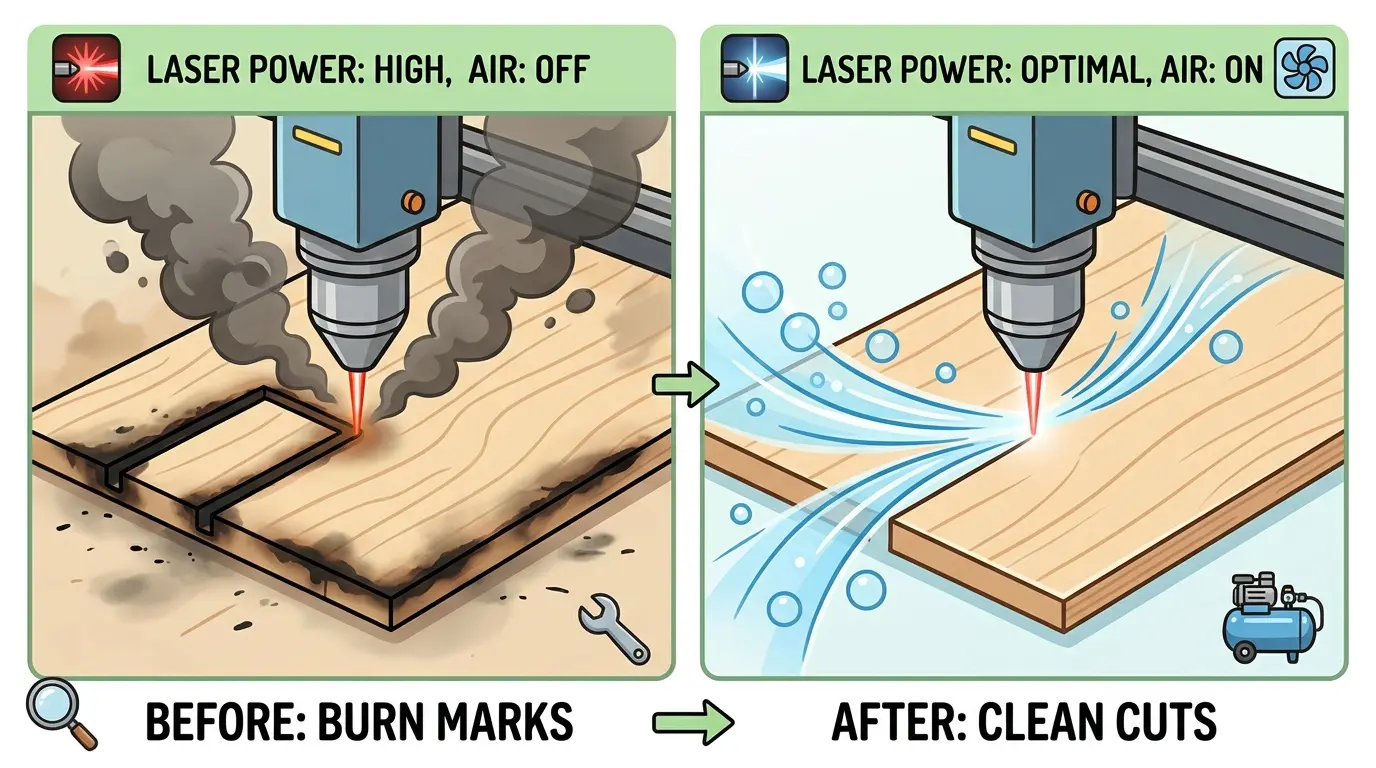
Burn marks are typically a sign that heat or smoke is staying in the wrong place for too long. That can happen because travel speed is too slow, because smoke is not being cleared effectively, or because the beam condition changes across the sheet.
In production, the most common causes are:
- Excessive Heat Dwell From A Conservative Recipe
- Weak Air Assist That Fails To Clear Smoke From The Kerf
- Inadequate Extraction That Lets Soot Recirculate Onto The Surface
- Incorrect Focus Position Or Poor Sheet Flatness
- Dirty Optics Or Nozzle Components That Reduce Process Stability
- Smoke Rebound From A Dirty Or Poorly Supported Cutting Bed
- Material Variation That Forces Some Areas To Cut Hotter Than Others
The key point is that dark edges are not always caused by “too much power” in isolation. Many shops increase or reduce one setting at a time without addressing airflow, focus consistency, table condition, or plywood quality. That usually makes the process harder to repeat.
A Quick Diagnostic Table For Common Burn Problems
| Burn Symptom | Likely Root Cause | What To Check First |
|---|---|---|
| Heavy Face Staining On The Top Surface | Weak extraction or smoke lingering above the cut | Exhaust performance, air assist direction, and nozzle cleanliness |
| Dark Edges With Full Separation | Too much heat dwell in the cut zone | Speed and power balance, plus focus position |
| Underside Charring | Smoke rebound from the support bed or poor evacuation below the sheet | Bed cleanliness, support style, and extraction path under the sheet |
| Random Burn Variation Across One Sheet | Material inconsistency or changing focus due to warp | Sheet flatness, batch quality, and incoming material sorting |
| Incomplete Cut With Extra Burning On A Second Pass | Unstable process window rather than a clean one-pass cut | Focus, flatness, optics condition, and recipe stability |
This kind of table matters because faster troubleshooting usually comes from reading the burn pattern correctly, not from making broad recipe changes across every plywood job.
Process Changes That Usually Reduce Burn Marks Without Sacrificing Throughput
The goal is not to run the coldest-looking cut at the slowest possible speed. The better target is the fastest stable recipe that still gives full separation and acceptable surface quality for the product standard.
In most plywood workflows, the following changes produce the best improvement:
- Sort plywood by grade, thickness, and surface expectation before release to the machine
- Recheck focus and sheet flatness across the working area instead of assuming one corner reflects the full sheet
- Strengthen air assist and smoke extraction so residue leaves the kerf quickly
- Clean optics, nozzles, and the cutting bed on a fixed schedule rather than after quality drifts
- Tune the recipe around one-pass stability instead of repeated trial cuts that vary from operator to operator
- Separate visible-face parts from hidden structural parts so the edge standard matches the application
One additional method that is commonly tested in appearance-sensitive plywood work is temporary surface masking. This can help reduce visible smoke staining on the face veneer, but it should be treated as a workflow choice rather than a universal fix. If masking adds too much handling time, the gain in face appearance may not justify the labor cost on every job.
Smoke Control Often Matters More Than Shops Expect
Many plywood burn issues are really smoke-management issues. If smoke remains close to the cut path, it does not just discolor the face. It also reduces visual consistency between sheets, makes inspection less predictable, and increases post-cut cleanup.
That is why quality improvements often come from airflow discipline rather than aggressive recipe changes. When extraction is stable and air assist is doing its job, shops usually see several benefits at once:
- Cleaner Face Veneers
- More Consistent Edge Appearance
- Less Manual Wiping Or Sanding
- Better Operator Confidence In First-Pass Results
- Fewer Quality Surprises Late In The Shift
This is also one reason underside staining should not be ignored. A dirty support bed or poor downward smoke evacuation can mark the part even when the top surface looks acceptable during the cut.
Improve Quality By Segmenting Jobs, Not By Slowing Everything Down
One of the most common production mistakes is using one overly cautious plywood recipe across every job. That may reduce some burn complaints, but it often lowers throughput more than necessary and still fails when plywood quality changes.
A better approach is to segment jobs by practical quality level:
- Visual-Grade Parts Where Face Appearance Matters Immediately
- Functional Parts Where Structural Fit Matters More Than Light Edge Color
- Mixed Jobs That Combine Decorative And Utility Components
Once those groups are separated, the shop can make better decisions about recipe tolerance, masking, inspection level, and acceptable cleanup time. This keeps high-appearance parts from being treated like hidden internal components, while also preventing utility parts from being slowed down by cosmetic standards they do not need.
In other words, better cut quality often starts with better production classification.
When Laser Is The Right Process For Plywood And When Another Workflow May Fit Better
Laser cutting is commonly a strong fit when plywood parts require fine contours, repeatable decorative detail, non-contact processing, or integrated cut-and-mark workflows. But that does not mean every plywood job belongs on a laser line.
For manufacturers also comparing plywood processing with CNC nesting machines, the better decision depends on what the part needs before and after cutting.
| Workflow Priority | Laser Cutting For Plywood | CNC Nesting Workflow |
|---|---|---|
| Fine Decorative Shapes | Strong Fit | Usually Less Efficient For Very Fine Detail |
| Non-Contact Cutting Of Sensitive Veneer Geometry | Strong Fit | Mechanical Tool Contact May Matter More |
| Integrated Routing And Drilling | Limited | Strong Fit |
| Large-Panel Breakdown For Cabinet Parts | Application Dependent | Often Stronger Fit |
| Mixed Cut-And-Mark Production | Strong Fit | Limited |
| Minimal Edge Burn On Thick Structural Sheet Processing | Application Dependent | Often Easier To Manage Mechanically |
This comparison matters because some shops try to solve a process-selection problem with recipe adjustments alone. If the production mix is dominated by panel breakdown, routing, drilling, and assembly-ready furniture components, another workflow may carry more of the load. If the value sits in contour detail, decorative cut quality, and non-contact processing, laser can be the better production fit.
A Practical Checklist Before Releasing A Plywood Batch To Production
Before a shop treats burn marks as a machine limitation, it should review a short checklist:
- Is the plywood batch consistent enough to hold one stable recipe?
- Is the sheet flat enough across the full cutting area?
- Are the optics, nozzle, and bed clean before the run starts?
- Is smoke being pulled away from both the top and bottom of the cut zone?
- Is the quality standard based on visible appearance or only on functional separation?
- Are operators measuring good parts per shift rather than only head speed?
- Would some parts be better routed to another process instead of forcing one laser standard across every plywood job?
These questions usually reveal whether the burn problem is caused by material, airflow, maintenance discipline, or process selection.
Practical Summary
Reducing burn marks in laser-cut plywood is usually about controlling heat dwell, smoke removal, focus consistency, and material variation as one system. Shops improve cut quality faster when they diagnose the burn pattern correctly, classify jobs by quality requirement, and tighten airflow, maintenance, and incoming-material discipline before slowing the line down.
The best plywood results usually do not come from the most aggressive recipe or the most cautious one. They come from a repeatable process window that gives full separation, acceptable face quality, and predictable output across real plywood batches. When that process window is stable, the shop gets more than cleaner cuts. It gets less rework, easier inspection, and more usable parts leaving the station on time.