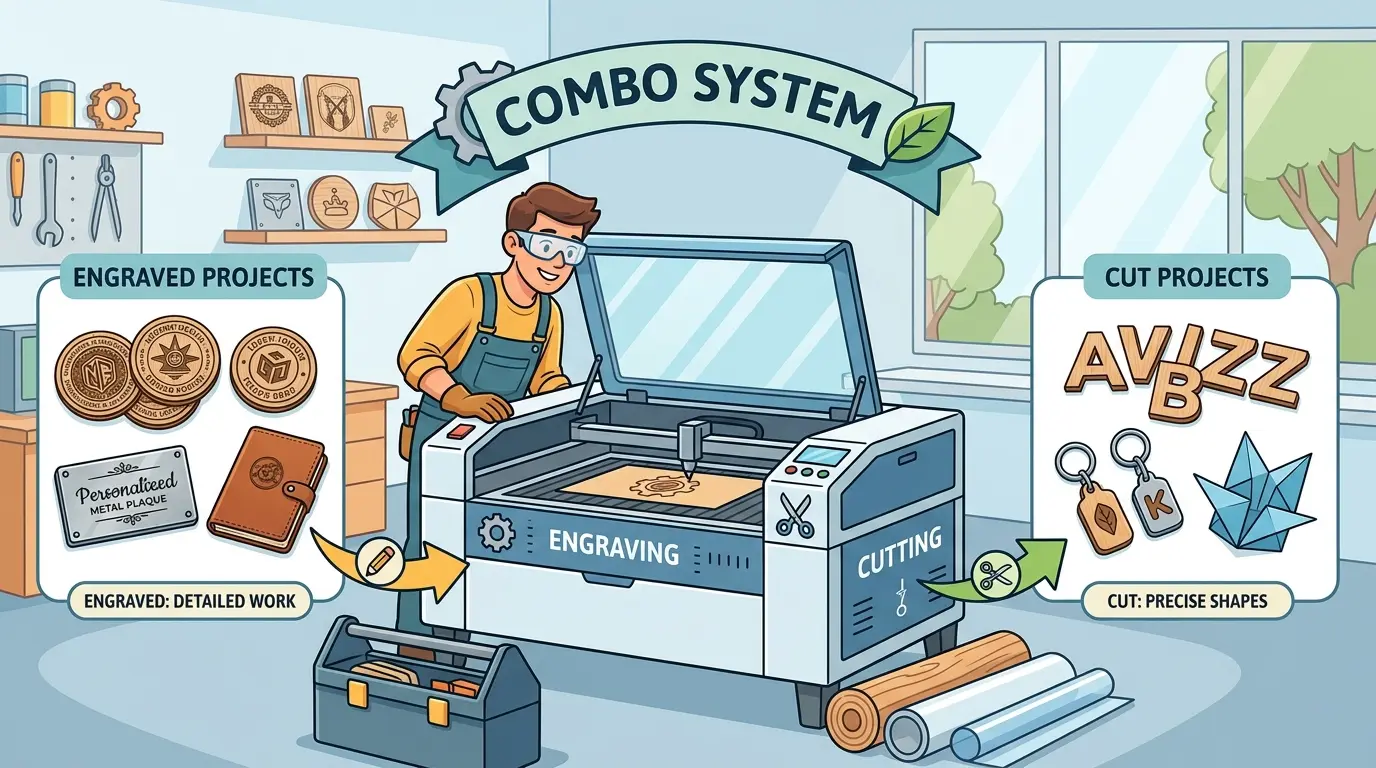
If a part needs both surface detail and contour cutting, a combo laser seems like the obvious answer. In practice, the better decision depends on whether engraving and cutting belong in the same workflow, on the same material family, and under the same scheduling pressure. For buyers comparing laser cutters and engravers for wood, acrylic, and similar non-metal materials, a combo system usually makes sense when one setup can finish a meaningful share of the order from start to finish.
What A Combo System Actually Solves
A combo system is most valuable when it removes process friction, not just when it checks two boxes on a brochure.
In a suitable workflow, one platform can help by:
- Keeping Engraving And Cutting In One Setup
- Reducing Manual Transfers Between Stations
- Lowering The Risk Of Alignment Errors Between Marking And Final Cut Geometry
- Simplifying Small-Batch File Preparation
- Making Custom Orders Easier To Schedule Without Building A Separate Laser Cell
That matters most when the same panel, sign blank, decorative part, or branded component regularly needs both operations. If the workflow already splits naturally into high-volume cutting on one side and short, artwork-heavy engraving on the other, the value of a combo system drops quickly.
The Best-Fit Production Scenarios
A combo system is commonly the right choice in five situations.
- The Same Part Often Needs Both Processes
If the job usually starts with engraving and ends with cutting on the same sheet or component, one machine can reduce handling and keep registration more consistent. This is often useful for signage, decorative panels, custom acrylic pieces, product branding elements, and mixed short-run work.
- Order Variety Matters More Than Peak Throughput
Shops with frequent design changes, seasonal SKUs, sample work, or customer-specific variations often benefit more from flexibility than from fully separated capacity. A combo system supports faster switching between part styles when the goal is responsiveness rather than maximum output in a single process.
- Production Volume Is Moderate Rather Than Constantly Pressed
If one shift can still absorb both engraving and cutting without turning the schedule into a queue-management problem, a combo setup can be a disciplined investment. It covers a broad application range without forcing the plant to maintain two separate laser stations too early.
- Floor Space, Labor, Or Utility Planning Is Tight
A single platform can be easier to place, support, and staff when the factory is working within a limited footprint. That does not automatically make it better, but it can make it more practical during the first stage of laser adoption or in mixed-use workshops.
- The Material Family Is Relatively Consistent
Combo logic becomes stronger when the shop is repeatedly processing similar non-metal materials and similar part types. The more stable the material family, the easier it is to standardize job preparation, inspection expectations, and operator routines.
Where A Combo System Usually Starts To Struggle
The main weakness of a combo machine is not that it cannot do both jobs. The weakness is that both jobs begin competing for the same production window.
That usually becomes visible when:
- Long Cutting Runs Delay Short, Urgent Engraving Orders
- Customized Engraving Work Interrupts Repeat Cutting Batches
- One Maintenance Stop Halts Two Revenue Streams At Once
- Operators Spend Too Much Time Reprioritizing The Queue
- Cutting And Engraving Need Different Levels Of Quality Attention
This is the point where the buying decision stops being technical and becomes operational. A machine that looks versatile in a demo can still create planning friction if two different kinds of work are forced through one shared bottleneck.
Decision Table: Combo System Vs Dedicated Setup
| Production Signal | Choose A Combo System When | Choose Separate Systems When | Why It Matters |
|---|---|---|---|
| Part Flow | The Same Part Commonly Needs Engraving And Cutting | Engraving And Cutting Usually Belong To Different Job Families | Shared setup only helps when the workflow is genuinely shared |
| Order Mix | Jobs Are Varied, Short-Run, Or Custom | Cutting Is Batch-Driven While Engraving Is Frequent And Irregular | Mixed scheduling benefits from flexibility, split scheduling benefits from separation |
| Capacity Pressure | Machine time is not yet heavily constrained | The queue is already tight or rush orders are common | One bottleneck is manageable only while demand is moderate |
| Quality Priorities | One team can control both output types consistently | Surface appearance and cut performance are managed as different quality disciplines | Different quality targets often justify different stations |
| Downtime Risk | A temporary stop will not disrupt too many orders | One machine outage would affect too much production | Shared risk becomes more expensive as dependency grows |
| Expansion Path | The business is still defining its dominant laser use case | Demand is already separating into clear cutting and engraving volumes | Growth stage should shape the equipment structure |
Questions Buyers Should Answer Before They Commit
Before choosing a combo platform, it helps to review recent orders and production constraints rather than relying on a few sample jobs.
The most useful questions are:
- How Many Weekly Machine Hours Go To Cutting Versus Engraving?
- How Often Does The Same Part Need Both Operations In Sequence?
- Are Delays More Likely To Come From Changeovers Or From Lack Of Capacity?
- Does The Shop Lose More Money From Missed Throughput Or From Missed Custom Turnaround?
- Would One Shared Machine Create Too Much Downtime Exposure?
These questions usually reveal whether a combo system will simplify the process or only postpone the need for separation.
The Buying Criteria That Matter Most
When the workflow points toward a combo system, buyers should still evaluate the machine through production logic rather than feature accumulation.
Focus on criteria such as:
- Job Registration Reliability Between Engraving And Cutting
- Ease Of Switching Between Artwork-Heavy And Shape-Heavy Orders
- Operator Simplicity In Daily Use
- Stability Of Output Across Repeated Materials
- How Well The System Fits The Shop’s Next Stage Of Volume Growth
In other words, the right combo system is not just the one that can technically cut and engrave. It is the one that lets the shop complete mixed jobs with fewer handoffs, steadier quality, and less scheduling friction.
When A Dedicated Split Is The Better Long-Term Move
A dedicated split usually becomes the smarter option once the shop is no longer running one laser workflow, but two.
That often happens when cutting becomes a throughput-driven production function while engraving becomes a customization, branding, or decorative finishing function. At that point, forcing both through one shared machine often protects initial capital cost while quietly increasing queue conflict, operator interruption, and delivery risk.
Separate systems are also easier to justify when one process needs to keep running even if the other is temporarily offline. That kind of resilience becomes more important as orders become larger, more frequent, or more deadline-sensitive.
Practical Summary
Choose a combo system when one machine can genuinely finish a meaningful share of the job from engraving through cutting, the material family is stable, and production flexibility matters more than peak dedicated output.
Choose separate systems when engraving and cutting have already become two different scheduling problems with two different performance priorities.
The strongest buying decision comes from workflow reality, not from machine versatility alone. If engraving and cutting live in the same order structure, a combo system can be efficient and disciplined. If they no longer share the same bottleneck, separation usually produces a cleaner, safer production flow.