When buyers start reviewing laser cutting machines for sale, the first mistake is usually comparing the wrong numbers. A listing may highlight power, maximum speed, or a large working area, but those headline specs do not tell you whether the machine matches your material, your part mix, or your daily production targets. In real manufacturing, the wrong comparison leads to poor edge quality, unnecessary rework, slower setup, or a machine that looks impressive on paper but creates bottlenecks on the floor.
The better approach is to compare laser systems in the order they affect production results: machine class, material fit, usable working area, motion quality, real throughput, software workflow, and long-term operating stability. If you follow that sequence, it becomes much easier to separate a useful quote from a misleading one.
Start by Comparing the Same Machine Class
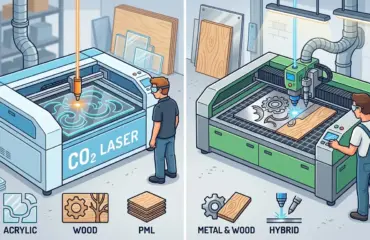
Before you compare any specification, confirm that the machines belong to the same processing category. A CO2 system for wood, acrylic, and similar non-metal materials should not be evaluated the same way as a fiber system for metal sheet processing. Even if two suppliers both advertise a “laser cutting machine,” the productivity logic, operating costs, and application fit may be completely different.
For Pandaxis buyers, this matters because current verified category positioning is centered on non-metal workflows such as wood and acrylic processing. If that matches your production needs, compare within the same family of laser cutters and engravers instead of mixing unrelated machine classes into one spreadsheet.
Ask these questions first:
- What Materials Will The Machine Process Most Often?
- Is The Goal Primarily Cutting, Engraving, Or A Combination Of Both?
- Are You Running Repeat Production Batches Or Mixed One-Off Jobs?
- Do You Need Clean Decorative Detail, Fast Sheet Processing, Or Both?
If you skip this step, every downstream comparison becomes unreliable.
Treat Laser Power as a Material-Match Spec
Power is one of the most misunderstood specs in laser buying. Many buyers assume higher power automatically means better performance. In reality, power only becomes meaningful when tied to your material type, material thickness range, edge-quality requirement, and intended output speed.
For example, a shop cutting mostly thin acrylic panels for display work may need a very different balance than a workshop processing thicker wood components with engraving detail. More power can support different cutting behavior, but it can also change heat input, edge finish, and operating cost expectations. That means you should not ask, “Which machine has more power?” You should ask, “Which power range fits my actual material mix without compromising finish quality or production stability?”
When comparing power, verify:
- Your Primary Material Types
- Your Normal Thickness Range
- Whether Quality Or Speed Is The Higher Priority
- Whether The Supplier Can Show Matching Sample Results
If a supplier cannot connect power to a real application outcome, the number alone is not useful.
Compare Working Area, Bed Design, and Part Handling
Working area is not just about how large a sheet you can place on the bed. It affects nesting flexibility, part yield, loading efficiency, and how often operators need to reposition material. A large bed may improve workflow for bigger panels or nested batches, but only if your part sizes and upstream material format actually justify it.
Look beyond the stated table size and ask how the machine fits your real part handling process:
- What Sheet Sizes Do You Buy Most Often?
- Do You Frequently Cut Full Sheets Or Mostly Smaller Blanks?
- How Much Time Is Lost To Manual Repositioning?
- Does The Bed Layout Support Stable Material Placement And Clean Unloading?
This is where buyers often confuse theoretical capacity with usable capacity. A machine may advertise a large processing area, but if your workflow still depends on awkward loading, frequent manual intervention, or inconsistent alignment, the larger bed will not create the productivity gain you expected.
Check Motion Quality, Not Just Headline Accuracy
Many quotations include impressive-looking claims around precision or positioning, but buyers should be careful here. Motion quality is not only about a single accuracy figure. It is about whether the system can repeat clean cuts consistently across repeated jobs, varied shapes, and day-to-day operation.
In practice, motion quality affects:
- Edge consistency on repeated parts
- Fit quality on assembled components
- Engraving clarity on detailed work
- Reliability when production moves from simple shapes to more complex layouts
Ask suppliers how the machine maintains stable motion during real production, not just during a controlled demo. Request sample parts that reflect your own geometry, especially if your work includes fine detail, nested shapes, corner definition, or cosmetic surfaces where imperfections are easy to see.
The goal is not to chase the most aggressive spec sheet claim. The goal is to confirm repeatability you can actually use.
Ask for Throughput Evidence, Not Only Maximum Speed
Maximum speed figures are often the least transferable number in a laser quotation. Real throughput depends on more than axis speed. It also depends on acceleration behavior, cutting path efficiency, material changeovers, file preparation, unloading time, and how often operators need to stop for adjustments.
That is why a machine with a stronger-looking top-speed number does not always deliver better output in production.
Use this table to keep the comparison grounded:
| Spec Area | What It Really Tells You | What Buyers Should Verify |
|---|---|---|
| Power | Material-fit and cutting behavior | Sample quality on your real materials |
| Working Area | Sheet capacity and nesting flexibility | Match with your normal part sizes and sheet format |
| Accuracy Claims | Potential positioning capability | Repeat part consistency across multiple runs |
| Speed Claims | Theoretical motion potential | Completed jobs per shift, including handling time |
| Software | File prep and machine usability | Compatibility with your existing design workflow |
| Cooling and Extraction | Operating stability and environment control | Daily maintenance burden and production downtime risk |
| Quote Scope | Purchase completeness | What is included, excluded, trained, and supported |
Instead of asking for headline speed, ask for proof of output:
- How Many Finished Jobs Can Be Completed In A Shift?
- What Slows The Workflow Most In Daily Use?
- How Long Do Common Changeovers Take?
- Can The Supplier Demonstrate A Job Similar To Yours From Start To Finish?
Those answers are far more valuable than a maximum-speed number in isolation.
Review Software, File Prep, and Workflow Integration
Laser performance is shaped by the workflow before the beam ever starts cutting. If file preparation is inconsistent, operator setup is slow, or design output needs constant manual correction, the machine will feel slower and less reliable than the brochure suggests.
Buyers should review how the machine fits the actual production chain:
- How Are Drawings Prepared And Imported?
- How Much Manual Cleanup Is Needed Before Processing?
- Can Operators Move Quickly From File To Production?
- Does The Workflow Support Mixed Orders, Repeat Jobs, Or Small-Batch Changes Efficiently?
This matters especially for shops that process both decorative and production parts. A system that saves time in file preparation, nesting, and job setup can create a larger operational advantage than a machine with slightly more aggressive cutting specs.
Compare Cooling, Extraction, and Daily Operating Stability
Many buyers focus on the cutting head and ignore the support systems that keep production stable. That is a mistake. Cooling, extraction, and environmental control directly affect uptime, cut quality consistency, operator comfort, and maintenance burden.
Even when two machines look similar in the main quotation, differences in supporting systems can change the long-term ownership experience significantly. Ask what is required to keep the machine stable through normal shifts, not only during a short demonstration.
Review these areas carefully:
- Cooling Requirements For Continuous Operation
- Extraction And Smoke Management For Your Material Mix
- Cleaning And Consumable Maintenance Expectations
- How Faults, Alarms, Or Instability Are Diagnosed And Resolved
In practical terms, stable support systems reduce interruptions. That means more predictable output, fewer quality swings, and less operator frustration.
Audit the Quote Beyond the Core Machine
One of the most expensive buying mistakes is comparing quotations as if the machine body were the entire purchase. In reality, the full investment may also include installation, training, startup support, recommended accessories, operating requirements, and after-sales response.
This is where lower-priced quotes can become risky. A cheaper listing may exclude items that are essential for daily use, or it may leave too much uncertainty around training and support. Buyers should compare the commercial package with the same discipline they use for technical specs.
Use a quote checklist like this:
- What Is Included In The Base Machine Price?
- What Is Required For Installation And Startup?
- What Operator Training Is Included?
- What Ongoing Service Or Technical Support Is Available?
- What Parts, Consumables, Or Maintenance Items Should Be Expected Early?
- What Proof Can The Supplier Provide For Similar Customer Applications?
If two machines appear close in price but one quote is clearer, more complete, and easier to support in daily production, that offer may represent the stronger buying decision.
Build a Comparison Sheet Around Production Outcomes
The most effective way to compare laser cutting machines is to translate specs into the production outcomes you actually care about. That usually means building a short buyer matrix rather than relying on supplier marketing order.
Your matrix should focus on outcomes such as:
- Material Fit
- Edge Quality
- Detail Quality
- Throughput Potential
- Setup Simplicity
- Workflow Compatibility
- Maintenance Burden
- Quote Completeness
- Support Confidence
Once you evaluate machines through that lens, weak quotations become easier to spot. A machine with strong marketing language but vague application evidence will usually drop quickly in the ranking.
Where Laser Processing Fits in a Broader Production Plan
Laser buying decisions also make more sense when placed inside the wider production workflow. In some operations, laser processing is a core cutting method. In others, it is best used for detail work, decorative components, signage, shaped acrylic parts, engraving, or mixed-product jobs that benefit from cleaner non-contact processing.
That broader perspective matters because the right machine is not just the one with the best isolated spec sheet. It is the one that strengthens the workflow around it. If you are reviewing multiple equipment categories at the same time, the broader Pandaxis product catalog can help frame where laser processing fits relative to your full machinery plan.
Final Thoughts
When reviewing laser cutting machines for sale, the best buyer is not the one who collects the most numbers. It is the one who understands which numbers change production results. Start by confirming machine class, then compare power in context, working area in relation to your sheet sizes, motion quality through repeat samples, and throughput through finished-job evidence rather than top-speed claims.
If you compare specs that way, you will make a more disciplined decision and reduce the risk of buying a machine that looks competitive in a quotation but underperforms in real use. For most industrial buyers, that is the difference between purchasing equipment and investing in a process that can scale.