Many shops start with the same question: if a laser can both engrave and cut, why not buy one machine and handle both jobs in the same cell?
For wood, acrylic, and similar non-metal materials, that can be the right answer, but only when the production rhythm actually supports it. In real use, the decision is less about whether the beam is capable of both processes and more about whether engraving and cutting create the same kind of workload. For buyers comparing laser cutters and engravers for non-metal processing, the better choice usually comes down to queue pressure, changeover frequency, finish expectations, and how expensive downtime becomes once the order volume grows.
Why This Decision Changes Once Production Scales
On a sample sheet, one laser may appear to handle everything well enough. In daily production, engraving and cutting usually create different bottlenecks.
Engraving-heavy work is often judged by:
- Surface Detail Quality
- Visual Consistency Across Repeated Jobs
- Fast Artwork Changes
- Reliable Positioning On Small Or Customized Orders
- Limited Heat Effect Outside The Marked Area
Cutting-heavy work is usually judged by:
- Clean Part Separation
- Stable Edge Quality
- Predictable Sheet Yield
- Lower Manual Cleanup
- Better Downstream Flow Into Assembly Or Packing
That difference matters because one machine can be technically capable of both processes while still being operationally awkward when both job types compete for the same capacity.
What One Combo Machine Usually Does Well
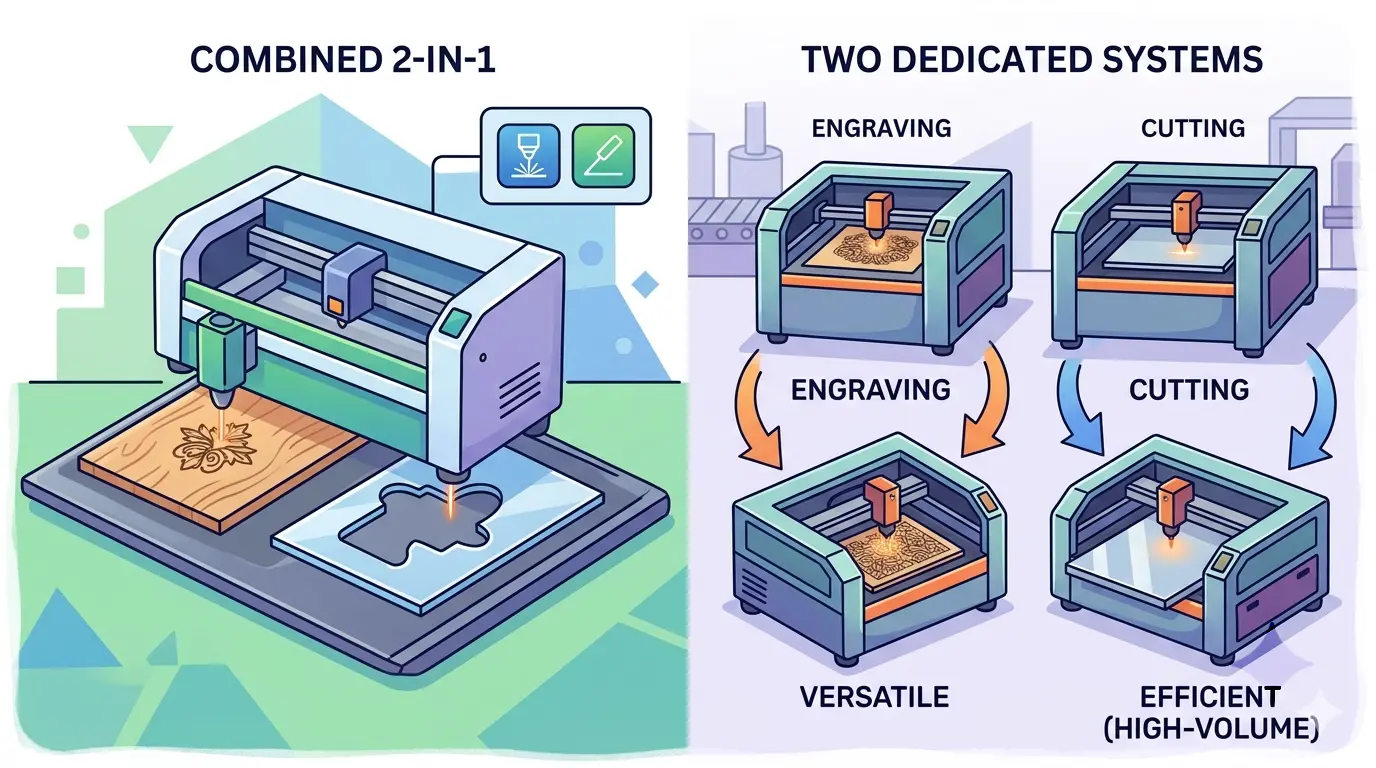
A single engraving-and-cutting platform is often a practical choice when the shop needs flexibility more than specialization.
It commonly makes sense when:
- The Order Mix Is Mostly Small Or Mid-Sized Batches
- The Same Part Needs Both Surface Engraving And Contour Cutting
- Floor Space Is Tight
- One Team Is Managing A Broad Mix Of Jobs Rather Than A Dedicated Production Line
- The Business Is Still Defining Which Laser Application Will Dominate Long Term
In that context, one machine can improve workflow by reducing footprint, simplifying operator training, and avoiding the cost of building two separate laser stations before the demand is proven. It can also be a sensible fit for custom products, decorative panels, branded acrylic parts, signage elements, and short-run work where job variety matters more than peak output in a single process.
Where A Single System Starts To Create Friction
The limits of a combo setup usually do not show up as a technical failure. They show up as scheduling conflict.
When one machine handles both tasks, shops often run into problems such as:
- Cutting Jobs Blocking Short, High-Margin Engraving Orders
- Frequent Setup Changes Between Surface-Finish Work And Part-Separation Work
- One Maintenance Stop Interrupting Both Revenue Streams
- More Operator Time Spent Prioritizing Queues Instead Of Running Parts
- Greater Pressure To Compromise On Settings For Speed Rather Than Process Fit
This is where the buying decision becomes a workflow question rather than a feature-list question. If the machine is always switching between long sheet-cutting runs and frequent custom engraving jobs, the lost time is not only in the laser cycle itself. It also appears in job sequencing, handling, cleaning, inspection, and rush-order disruption.
When Two Separate Systems Usually Work Better
Two systems are often the stronger option when engraving and cutting have become two different production functions.
That is commonly true when:
- Cutting Runs Are Long, Repeated, And Throughput-Driven
- Engraving Jobs Are Short, Varied, Or Customization-Led
- The Shop Has Different Quality Standards For Surface Appearance And Cut Output
- One Operator Or One Shift Cannot Reliably Absorb Both Queues
- Downtime On A Single Laser Would Disrupt Too Many Orders At Once
Separate systems usually improve flow because each station can be tuned around a clearer purpose. The cutting side can stay focused on part release, edge cleanliness, and material utilization. The engraving side can stay focused on visual consistency, alignment, and faster changeovers for customized work. That separation often leads to better repeatability, lower rework, and a steadier schedule even before the shop reaches very high volume.
A Practical Comparison Table
| Decision Factor | One Machine Handling Both Jobs | Two Separate Systems | What Usually Tips The Decision |
|---|---|---|---|
| Best Fit | Mixed, moderate-volume work with varied jobs | Higher-volume or clearly split engraving and cutting workloads | Whether both processes truly share the same pace |
| Main Strength | Lower footprint and simpler initial setup | Better throughput and clearer task separation | Whether flexibility or dedicated capacity matters more |
| Main Risk | Queue conflicts and changeover drag | Higher investment and more floor-space demand | Whether scheduling pain is already visible |
| Downtime Impact | One stop affects both engraving and cutting | One process can keep running if the other is offline | How costly lost machine time is to the shop |
| Operator Focus | Broad, mixed-task management | More consistent process discipline by station | Whether one team can handle both job types well |
| Quality Control | One machine must balance two finish priorities | Each system can be optimized for its main output | Whether cosmetic engraving and cut quality need different standards |
| Growth Path | Works well while the job mix is still evolving | Stronger when demand is already separating into distinct queues | Whether the business is still testing demand or already scaling it |
The Workflow Signals Buyers Should Pay Attention To
Before deciding, it helps to review actual orders instead of basing the purchase on a few memorable samples.
The most useful questions are:
- Which Job Type Occupies More Machine Hours Each Week?
- Are Most Jobs Combined Engrave-And-Cut Parts, Or Two Different Families Of Work?
- Does More Lost Time Come From Setup Changes Or From Insufficient Capacity?
- Is The Bigger Quality Problem Cosmetic Inconsistency Or Cut Reliability?
- Would One Machine Failure Shut Down Too Much Production At Once?
Those answers usually reveal whether the shop needs a flexible first platform or a clearer division between a cutting station and an engraving station.
When One Machine Is Usually Enough
One machine is often enough when the business is still in a mixed-use phase and the laser is supporting flexible production rather than feeding a dedicated line.
That tends to be true when:
- The Shop Runs Short Batches With Frequent Design Changes
- The Same Product Commonly Needs Both Engraving And Cutting
- Daily Capacity Pressure Is Moderate Rather Than Severe
- The Team Can Tolerate Some Scheduling Tradeoffs In Exchange For Lower Complexity
- The Laser Department Is Still Growing Into Its Future Volume
In that stage, a combo system can be a disciplined way to keep investment aligned with demand while still covering a broad range of non-metal applications.
When Two Systems Become The Safer Long-Term Choice
Two separate systems usually become easier to justify when the shop no longer has one laser workflow. It has two.
That is often the case when one side of the business behaves like production cutting and the other behaves like customization or decorative finishing. Once that split is real, forcing both job types onto one platform often protects purchase cost at the expense of throughput, queue stability, and operator efficiency.
Separate systems also make more sense when the plant needs clearer planning discipline. Cutting jobs may be scheduled around material batches and part flow. Engraving jobs may be scheduled around branding, small orders, or customer-specific variations. When those priorities stop aligning, two systems are usually easier to manage than one overloaded “do everything” machine.
A Practical Summary
The best answer is not whether a laser engraver and cutter can perform both tasks. Many can. The better question is whether both tasks belong in the same production rhythm.
If your shop mainly runs mixed, moderate-volume work and often needs engraving and cutting on the same part, one machine can be a practical and efficient choice. If cutting has become a throughput-driven operation while engraving has become a customization or appearance-driven operation, two separate systems usually protect output better.
In other words, buy one machine when flexibility is the main advantage. Move to two systems when engraving and cutting are no longer sharing the same bottleneck.