Pandaxis

  • Products
    • CNC Nesting Machines
    • Panel Saws (Beam Saws)
    • Sliding Table Saws
    • Edgebanders
    • Boring & Drilling Machines
    • Wide Belt Sanders
    • Laser Cutters and Engravers
    • Stone CNC Machines
  • About Us
  • Contact Us
  • EnglishEnglish
    • Español Español
    • Italiano Italiano
    • Deutsch Deutsch
    • Français Français
    • Português Português
    • العربية العربية
    • Türkçe Türkçe
    • Русский Русский
    • Tiếng Việt Tiếng Việt
    • 한국어 한국어
    • 日本語 日本語
    • 简体中文 简体中文
  • Home
  • Blog
  • Blog
  • Portable Laser Engravers for Events and On-Site Customization: Matching Mobility to Throughput and Safety

Portable Laser Engravers for Events and On-Site Customization: Matching Mobility to Throughput and Safety

by pandaxis / Monday, 27 April 2026 / Published in Blog

Live personalization at trade shows, retail pop-ups, and branded events rarely fails because the laser cannot engrave; it fails because the full station—transport, fixturing, extraction, and operator pace—cannot sustain the customer queue. Buyers who evaluate a portable unit on cycle time alone will discover that setup minutes, smoke management, and product alignment multiply across every interaction, dragging real throughput to 15–20 finished pieces per hour. This article breaks down the system-level decisions that separate a demo-friendly machine from an event-ready workflow, forcing procurement teams to match mobility to actual venue constraints before committing capital.

Live Personalization Looks Simple Until the Queue Forms

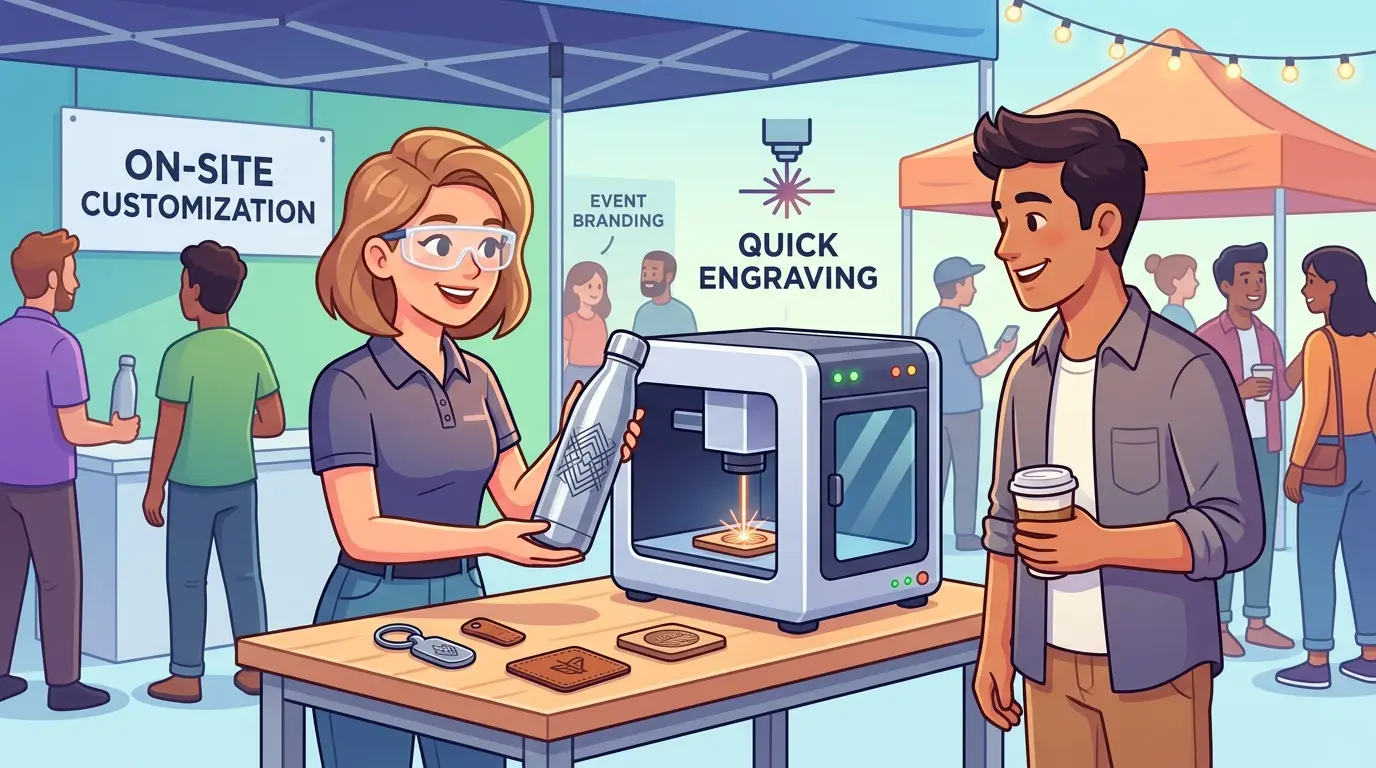
At trade shows, retail pop-ups, hotel activations, and branded gifting events, the bottleneck is rarely engraving capability alone. The real constraint is whether the setup can travel cleanly, operate safely in a public-facing environment, and finish each item fast enough to keep the line moving.

That is why a portable laser engraver should be evaluated as a workflow tool, not just a compact machine. For some businesses, it is a practical way to bring personalization closer to the customer. For others, it becomes a slow, difficult-to-control setup that looks good in a demo but struggles under real event pressure.

Why Event Portability Is Different From Factory Portability

In a factory, portability usually matters because the part is awkward to move. At an event, portability matters because the business has to move the machine, the accessories, the blanks, the power setup, the operator station, and the finishing workflow into a temporary space.

That changes the buying logic.

For event use, the better question is not “Can this machine engrave on-site?” It is “Can this setup be transported, installed, operated, and reset without breaking the customer flow?”

In practice, event-ready portability depends on several factors working together:

  • Fast transport and setup
  • Stable product positioning
  • Predictable cycle time
  • Safe operation around staff and visitors
  • Controlled smoke, odor, and debris
  • Easy template switching for names, logos, or short custom messages

If one of those breaks down, the machine may still engrave well, but the live-customization workflow becomes difficult to sustain.

Which Event Jobs Usually Fit Portable Laser Engraving Best

Portable engraving makes the most sense when the item is small enough to handle quickly, the design can be repeated from saved templates, and the value of live personalization is high enough to justify on-site operation.

Event Product Type Why It Fits Portable Engraving Main Watchpoint
Wood tags, ornaments, and gift pieces Flat handling and simple placement support fast personalization Surface variation can affect visual consistency
Acrylic nameplates, keychains, and display pieces Strong visual impact and easy short-run customization Edge appearance and debris control still matter in front of customers
Leather patches, tags, and accessories Personalization adds value without large part handling Material variation can change engraving appearance
Wood or coated gift packaging Names, dates, and logos can be added close to the point of sale Positioning must stay consistent across repeated blanks
Small promotional items with simple artwork Fast turnaround can improve booth engagement Very small parts can slow the operator if fixtures are weak
Cylindrical gift items with rotary setup Premium live customization can justify higher selling price Setup time and alignment can reduce real throughput

The common pattern is clear: the best event jobs are not always the most technically impressive ones. They are the ones that can be loaded, engraved, checked, and handed over with minimal interruption.

What Buyers Usually Underestimate at Live Events

Many buyers focus on engraving quality first. That is understandable, but event success is often decided by queue management rather than sample appearance.

Four problems show up repeatedly in live-customization workflows.

First, setup time is often longer than expected. A unit that is easy to move is not automatically easy to install. Tables, power access, ventilation routing, product trays, packaging, and customer-facing layout all affect whether the station is actually ready to work. Consider a typical trade show booth: the machine may arrive in a case that fits under a table, but the operator still needs a stable work surface at the right height, a power outlet that does not trip the venue breaker, and a place to stage finished pieces without blocking the customer queue. Each of those requirements adds minutes to setup and minutes to teardown, and those minutes multiply across every event in a season.

Second, product positioning becomes a major variable. In workshop production, operators can spend more time adjusting jigs or rechecking alignment. At an event, every extra adjustment is visible to the customer and slows the line. A wood tag that sits slightly crooked in the tray produces an engraving that is visibly off-center. The operator then has to decide whether to redo the piece, which doubles the cycle time for that customer, or hand over a flawed product, which damages the brand impression. Neither option is acceptable, so the fixture design has to eliminate the possibility of misalignment before the event begins.

Third, smoke and odor control matter more in temporary venues than many buyers expect. Even when the engraving result is acceptable, poor extraction can create an unpleasant customer experience or conflict with venue rules. Laser engraving of wood produces fine particulate and volatile compounds that smell strongly, especially in a confined booth space. Acrylic engraving produces a sharp, acrid odor that can irritate eyes and throats. Venue managers increasingly ask about ventilation plans before approving equipment, and some venues prohibit laser operation entirely unless the setup includes verified filtration. A portable unit with an integrated extraction system or a compatible external fume extractor is not a luxury; it is often a condition of entry.

Fourth, event throughput is usually lower than machine-only cycle time suggests. The real cycle includes product loading, artwork confirmation, engraving, unloading, visual check, packaging, and customer handoff. If the machine runs quickly but the overall station does not, the setup still underperforms. A typical engraving job might take 30 seconds of laser time, but the full customer interaction—greeting, confirming the name spelling, loading the blank, waiting for the engrave, inspecting the result, and wrapping the piece—can easily take three to four minutes. That means a station that looks fast on paper may only produce 15 to 20 finished pieces per hour in practice. Buyers who plan for 50 pieces per hour based on cycle time alone will face disappointed customers and a stressed operator.

What Separates an Event-Ready Portable Unit From a Demo-Friendly One

For on-site customization, portability should be judged at the system level rather than the machine level.

Evaluation Factor Why It Matters On-Site What to Verify
Transport format Frequent loading, unloading, and short venue windows demand practical mobility Whether the unit, accessories, and support tools move as one workable kit
Enclosure and operator control Public-facing use needs more controlled operation than open workshop use Whether the setup keeps the process stable and visually manageable around customers
Fixture repeatability Live personalization slows down quickly when product alignment depends on guesswork Whether blanks can be loaded consistently with minimal repositioning
File and template management Event work often repeats the same layout with different names or short text changes Whether operators can switch jobs quickly without rebuilding artwork
Power and extraction planning Temporary venues rarely behave like permanent production spaces Whether the setup can run cleanly under site-specific utility limits
Real throughput per hour Machine speed alone does not reflect customer-facing output Whether the station can complete finished sellable pieces at the required pace
Product range discipline Too many item types often create slow changeovers and more operator error Whether the offering has been narrowed to a realistic live-customization menu

A portable laser engraver usually performs better at events when the business limits the number of product formats, simplifies the artwork choices, and standardizes fixturing before the event begins.

How Fixture Design Determines Real Event Throughput

The single most underrated factor in live engraving is the fixture that holds the blank. In a workshop, an operator can afford to spend 20 seconds positioning a part because the machine runs for hours. At an event, those 20 seconds are repeated for every customer, and they are visible to everyone waiting in line.

Consider two common event products: a flat wooden tag and a cylindrical glass or metal tumbler.

For the flat tag, a simple recessed tray with a fixed corner stop allows the operator to drop the blank into place and close the lid without checking alignment. The tray should be sized to the exact blank dimensions, with a small cutout for easy removal. If the tray is too loose, the blank shifts during engraving. If it is too tight, the operator struggles to remove the finished piece. A well-designed tray reduces loading time to under five seconds and eliminates alignment errors entirely.

For the cylindrical item, the rotary fixture introduces a different set of problems. The blank must be centered between the chuck and tailstock, the axis must be parallel to the laser path, and the rotation speed must match the engraving parameters. Each of those adjustments takes time and judgment. An experienced operator can align a tumbler in under a minute, but a temporary event staffer may need several attempts. The practical solution is to pre-set the rotary fixture for one specific product diameter and refuse to accept other sizes during the event. That discipline keeps the setup consistent and the cycle time predictable.

The same logic applies to artwork files. Event operators should work from a small library of pre-tested templates: one for names, one for short phrases, one for dates, and one for logos. Each template should already have the correct power, speed, and focus settings saved. The operator only changes the text string, not the job parameters. If the business offers multiple font options, the number of combinations multiplies quickly, and the risk of a wrong setting increases. Narrowing the menu to two or three fonts simplifies training and reduces errors.

When Portable Engraving Works Well and When It Does Not

Not every customization business should engrave live.

Decision Factor Portable Event Engraving Fixed Workshop Engraving
Customer experience value Strong when buyers want to watch the item being personalized Lower if the order is collected later or shipped
Temporary venue flexibility Strong if the setup is compact and repeatable Usually weaker outside a permanent workspace
Throughput stability Can be limited by setup, queue management, and operator pace Usually better for repeated batch work
Product variety Better with a narrow, controlled product menu Better when many product types must be processed daily
Fixturing precision Often adequate for simple personalization Usually stronger for tighter alignment control
Smoke and environmental control More difficult in public or temporary spaces Easier to manage in a dedicated production area
Labor efficiency over longer runs Can drop if every job needs manual attention Usually better once fixtures and workflows are established

This tradeoff matters because event buyers sometimes ask one portable unit to do two separate jobs: create a strong live experience and also behave like a high-output production machine. Those are not always the same requirement.

If the business depends on long runs, frequent artwork changes, or tighter positioning standards, a fixed workshop machine often deserves the heavier workload. The portable setup then becomes a selective front-end tool for high-visibility personalization rather than the entire production system.

Why Many Successful Setups Use a Hybrid Workflow

The most reliable event operations often separate preparation from personalization.

Instead of producing every part from raw material on-site, they pre-produce blanks, fixtures, packaging, and common graphics in advance. The live station then handles only the final customized step, such as a name, short phrase, date, or event-specific mark.

That hybrid model improves several things at once:

  • Faster customer turnaround
  • Less setup complexity at the venue
  • More predictable product quality
  • Lower risk of public-facing delays
  • Easier staff training for temporary operators

Consider a concrete example. A company sells personalized wooden ornaments at holiday markets. In a pure live-production model, the operator would cut the ornament shape from a sheet of wood, sand the edges, apply a finish, and then engrave the customer’s name. That process takes several minutes per piece and requires multiple tools at the booth. The queue backs up quickly, and the operator is constantly switching between cutting, sanding, and engraving tasks.

In a hybrid model, the company pre-cuts, sands, and finishes 200 ornament blanks in the workshop before the market opens. At the booth, the operator only loads a finished blank into the fixture, types the customer’s name, and runs the engraving cycle. The live step takes under a minute, the quality is consistent because the blanks are identical, and the operator can focus on customer interaction rather than material preparation. The same logic applies to acrylic keychains, leather patches, and coated gift boxes.

The hybrid model also reduces the skill required for event staff. A temporary operator does not need to know how to adjust laser focus, calibrate power settings, or troubleshoot material issues. They only need to load a blank, select the correct template, and start the job. That lowers training time and reduces the risk of operator error during peak hours.

For businesses that also run workshop-based wood or acrylic production, a broader look at laser cutters and engravers can help separate what should be prepared in advance from what is realistic to personalize live.

Power, Ventilation, and Venue Compliance Planning

Portable laser engravers draw modest power compared to industrial machines, but that does not mean venue power is a non-issue. Trade show floors and hotel ballrooms often have limited circuits, and multiple exhibitors may be drawing from the same breaker panel. A laser engraver that draws several hundred watts is usually fine, but the operator should verify the venue’s power layout before the event.

Extension cords are another hidden problem. A long, undersized cord can cause voltage drop, which affects laser power consistency and engraving depth. The operator should bring a heavy-gauge cord rated for the machine’s draw and keep it as short as possible. Surge protection is also worth carrying, because venue power can be noisy when other equipment cycles on and off.

Ventilation planning starts with understanding what the machine produces. Wood engraving creates fine particulate that settles on nearby surfaces. Acrylic engraving produces fumes that are more noticeable and more irritating. Leather can produce odors that linger in enclosed spaces. Each material requires a different level of filtration, and the operator should test the setup in a closed room before the event to confirm that the extraction system keeps the air acceptable.

Some venues require written confirmation that the equipment includes filtration. Others prohibit laser operation in certain areas entirely. The operator should ask about these rules during the booking process, not at the loading dock. A machine with an integrated fume extractor simplifies compliance, but the extractor adds weight and bulk to the transport kit. That tradeoff is worth accepting for venues that demand clean air.

Practical Buying Questions Before You Commit

Before choosing a portable engraver for event work, buyers should answer a few operational questions honestly.

1. What exact products will be personalized live?

Flat tags, acrylic blanks, leather patches, and cylindrical gifts do not place the same demands on the station. Each product type requires a different fixture, different laser parameters, and different handling procedures. A station that supports three product types is manageable. A station that supports ten will fail under event pressure.

2. How many finished pieces per hour are actually required?

The answer should include customer interaction and packaging time, not just machine cycle time. A realistic estimate for a single-operator station is 15 to 25 pieces per hour for simple flat products, and fewer for cylindrical items or products that require careful alignment. If the event requires 50 pieces per hour, the station needs either a second operator or a much more streamlined workflow.

3. Will the event workflow use one standard fixture or several?

If each product needs a different loading method, real throughput usually drops fast. The operator has to switch fixtures, re-check alignment, and adjust parameters for each product type. That changeover time is invisible in a demo but very visible in a queue. The most reliable events use one product format and one fixture.

4. How will smoke, odor, and cleaning be managed in the venue?

This affects both compliance and customer comfort. The operator should test the extraction system in a closed room, confirm that the filter media is fresh, and carry spare filters for long events. Cleaning supplies should include a brush or vacuum for removing debris from the machine bed between jobs.

5. How quickly can the operator switch between repeat templates?

Live customization becomes inefficient when every new name or layout behaves like a fresh setup. The software should allow the operator to type a name into a pre-built template and start the job without adjusting power, speed, or focus. If the software requires manual parameter changes for each job, the station will not keep pace with demand.

6. What portion of the job should be completed before arrival?

The more preparation completed off-site, the more stable the live station usually becomes. Pre-cut blanks, pre-finished surfaces, pre-printed packaging, and pre-tested templates all reduce the workload at the venue. The live station should only handle the final customized step.

7. Is the goal brand theater, high volume, or both?

If the live engraving experience is the selling point, the workflow can tolerate more theater and less output. If the event depends on fast order turnover, the setup has to be much more disciplined. A business that wants both should plan for a longer queue and a larger station footprint.

Staffing and Operator Training for Live Engraving

The operator is the most variable component in any live engraving station. A skilled operator can compensate for weak fixtures and slow software. An untrained operator can turn a capable machine into a bottleneck.

Training should focus on the specific event workflow, not on general laser operation. The operator needs to know how to load each blank type, select the correct template, start the job, and inspect the result. They do not need to know how to calibrate the laser, adjust focus, or troubleshoot material issues—those tasks should be handled by a supervisor or resolved before the event.

A simple checklist posted at the station helps maintain consistency. The checklist should cover the loading sequence, the template selection, the start command, and the quality check. It should also include a list of common problems and their solutions, such as what to do if the engraving appears too light or if the blank shifts during the job.

For multi-day events, the operator should have a backup plan for fatigue. Standing for eight hours, interacting with customers, and managing a queue is physically demanding. A second operator who can rotate shifts keeps the station running at a consistent pace. If a second operator is not available, the schedule should include regular breaks to maintain quality.

Operating Discipline: Portable Laser Engravers for Events and On-Site Customization

Portable laser engravers can be a strong fit for events and on-site customization when the workflow is built around a controlled product range, repeatable fixtures, clean setup, and realistic turnaround expectations. Their value comes from bringing personalization closer to the customer, not from replacing every workshop process.

They are usually most effective when the live station handles the final customized step and the more time-sensitive preparation work is completed in advance. They are less effective when buyers expect one portable setup to deliver open-ended product variety, tight production-level repeatability, and workshop-style throughput in a temporary venue.

The practical decision is straightforward: match mobility to the real event workflow. If the station can travel cleanly, run safely, and keep the queue moving, a portable engraver can create both commercial value and customer engagement. If not, the better answer is often a hybrid model that keeps complex production in the workshop and reserves on-site engraving for the part the customer actually needs to see.
Before purchasing, run a realistic simulation of the event workflow. Set up the machine in a confined space, load the exact blanks you plan to sell, and time the full cycle from customer greeting to finished handoff. Repeat that simulation with a temporary operator who has only brief training. The results will tell you whether the portable setup is ready for live events or whether it needs more preparation, better fixtures, or a narrower product menu. That test costs a few hours and saves the embarrassment of a failed event.

What you can read next

Fiber Laser Cutter vs CO2 Laser Cutter for Metal Fabrication
Fiber Laser Cutter vs CO2 Laser Cutter for Metal Fabrication: Which One Fits Your Workflow?
50W Fiber Laser vs Higher-Power Fiber Laser: Which Is Right for Your Workflow?
When to Upgrade Your Edgebanding Process

Recent Posts

  • CNC Machine Plans When Plans Save Money and When They Create Rework

    CNC Machine Plans: When Plans Save Money and When They Create Rework

    CNC machine plans promise a lower purchase bill...
  • CNC Simulator Tools

    CNC Simulator Tools: When Virtual Testing Saves Time and Scrap

    Every CNC program that reaches the floor with a...
  • Laser Engraver for Wood

    Laser Engraver for Wood: Best Use Cases in Commercial Production

    Commercial wood shops routinely face a bottlene...
  • What Is a CNC Slicer

    What Is a CNC Slicer? Common Meanings and Use Cases

    When a purchasing team or production engineer s...
  • Big CNC Machine vs Small CNC Machine

    Big CNC Machine vs Small CNC Machine: How Size Changes Cost and Capability

    Production teams comparing CNC platforms often ...
  • Automatic Edgebander vs. Manual Edge Banding: Which One Delivers Better ROI?

    When edge finishing becomes the bottleneck, the...
  • Wall Saw

    Wall Saw Safety, Blade Selection, And Cutting Strategy For Controlled Structural Cuts

    Wall sawing fails most often before the blade e...
  • Metal Engraving: How To Choose the Right Machine for the Job

    Metal engraving decisions fail not at the demo ...
  • What Are CNC Bushings Used For?

    When an axis develops a vague roughness or surf...
  • Root CNC, RS CNC, and PrintNC-Style Open Builds

    Root CNC, RS CNC, and PrintNC-Style Open Builds: Which DIY Community Platform Fits You?

    Community CNC names like Root CNC, RS CNC, and ...
  • Laser Glass Cutter

    Laser Glass Cutter: Where It Fits in Production and Where It Does Not

    The production question comes before comparing ...
  • CNC Stone Cutting for Quartz, Granite, and Marble: How Material Differences Shape Machine Choice

    Quartz, granite, and marble share a fabrication...
  • Small CNC Mill vs Industrial CNC Mill

    Small CNC Mill vs Industrial CNC Mill: How Capacity Changes the Decision

    Shops comparing small CNC mills against industr...
  • Sheet Metal Laser Cutter

    Sheet Metal Laser Cutter Best Practices for Clean, Accurate Cuts

    Laser-cut defects rarely surface at the cutting...
  • What Is a Spiral Milling Cutter

    What Is a Spiral Milling Cutter?

    Buying a “spiral milling cutter” by...

Support

  • About Us
  • Contact Us
  • Company Blog
  • Terms of Service
  • Privacy Policy
  • Sitemap

Newsletter

Subscribe for Pandaxis product updates, application insights, and practical news on CNC woodworking, stone fabrication, and laser processing solutions.

GET IN TOUCH

Email: info@pandaxis.com

Whether you are looking to integrate a high-speed CNC woodworking line or deploy a heavy-duty stone cutting center, our technical engineers are ready to optimize your production. Reach out today to bring precision to every axis of your facility.

  • GET SOCIAL

© 2026 Pandaxis. All Right Reserved.

TOP