Pandaxis

  • Products
    • CNC Nesting Machines
    • Panel Saws (Beam Saws)
    • Sliding Table Saws
    • Edgebanders
    • Boring & Drilling Machines
    • Wide Belt Sanders
    • Laser Cutters and Engravers
    • Stone CNC Machines
  • About Us
  • Contact Us
  • EnglishEnglish
    • Español Español
    • Italiano Italiano
    • Deutsch Deutsch
    • Français Français
    • Português Português
    • العربية العربية
    • Türkçe Türkçe
    • Русский Русский
    • Tiếng Việt Tiếng Việt
    • 한국어 한국어
    • 日本語 日本語
    • 简体中文 简体中文
  • Home
  • Blog
  • Blog
  • When to Upgrade From a Sliding Table Saw to a Beam Saw

When to Upgrade From a Sliding Table Saw to a Beam Saw

by pandaxis / Thursday, 16 April 2026 / Published in Blog
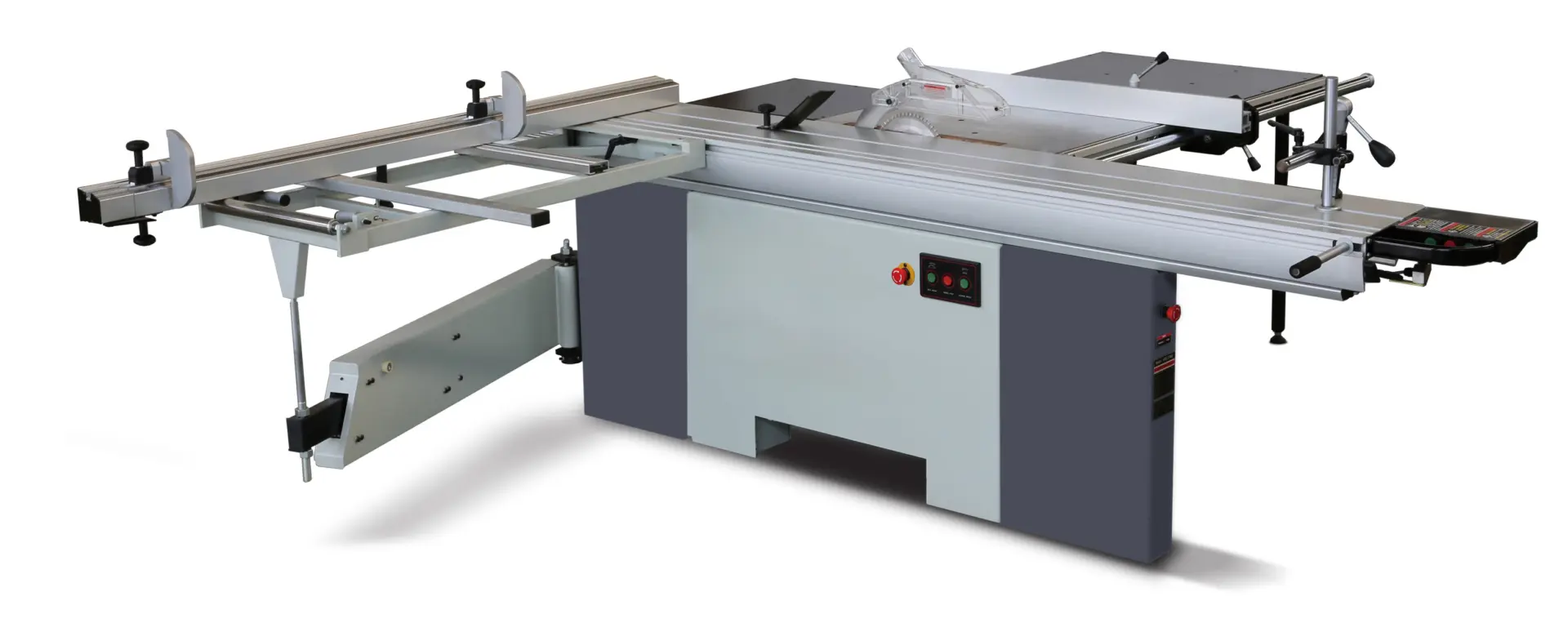
Sliding Table Saw

When repeated cabinet panels dominate your daily cut list and downstream edge banding or assembly crews routinely wait on parts, your sliding table saw is no longer the constraint—your workflow is. The upgrade decision rarely hinges on a worn-out machine; it hinges on whether your factory has shifted from project-based flexibility to batch-oriented production. Before comparing spec sheets, read the production pattern: if operator skill determines part quality, re-cuts keep appearing, and scheduling spikes strain the cut cell, you are asking a versatile machine to behave like a production platform. That mismatch is what makes the beam saw evaluation a workflow decision, not a machine purchase.

Read the Production Pattern Before You Read the Spec Sheet

The upgrade question rarely appears when a sliding table saw breaks down. More often, it surfaces when the machine still cuts cleanly but the factory around it has changed. Downstream stations wait for parts. The same cabinet panels get cut day after day. Output quality depends more on which operator is running the saw than on the process itself. The saw is not failing; the workflow around it is.

That is the moment to stop comparing machine features and start comparing production models. A sliding table saw and a beam saw solve different problems. One is built for flexibility; the other is built for repeatable batch output. Choosing between them means deciding which problem your cut cell actually faces right now. The decision should come from the floor, not from the brochure.

What a Sliding Table Saw Still Does Well

Sliding table saws remain the right tool for a specific range of work. They give the operator direct control over every cut, which matters when the job list changes constantly. Custom furniture, one-off cabinetry, angled cuts, solid-wood processing, and short runs all benefit from a machine that responds to manual judgment.

The operator can read the material, adjust for grain or defects, handle non-rectangular parts, and switch setups quickly. That versatility is real value. It is also the reason many workshops start with a sliding table saw and keep one on the floor even after adding a beam saw.

Consider a typical custom shop scenario. A client orders a built-in bookcase with a sloped top, another orders a dining table with a live edge, and a third needs a set of kitchen cabinets with a 15-degree miter on the end panels. The sliding table saw handles all of these in a single morning. The operator reads the grain direction on the solid oak, adjusts the fence for the taper, and cuts the miters with the angle stop. No programming, no nesting calculation, no waiting for a cut file. That is the machine’s natural habitat.

The problem appears when daily work stops looking like a custom shop and starts looking like a production line. If most of your output is rectangular panels for cabinets, wardrobes, or modular furniture, the cut cell is no longer serving a variable workflow. It is feeding a standardized process. That is when the strengths of a sliding table saw become secondary to its limitations.

Signs That the Cut Cell Has Become the Bottleneck

The clearest signal to evaluate a beam saw is not that the current saw is worn out. It is that the factory has outgrown what operator-led cutting can deliver. Watch for these patterns on the floor:

What You Are Seeing on the Floor What It Usually Means Why a Beam Saw Starts Making Sense
The same cabinet or furniture parts are cut repeatedly every day The workflow is becoming batch-oriented rather than project-oriented A beam saw is better aligned with stable, repeated panel sizing
Edge banding, drilling, or assembly teams regularly wait on cut parts The cut cell has become the line constraint Higher front-end throughput becomes strategically important
Re-cuts, size corrections, or squareness issues keep showing up downstream Output quality depends too much on operator variation A more structured cutting process helps reduce avoidable rework
Batch organization becomes difficult as volume rises Manual part flow is getting harder to control A beam saw supports a more disciplined production rhythm
Growth requires adding pressure to the operator instead of stabilizing the process Capacity is being created through effort rather than system design A beam saw is often evaluated when management wants more predictable scaling
Scheduling becomes harder whenever cut demand spikes The saw cell lacks buffer against volume swings More repeatable, production-focused cutting helps planning

If several of these signals appear at the same time, the issue is not operator skill or machine condition. The factory is asking a flexible machine to behave like a production platform. That mismatch creates friction that no amount of operator effort can fully remove.

What a Beam Saw Changes Beyond Cutting Speed

The obvious expectation from a beam saw is more panels per hour. That is usually true, but it is not the most important change. The bigger shift is how the front end of production behaves.
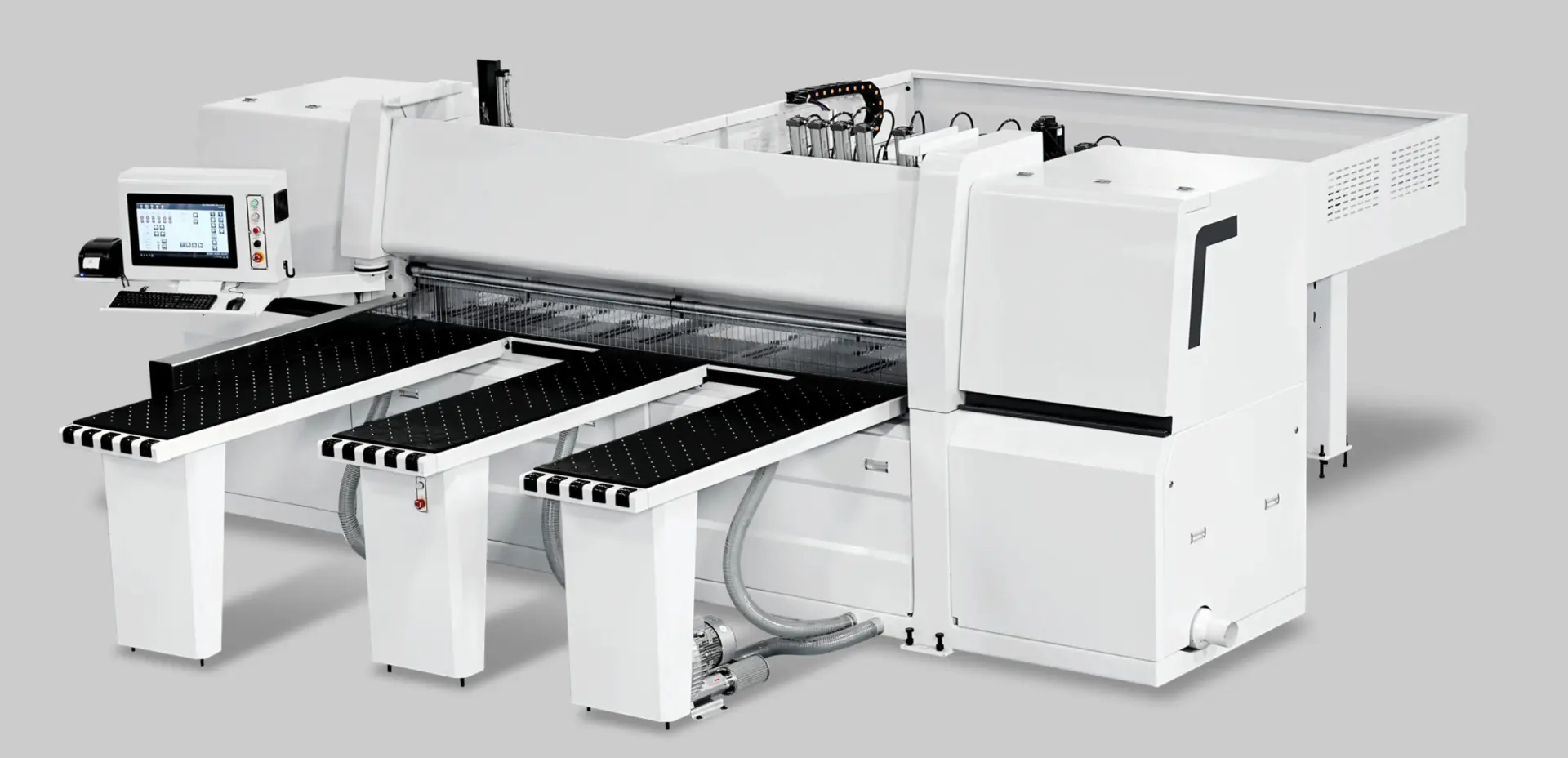
A beam saw changes the workflow in several ways:

  • Better repeatability across repeated panel jobs. The saw carriage follows a programmed path. Once the cut pattern is set, every panel comes off the machine to the same tolerance. That consistency is what downstream stations actually need.
  • Lower dependence on individual cutting technique. The operator’s role shifts from executing each cut to managing the program, loading material, and monitoring output. Quality no longer swings with shift changes or operator fatigue.
  • Smoother handoffs into edge banding, drilling, and assembly. When incoming parts are dimensionally consistent, downstream operators spend less time checking, adjusting, re-sorting, or compensating during assembly.
  • Cleaner batch logic for rectangular panel processing. Cut lists can be optimized for material yield and organized by batch, which simplifies staging and part flow.
  • More predictable daily planning at the cut stage. Cycle times become more standardized, which makes scheduling the rest of the line more reliable.

Downstream departments rarely feel only the speed of cutting. They feel the stability of cutting. A beam saw delivers that stability because it removes the largest source of variation from the cut cell: the operator’s moment-to-moment decisions.

Think about what happens on a sliding table saw during a long production run of identical panels. The operator measures the first panel, cuts it, checks it, and adjusts. The second panel is slightly different because the operator pushed a little harder or the material shifted a fraction of a millimeter. By the tenth panel, the operator has settled into a rhythm, but the first few panels may be off by half a millimeter. On a beam saw, the program controls the carriage travel, the clamp pressure, and the scoring depth. The first panel and the fiftieth panel come off the machine with the same dimensions. That consistency is not a luxury; it is what makes downstream automation and assembly work without constant manual correction.

That is also why a beam saw should be evaluated as a workflow decision rather than a stand-alone machine upgrade. In many furniture factories, its value comes from making the cut cell easier to schedule, easier to standardize, and easier to connect to the rest of the line.

When You Should Not Upgrade Yet

Not every shop that wants more output should move immediately from a sliding table saw to a beam saw. The upgrade is easier to justify when the workload is already dominated by repeated rectangular parts and the business is moving toward a more standardized production model.

Staying with the current format often remains the smarter choice if:

  • The shop still runs mostly custom, mixed, or short-run work.
  • Angled cuts, manual judgment, and frequent setup changes are still central to daily output.
  • Solid-wood processing and varied part geometry matter as much as sheet-based batch cutting.
  • The real bottleneck is elsewhere, such as edge banding, drilling, material staging, or assembly.
  • Cut lists, labeling, and part-sorting discipline are not yet strong enough to support a more structured cutting system.

A beam saw will not fix weak staging, disorganized cut planning, or poor batch handling by itself. If those problems are the real source of delay, the factory can spend more money and still keep the same production friction. The machine only delivers value when the surrounding process can absorb its output and feed it reliably.

Consider a shop that produces custom commercial millwork. Each project involves different materials, different panel sizes, and frequent on-site adjustments. The operator needs to see the grain, feel the material, and make judgment calls about which side of the panel faces up. A beam saw would force that work into a rectangular, batch-oriented pattern that does not match the actual job flow. The shop would lose flexibility without gaining proportional throughput. In that case, the sliding table saw is not a compromise; it is the correct tool.

How to Test Whether the Upgrade Is Operationally Justified

Before making the move, frame the decision in production terms rather than machine terms. Work through these questions with your production manager and lead operator:

  1. Is most daily output now repeated rectangular panel work? If yes, the flexibility of a sliding table saw is not being fully used. If no, the upgrade may reduce capability without adding proportional value.
  2. Is the cut cell the actual constraint, or is another process really slowing the line? Track work-in-progress for a week. If panels pile up in front of the edge bander or the drilling station, a faster saw will only move the bottleneck downstream.
  3. Would more consistent part flow create visible gains in downstream operations? Talk to the edge banding and assembly teams. If they regularly compensate for inconsistent panel sizes, a beam saw directly addresses their pain.
  4. Is management trying to scale standardized production rather than protect high flexibility? The upgrade makes sense when the business strategy has shifted toward repeatable batch output. If custom work remains the profit center, keep the flexible machine.
  5. Are material staging, cut lists, and batch sorting disciplined enough to support a more production-oriented system? A beam saw rewards organized input. If panels arrive at the saw in mixed batches without clear labeling, the machine will not fix that chaos.

If the answers point toward repeatable panel flow, downstream dependence on cut consistency, and a need for steadier capacity, the upgrade case becomes much stronger.

What Actually Drives the Cost of Upgrade From a Sliding Table Saw to a Beam Saw

The purchase price of a beam saw is only the first line of the comparison. The full cost picture includes several factors that shops often underestimate when they evaluate the upgrade.

Floor space and layout. A beam saw requires a different footprint than a sliding table saw. The machine itself is longer, and it needs dedicated infeed and outfeed zones. Many beam saws use a front-loading configuration with a side-alignment fence, which means the operator works from the front while the cut pieces exit to the rear or side. That layout change can affect material flow through the entire shop. If the saw cell is currently in a corner with limited access, the upgrade may require moving walls, relocating dust collection, or re-routing the panel storage area.

Material handling equipment. A beam saw processes full sheets efficiently, but that efficiency depends on how panels arrive at the machine. If operators are manually lifting 18 mm MDF panels from a stack on the floor, the saw will wait. Many shops add a panel lift or a scissor table at the infeed, and some add an automatic loading system. Those additions are not optional accessories; they are part of the throughput calculation. The same logic applies to the outfeed side. Cut parts need to move away from the saw quickly, either onto a roller conveyor or into a sorting cart. Without that downstream handling, the beam saw creates a pile of panels that blocks the next cycle.

Programming and data preparation. A beam saw runs from cut lists. Someone has to enter those lists into the machine control, either manually or through an interface with the shop’s production software. If the shop has no digital cut-list system, the operator becomes the programmer, and that adds setup time to every batch. The machine’s optimization software can reduce waste, but only if the input data is accurate. Shops that already use a cabinet design package or an ERP system with cut-list export will find the transition easier. Shops that still work from paper drawings will need to build that discipline first.

Operator training and skill shift. The operator’s role changes from cutting to programming, loading, and monitoring. That is not a trivial shift. A skilled saw operator who has spent years reading grain and adjusting for material variation may need time to trust the machine’s consistency. Conversely, a younger operator with software experience may adapt quickly to the programming side but need training on material handling and blade maintenance. The upgrade plan should include a training period, not just a delivery date.

Maintenance and tooling. A beam saw uses a main blade and a scoring blade, and both need to be maintained to the same standard. Blade changes are more involved than on a sliding table saw because the scoring unit must be aligned with the main blade. The machine also has more moving parts: the carriage drive, the clamps, the pusher, and the side-aligning fence. Preventive maintenance becomes a scheduled activity rather than a reactive one. Shops that already run a maintenance calendar will adapt easily. Shops that wait for breakdowns will find the beam saw less forgiving.

Production Scenarios That Clarify the Decision

To make the comparison concrete, consider three production scenarios and how each machine performs.

Scenario A: Custom kitchen cabinet shop with 10 to 15 jobs per week. Each job involves different cabinet sizes, some angled fillers, and a mix of melamine and plywood. The shop employs two saw operators who also handle edge banding and assembly. The sliding table saw is busy but not overwhelmed. The bottleneck is actually the assembly area, where custom details require manual fitting. In this scenario, a beam saw would add capacity that the shop cannot use. The sliding table saw remains the right choice because the workflow is project-based, not batch-based.

Scenario B: Modular wardrobe manufacturer producing 200 units per week. The product line is standardized: five cabinet widths, three heights, and two depths. The same panels repeat across every order. The cut cell runs two shifts, and the edge banding line frequently waits for parts. The operator on the sliding table saw cuts the same dimensions dozens of times per day, and the quality varies slightly with each batch. In this scenario, the beam saw directly addresses the constraint. The cut cell becomes faster and more consistent, and the edge banding line runs without interruption. The upgrade pays for itself through reduced rework and increased throughput.

Scenario C: Mixed shop doing 60 percent standard panels and 40 percent custom work. The standard panels are for a furniture line that sells consistently. The custom work includes angled cuts, solid-wood components, and one-off pieces. The shop has the floor space for both machines. In this scenario, the best answer is often to keep the sliding table saw for the custom work and add a beam saw for the standard panel production. The two machines complement each other, and the shop can route work based on the job type rather than forcing everything through one process.

Where It Earns Its Place: Upgrade From a Sliding Table Saw to a Beam Saw

Upgrade from a sliding table saw to a beam saw when the shop is no longer winning through flexibility alone. The clearest moment is when repeated panel work, higher volume, and downstream process stability matter more than operator-led versatility.

A sliding table saw is still a strong fit for custom, mixed, and change-heavy production. A beam saw becomes the stronger fit when the factory needs the cut stage to behave like a reliable front-end production system for batch panel processing.

The right time to upgrade is when the cost of staying flexible has become higher than the value of becoming repeatable. If you are seeing that pattern in your own production data, it is worth evaluating beam-saw-style panel saws against your current workflow. The upgrade case should be supported by measured queue time, handling burden, and rework, not by a brochure comparison alone.
What you can read next

CNC G54 and Work Offsets Explained for Beginners
Stone CNC Machines
How Stone CNC Machines Improve Countertop And Architectural Fabrication
Mach4 CNC Setup Guide: Who Should Use This Control Software?

Recent Posts

  • CNC Machine Plans When Plans Save Money and When They Create Rework

    CNC Machine Plans: When Plans Save Money and When They Create Rework

    CNC machine plans promise a lower purchase bill...
  • CNC Simulator Tools

    CNC Simulator Tools: When Virtual Testing Saves Time and Scrap

    Every CNC program that reaches the floor with a...
  • Laser Engraver for Wood

    Laser Engraver for Wood: Best Use Cases in Commercial Production

    Commercial wood shops routinely face a bottlene...
  • What Is a CNC Slicer

    What Is a CNC Slicer? Common Meanings and Use Cases

    When a purchasing team or production engineer s...
  • Big CNC Machine vs Small CNC Machine

    Big CNC Machine vs Small CNC Machine: How Size Changes Cost and Capability

    Production teams comparing CNC platforms often ...
  • Automatic Edgebander vs. Manual Edge Banding: Which One Delivers Better ROI?

    When edge finishing becomes the bottleneck, the...
  • Wall Saw

    Wall Saw Safety, Blade Selection, And Cutting Strategy For Controlled Structural Cuts

    Wall sawing fails most often before the blade e...
  • Metal Engraving: How To Choose the Right Machine for the Job

    Metal engraving decisions fail not at the demo ...
  • What Are CNC Bushings Used For?

    When an axis develops a vague roughness or surf...
  • Root CNC, RS CNC, and PrintNC-Style Open Builds

    Root CNC, RS CNC, and PrintNC-Style Open Builds: Which DIY Community Platform Fits You?

    Community CNC names like Root CNC, RS CNC, and ...
  • Laser Glass Cutter

    Laser Glass Cutter: Where It Fits in Production and Where It Does Not

    The production question comes before comparing ...
  • CNC Stone Cutting for Quartz, Granite, and Marble: How Material Differences Shape Machine Choice

    Quartz, granite, and marble share a fabrication...
  • Small CNC Mill vs Industrial CNC Mill

    Small CNC Mill vs Industrial CNC Mill: How Capacity Changes the Decision

    Shops comparing small CNC mills against industr...
  • Sheet Metal Laser Cutter

    Sheet Metal Laser Cutter Best Practices for Clean, Accurate Cuts

    Laser-cut defects rarely surface at the cutting...
  • What Is a Spiral Milling Cutter

    What Is a Spiral Milling Cutter?

    Buying a “spiral milling cutter” by...

Search for posts

Recent Posts

  • CNC Machine Plans When Plans Save Money and When They Create Rework

    CNC Machine Plans: When Plans Save Money and When They Create Rework

    0 comments
  • CNC Simulator Tools

    CNC Simulator Tools: When Virtual Testing Saves Time and Scrap

    0 comments
  • Laser Engraver for Wood

    Laser Engraver for Wood: Best Use Cases in Commercial Production

    0 comments

Recent Comments

    Support

    • About Us
    • Contact Us
    • Company Blog
    • Terms of Service
    • Privacy Policy
    • Sitemap

    Newsletter

    Subscribe for Pandaxis product updates, application insights, and practical news on CNC woodworking, stone fabrication, and laser processing solutions.

    GET IN TOUCH

    Email: info@pandaxis.com

    Whether you are looking to integrate a high-speed CNC woodworking line or deploy a heavy-duty stone cutting center, our technical engineers are ready to optimize your production. Reach out today to bring precision to every axis of your facility.

    • GET SOCIAL

    © 2026 Pandaxis. All Right Reserved.

    TOP